
Player who enjoys long sessions
You’ll want to focus on the shape, how easy the buttons are to reach and how comfortable repeated actions feel. Try the fit for yourself: an ‘ergonomic’ label doesn’t tell you how a mouse will feel in your hand.


Start with a mouse that feels comfortable in your hand and makes repeated pointing and scrolling easy. Extra programmable buttons are most useful if you want to assign them in-game commands. A wired mouse means you don’t have to manage a battery, while a wireless one gives you more freedom to move. Tackle screen reflections or glare by adjusting your lighting and screen setup, not by increasing your mouse’s DPI.
You’ll want to focus on the shape, how easy the buttons are to reach and how comfortable repeated actions feel. Try the fit for yourself: an ‘ergonomic’ label doesn’t tell you how a mouse will feel in your hand.
You want to assign in-game commands to mouse buttons, so compare the number and placement of the buttons with the commands you actually use.
You want precise pointing on your own surface and need to decide between a wired and wireless mouse. If daylight reflects off your screen, the layout of your gaming area matters too.
Start with fit and the controls you use most often. Treat distracting daylight as a separate issue with your gaming setup.
| What to consider | What should you check? | Who is it important for? |
|---|---|---|
| Fit for extended use | Check the shape, your hand preference and whether the scroll wheel and side buttons are comfortable to reach. | For long gaming sessions, I want a mouse that fits my hand, even when I click and scroll frequently. Around 36% of consumers put fit first. |
| Pointing, scrolling and daylight | Compare scroll settings and settings on your own surface; consider screen position and window shading separately from the mouse. | If I navigate a lot, I want pointing and scrolling to feel comfortable. If there’s glare, I’ll adjust the lighting or screen setup. Around 29% of consumers prioritise essential controls. |
| Number and position of programmable buttons | Decide which commands you want to assign and check that the side buttons are easy to reach. | I want to call up in-game commands quickly, but only if I can comfortably reach the buttons with my grip. Around 21% of consumers put programmable buttons first. |
| Wired or wireless | Check the available connection, your preferred connection mode and whether charging or replacing batteries suits you. | At a fixed setup, I don’t want to manage a battery; for more freedom to move, I’d rather go wireless. Around 14% of consumers prioritise their choice of connection. |
The DPI setting won’t change the amount of light coming in or reflections on your screen.
Consider your pointer settings and mouse surface separately from your screen position and window shading.
Extra assignable buttons are only useful if they suit your game and feel comfortable to reach.
First decide which commands you want to assign, then check that the buttons work with your thumb.
Setting up functions takes time; unused buttons won’t give you any extra control in your game.
A manufacturer’s warranty doesn’t automatically replace your statutory rights against the retailer. According to the Dutch Government, there is no fixed statutory warranty period in the Netherlands.
Keep your proof of purchase and read the manufacturer’s warranty terms separately from the information provided by the retailer.
The wired G502 X is one to consider if you’re looking for customisable controls and different scroll modes.
The wired Scimitar RGB Elite is one to consider if you want to assign lots of commands to an adjustable thumb panel.
The Naga V2 HyperSpeed is a wireless option with plenty of thumb buttons.
The GXT 931 Ybar is a simpler wireless option for a tidy gaming setup or use with multiple devices.
The Aerox 9 Wireless is a wireless option if you want to assign lots of commands to your mouse.
This selection includes wired and wireless gaming mice, with options for different connections and numbers of programmable buttons.
 No image available
An option if you want to play wirelessly and choose between different connection types.
The product name lists a PAW3395 sensor, 26K DPI, 56 g, a 400 mAh battery, 2.4G/USB-C/BT, RGB lighting and a magnetic charging dock.
Keep the magnetic charging dock away from pacemakers and other medical implants.
 No image available
A wireless option if you want to assign extra commands and choose between connection options.
Logitech lists a HERO 25K sensor, LIGHTSPEED and Bluetooth, and up to six programmable buttons.
 No image available
A wired option for a fixed PC setup where a cable won’t be a problem.
Logitech G lists 13 customisable controls and two scroll modes: free-spinning and ratcheted.
The USB Type-A cable means you’ll need a compatible port.
 No image available
A wireless option if you want to customise the functions assigned to your mouse buttons.
Razer lists an optical sensor, HyperSpeed Wireless and Bluetooth, programmable buttons and Razer Synapse.
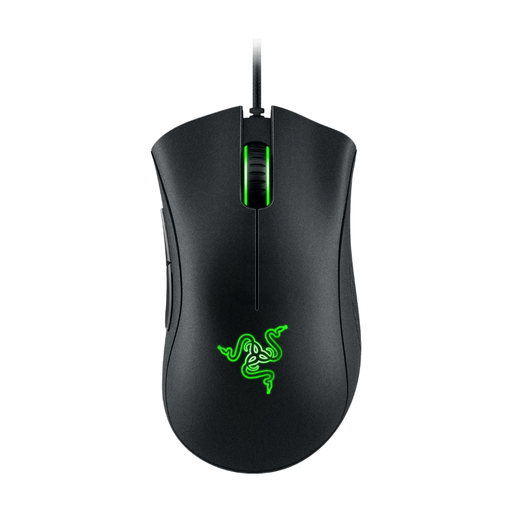 No image available
A wired option if wireless isn’t essential and you want to assign a few functions to the mouse buttons.
Razer lists an optical sensor, 6,400 DPI and five programmable buttons with adjustable DPI.
No. DPI is a mouse setting; screen reflections are related to the light coming in and the position of your screen. Arboportaal advises positioning your viewing direction parallel to the window when working at a screen. This isn’t a legal requirement for gaming at home.
First check whether your game supports the commands you want. Logitech recommends G HUB for the wired G502 X, while Corsair recommends iCUE for the Scimitar RGB Elite. The settings available depend on the model, software and game.
That depends on the connection mode you choose and your device. Trust lists both a USB receiver and Bluetooth for the GXT 931 Ybar; check that your computer supports your preferred connection.
No. According to the Dutch Government, there’s no fixed statutory warranty period in the Netherlands. You’re entitled to a product that meets the standards you can reasonably expect, and the retailer is your point of contact if there’s a problem. A manufacturer’s warranty is separate from this.
The Dutch Authority for Digital Infrastructure (RDI) states that equipment covered by the relevant European rules must carry the required CE marking. Wireless models are also subject to radio equipment rules, so check the specific version being offered.