
Vandaag of morgen in huis

Kwaliteit gegarandeerd

Welkomstaanbiedingen ontgrendelen: GRATIS bezorging | Tot 80% korting | Gratis 30 dagen JoyPlus-proefperiode
Download de app
A gaming mouse should suit your hand, the games you play and your computer. Even so, it is easy to focus mainly on a high DPI figure or eye-catching RGB lighting. These features do not automatically determine whether a mouse feels comfortable during a long FPS match or for everyday use.
The biggest differences often come down to the details: the actual weight, connection type, polling rate, number of buttons and shape. By considering these points, you can avoid buying a mouse that no longer suits your playing style after a few weeks.
DPI indicates how sensitive the mouse can be set to. A gaming mouse with a high DPI is not automatically more accurate in practice. Many players actually use a lower sensitivity for greater control, particularly in FPS games. A sensor with adjustable DPI and stable tracking is therefore more relevant than simply looking at the maximum figure on the packaging.
Also check the available increments. Some models offer fixed levels, while other mice allow finer adjustments or separate X and Y DPI settings.
A wireless gaming mouse eliminates cable drag, but you need to consider battery life and the charging method. Check whether the stated usage time applies at a particular polling rate or in an energy-saving mode. A higher polling rate may also require more processing power from your PC.
A wired gaming mouse does not need a battery and works immediately via USB. On the other hand, the cable can pull across your desk or catch on the edge.
An RGB gaming mouse can complement your setup, but lighting does not change the grip or sensor. Eight or thirteen buttons are not necessarily useful for everyone either. In an FPS game, a few well-positioned buttons may be enough, while a MOBA or RTS player could benefit from more programmable functions.
Also check whether the model is designed specifically for right-handed use, has a symmetrical design or is suitable for both left- and right-handed users.
An optical gaming mouse uses an optical sensor to register movement. As well as DPI, check the sensor information, maximum speed and adjustability. For everyday PC use and most games, a range of a few thousand DPI is already more than sufficient. Higher values are mainly useful if you prefer to play with very high sensitivity or use specific screen settings.
A DPI switch is practical when you want to switch quickly between profiles. However, check whether the settings need to be adjusted in software and whether the software is only available for Windows.
The polling rate, measured in hertz, indicates how often the mouse reports data to the computer. 1000 Hz is a common value for a wired gaming mouse and many wireless models. Some advanced mice support 4000 or 8000 Hz. This can increase the reporting frequency, but the difference is not noticeable to every user. At 4000 or 8000 Hz, CPU usage may also increase.
For a stable connection, look at the technology used:
A lightweight gaming mouse weighing around 50 to 70 grams moves easily across a large mouse mat. A heavier model may feel more stable. The right choice depends on your grip: palm grip, claw grip or fingertip grip.
If you are unsure, measure the length and width of your current mouse. Also consider the height of the hump, the position of the thumb buttons and the space available for your ring finger and little finger. An ergonomic gaming mouse is not automatically comfortable for every hand; the shape needs to suit the way you hold it.
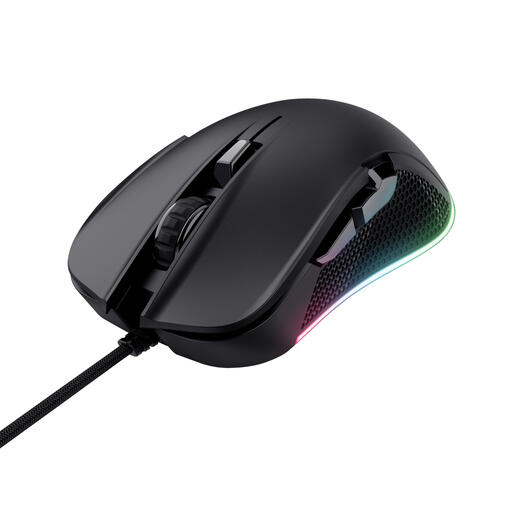
Why it suits this profile: This wired gaming mouse offers a simple USB connection, an optical sensor and adjustable DPI without the need to manage a battery.
The specifications state the maximum 7200 DPI as well as the 1000Hz polling rate and six buttons, so you do not have to choose based on lighting alone.
Optical sensor, up to 7200 DPI, six programmable buttons, RGB lighting and a 210 cm cable.

Why it suits this profile: The compact design and wireless LIGHTSPEED connection are ideal for players who want a lightweight mouse without a cable.
The product information specifies a weight of 53 grams, battery life of up to 95 hours and a polling rate of up to 8000Hz. These details are more useful than general claims about speed.
53 grams, HERO 2 optical sensor, adjustable up to 44,000 DPI, USB-C charging and five programmable buttons.

Why it suits this profile: Ideal for FPS and MOBA players looking for plenty of buttons, a low weight and a high wireless polling rate.
The product description specifies 53 grams, 8000Hz wireless, ten programmable buttons and a required driver update for low-power mode.
Up to 30,000 DPI, separate X/Y adjustment, optical switches and a stated battery life of up to 750 hours at 1000Hz.
We have compiled a complete, up-to-date list of products that fully meet these strict selection criteria and the applicable European safety regulations.
Start with a moderate DPI value and adjust it in small increments. In your game, it is best to use a single sensitivity profile so that your movements remain predictable. Only programme extra buttons with functions you can reach easily. With wireless models, check that the receiver is unobstructed and recharge the mouse before the battery runs out.
A flat, clean surface helps the sensor and mouse feet work consistently. Clean the sensor and surface with a dry cloth, and do not use liquids near the electronics.
Yes, provided the mouse has a stable 2.4GHz connection, a suitable polling rate and sufficient battery life. Bluetooth is mainly convenient for general use. For competitive gaming, many users choose a wired connection or a dedicated wireless dongle.
This depends on your screen, game and sensitivity settings. An adjustable range from 800 to a few thousand DPI is sufficient for many players. A maximum of 24,000 or more gives you additional choice, but it will not automatically make your gameplay more accurate.
Its lifespan depends on usage, switches, cable or battery, and maintenance. Manufacturers sometimes state a rated click lifespan; according to the brand’s own information, this is a product specification rather than a guarantee for every usage situation. The statutory guarantee in the EU is at least two years, with additional rights potentially applying under Dutch consumer law.
