
Vandaag of morgen in huis

Kwaliteit gegarandeerd

Welkomstaanbiedingen ontgrendelen: GRATIS bezorging | Tot 80% korting | Gratis 30 dagen JoyPlus-proefperiode
Download de app
A gaming mouse should suit your play style, hand and computer above all else. Yet many buyers look first at RGB lighting or an extremely high DPI value. These are visible features, but they do not alone determine how comfortable a mouse is to use.
For FPS, MOBA and RTS games, factors such as the sensor, weight, shape and connection are all important. Below, you can find out which specifications you should actually check and which popular choices suit different types of user.
A gaming mouse with 16,000 or 26,000 DPI may sound impressive, but a higher value does not automatically mean a more accurate experience. In practice, many players use a lower sensitivity, particularly in FPS games where controlled movements are important.
So check:
A gaming mouse with adjustable DPI is more practical than a model that merely emphasises a high maximum value.
A wireless gaming mouse with a 2.4GHz connection can be suitable for competitive gaming, but pay attention to the battery life, receiver and charging method. Bluetooth is convenient for general use, but gaming mice often use a dedicated 2.4GHz receiver because, according to the product specifications, it offers lower latency.
A wired gaming mouse does not need a battery and is always ready to use. However, when using low sensitivity or making large arm movements, the cable may catch on the edge of your desk. So also check the cable length and flexibility.
An RGB gaming mouse can complement your setup, but lighting does not change the sensor performance. Eight or ten buttons are not useful for every player either. In an FPS game, extra buttons may even be pressed accidentally, while they can be useful in a MOBA or RTS game.
Look at the grip first:
Most gaming mice in this selection use an optical sensor. Pay attention to the maximum DPI, but also to the available increments and software. A high value can be useful for moving the cursor quickly across multiple screens, but it is not proof of quality on its own.
The polling rate indicates how often the mouse position is transmitted to the computer. 1000 Hz is a common value. Higher polling rates may use more system resources. For example, the RAPOO VT9Pro is listed with a polling rate of 4000 Hz; the product information warns that this can increase CPU usage and may cause frame drops on systems with lower performance.
An ultralight gaming mouse can be quicker to move, particularly when using low sensitivity. A heavier model may feel more stable or be a better fit for a larger hand. Pay attention to the stated product weight rather than relying solely on terms such as “lightweight”.
Examples from the product specifications:
Weight is only useful when considered alongside the shape, glide pads and your own grip.
Programmable mouse buttons are useful if you want to assign actions, macros or shortcuts. Check whether the software is compatible with your operating system and whether settings can be saved to the mouse’s internal memory.
Also look out for:
A gaming mouse for PC will not automatically work with every device in exactly the same way. Always check the system requirements on the product page.
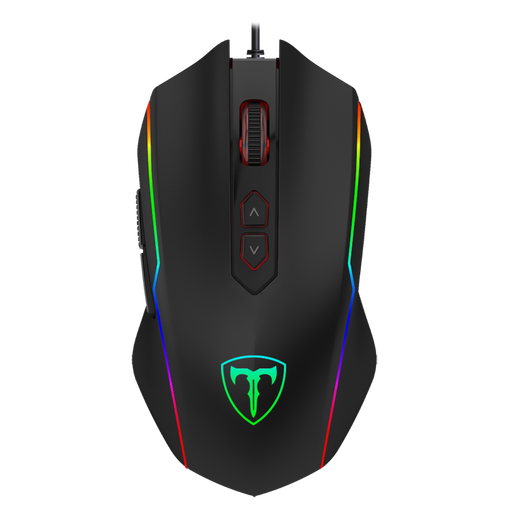
Why it suits this profile: This wired model offers adjustable DPI, RGB lighting and eight programmable buttons without relying on a battery.
The product specifications list five DPI levels up to 7200 DPI and four polling rates up to 1000 Hz, so you do not have to judge it solely by its RGB lighting or maximum value.
USB connection, eight programmable buttons, seven RGB modes and adjustable sensitivity.
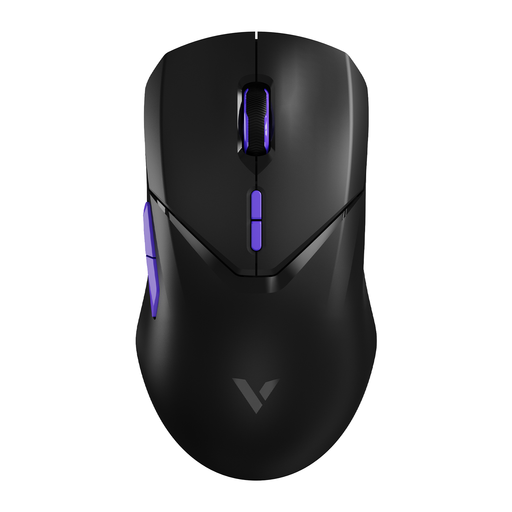
Why it suits this profile: This wireless gaming mouse is aimed at players looking for plenty of adjustment options and long battery life.
The product information lists both the 4K polling rate and the warning about CPU load. This allows you to match your choice to your PC configuration.
26000 DPI, 68 grams, ten programmable buttons and a stated battery life of up to 180 hours.
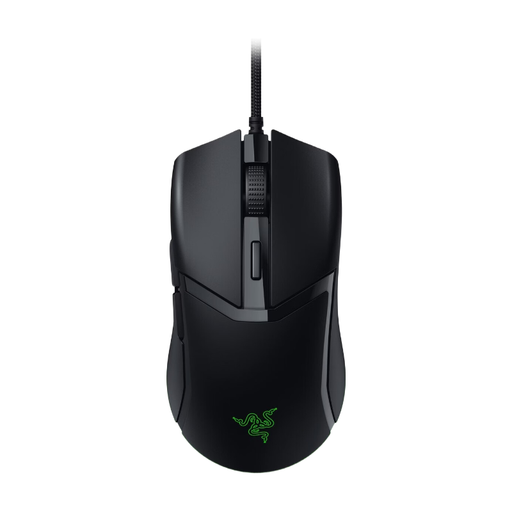
Why it suits this profile: A compact wired gaming mouse for players who value low weight, adjustable DPI and direct USB connectivity.
The stated 58-gram weight and DPI adjustment in increments of 50 make the practical setup clearer than relying on a marketing term such as “ultralight”.
8500 DPI, six buttons, RGB lighting, PTFE glide pads and a 1.8-metre cable according to the product specifications.
We have put together a complete, up-to-date list of products that fully meet these strict selection criteria and the applicable European safety regulations.
It can be, provided the model uses a 2.4GHz connection with a USB receiver and an appropriate polling rate. Also check the battery life and whether you can continue playing while it charges. The Trust GXT 929 Helox is listed with a battery life of up to 80 hours and use while charging via USB-C.
There is no fixed DPI value that suits every player. Start with a moderate setting and adjust it based on your screen, game and grip. An adjustable range is more important than the maximum DPI figure alone. For everyday use, a lower setting may also feel more comfortable.
Its lifespan depends on the switches, cable or battery, intensity of use and maintenance. Brands sometimes state a click rating, such as up to 20 million or 90 million clicks. According to the brand’s own information, this is a product specification rather than a guarantee of a particular service life. Keep the sensor and glide pads clean, avoid liquids and do not pull on the cable.
