
Players with limited room for a mouse
If you have a small desk, consider the shape, grip and where the cable will sit before you choose extra features. Logitech G and CORSAIR describe wireless models; check that the shape suits your hand.


Start by checking how much room you have to move your mouse and whether its shape suits your hand and grip. Then decide how many game commands you really want to assign to the mouse. A compact wireless mouse keeps the cable off your desk, while extra buttons give you more control options but need to be easy to reach.
If you have a small desk, consider the shape, grip and where the cable will sit before you choose extra features. Logitech G and CORSAIR describe wireless models; check that the shape suits your hand.
Compare the button layout and how easy the buttons are to reach, as well as the software used to configure them. Logitech G and Razer describe models with customisable controls.
Consider how the mouse shape and your setup suit your hand and posture; a compact mouse is not automatically more comfortable. Arboportaal describes the strain associated with screen-based work, not the suitability of specific gaming mice.
Best for: limited desk space and mainly using the keyboard for commands.
Keep in mind: battery maintenance, and whether the shape and buttons suit your grip.
Best for: players who regularly want to assign game commands to the mouse and have room for a cable.
Keep in mind: whether the cable restricts the room you have to move the mouse, and whether you can reach the buttons without changing your grip.
Best for: players who want to keep cables off their desk and assign several commands to the mouse.
Keep in mind: the shape, battery use and the software needed to configure the buttons.
| What to consider | What should you check? | Who should prioritise this? |
|---|---|---|
| Space and cable | Check how much room you have to move the mouse and how you hold it; for wireless models, also check the battery type. | If I have little space next to my keyboard, I don't want a cable getting in the way of my mouse movements. Room to move is the top priority for around 36% of consumers. |
| Easy-to-reach buttons | Decide which commands you want to assign, then check the button placement and the software required. | If I want to use my thumb or fingers to access frequently used commands, I look for easy-to-reach buttons. Extra game commands on the mouse are the top priority for around 29% of consumers. |
| Fit and posture | Compare the shape with your usual grip and check that your hand and arm have enough room. | If I play for a long time, I want a mouse that suits my hand and posture; a smaller shape is not automatically more comfortable. Fit comes first for around 21% of consumers. |
| Battery and setup | Check the power supply and connection type for the exact model, and how to configure its buttons. | If I want setup and maintenance to be straightforward, I consider battery use and the work involved in configuring the mouse. Ease of connection and maintenance is the top priority for around 14% of consumers. |
A high maximum figure alone does not tell you whether a mouse will suit your grip, available space or in-game controls.
Compare the customisation options and fit with the way you use your mouse before considering maximum sensor figures.
According to their manufacturers, the G305 and M55 Wireless use an AA battery, so wireless models still require you to consider their power supply.
Check the battery type and connection method for the exact variant before choosing.
The Razer Basilisk V3 Pro and Basilisk V3 Pro 35K are different variants; Joybuy product information lists a 30K sensor for one and a 35K sensor for the other.
Check the full model name and the variant's specifications before treating a product as identical.
The G305 is a wireless option; according to Logitech G, the wired G502 HERO has eleven programmable buttons.
The Basilisk V3 X HyperSpeed is a wireless option with customisable controls; the Naga V2 HyperSpeed has a dedicated thumb grid.
CORSAIR describes the M55 Wireless as a compact, ambidextrous wireless gaming mouse with six programmable buttons.
The Rival 3 Wireless is worth comparing if you're considering wireless connections via 2.4 GHz and Bluetooth.
These Joybuy products include wired and wireless gaming mice to compare for cable space, grip and customisable controls.
 No image available
A wired option if you don't want to maintain a battery; remember to factor in the cable on a small desk.
The product name specifies USB Type-A, an optical sensor and 25600 DPI.
 No image available
Wireless use may suit you if you don't want a mouse cable on your desk; also consider whether the shape and controls suit your grip.
 No image available
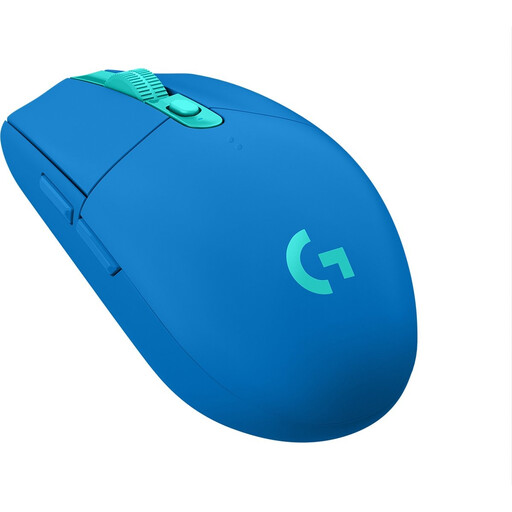
Wireless use keeps a mouse cable off your desk; according to Logitech G, the G305 runs on one AA battery.
 No image available
A compact, ambidextrous shape may be useful if you have limited space; check that it suits your grip.
The product information specifies AA or AAA battery power and a non-rechargeable battery.
 No image available
A wireless option if you want to keep cables off your desk and assign commands to the mouse.
Razer lists nine programmable buttons and two wireless connection methods. The product information specifies an AA battery and configuration through Razer Synapse.
No. Choose the number of buttons based on the commands you want to assign and can reach with your grip. Manufacturer information about programmable buttons doesn't prove that they offer an advantage in a specific game.
Check the battery, receiver and connection method for the exact variant. Logitech G specifies one AA battery for the G305; SteelSeries lists 2.4 GHz or Bluetooth connectivity for the Rival 3 Wireless.
Check that the mouse and your setup suit your hand and posture, and take breaks from sitting still and repeating the same movements. Arboportaal covers things to consider when working with screens, but doesn't recommend a specific gaming mouse.
For eligible distance purchases, a 14-day cooling-off period applies in many cases. You are also entitled to a product that is fit for purpose; according to the Dutch Government, there is no fixed statutory guarantee period in the Netherlands, and you should contact the seller if there is a problem.