
Player with limited mouse space
If your keyboard leaves only a narrow strip of desk space, consider the mouse’s shape and dimensions, as well as potential cable clutter. These features vary between models.


On a small desk, a compact wireless mouse can help keep cables out of the way. If you move around the map a lot, an easily accessible scroll wheel and middle-click are just as important. Extra buttons or scroll-wheel modes are useful mainly if you want to customise them and have enough room to move the mouse. Before buying, check the fit, connection options and product information about the applicable conformity requirements.
If your keyboard leaves only a narrow strip of desk space, consider the mouse’s shape and dimensions, as well as potential cable clutter. These features vary between models.
In Transport Fever 2, you zoom with the scroll wheel and, by default, rotate or tilt the camera by holding down the middle button. Other games may use different controls.
Programmable buttons could be useful if you want to assign frequently repeated actions. Check that the mouse software and your game support the settings you want.
Start by checking the space next to your keyboard and the controls you use in the game. Then consider extra buttons or scroll-wheel modes. The default controls in Transport Fever 2 use the wheel to zoom and middle-click to rotate and tilt the camera, according to the Transport Fever 2 Wiki.
| What to consider | What to look for | Who is this important for? |
|---|---|---|
| Room to move and cable clutter | Measure the available space and compare the mouse’s dimensions and shape. If you’re going wireless, also check whether you’ll need a USB port for a receiver. | If my keyboard reaches almost to the edge of the mouse area, I want enough room to move without a cable getting in the way. That’s why around 36% of consumers prioritise room to move and minimal cable clutter. |
| Zooming and rotating | Check that the scroll wheel is easy to reach and comfortable to press. Extra scroll-wheel modes are a matter of personal preference, not a requirement for the default controls in Transport Fever 2. | When I move around the map a lot, I want to zoom with the wheel and rotate the camera with a middle-click. Around 29% of consumers prioritise these map controls. |
| Fit and grip | Compare the length and width, symmetrical or right-handed shape, and accessibility of the wheel and side buttons with the way you usually hold a mouse. | For a long gaming session, I want a shape that suits my hand and grip, not just a mouse described as compact. Around 21% of consumers prioritise fit. |
| Customisable controls and power | Check how many buttons you can customise, which software you’ll need and what type of power the mouse uses. | If I want to assign frequently repeated actions, I want to know whether the game and software allow it, and what upkeep the power source requires. Around 14% of consumers prioritise customisation and the maintenance involved. |
Joybuy product information lists Bluetooth for the G305, while Logitech Support specifies a LIGHTSPEED receiver for this model and doesn’t mention Bluetooth. For the G502 X, Logitech distinguishes between 11 buttons and 13 programmable controls.
Compare the information for the exact version with the manufacturer’s documentation. Ask the seller for clarification if a feature you need doesn’t match.
With the default controls in Transport Fever 2, you use the wheel to zoom and middle-click to rotate the camera. An extra wheel mode is a feature of some models, not a proven requirement for these actions.
First, see whether regular scrolling and middle-click work for you. Then weigh up extra wheel modes against the size of the mouse.
Logitech specifies the G305 as weighing 75 g without a battery and 99 g with one AA battery. So it’s important to compare the weight with the battery included.
When choosing, take into account the battery you use and replacing it when needed.
The G305 requires periodic replacement of its AA battery.
The G305 and G502 X show the different options in this range: a wireless model with a receiver and a wired model with more controls.
The Orochi V2 is a compact wireless option to consider if you’re looking for a mouse without a fixed cable.
The KATAR PRO XT (EU) is a compact, symmetrical wired mouse.
The Aerox 3 and Aerox 3 Wireless Gen 2 are separate versions; information about the wireless version doesn’t automatically apply to the wired mouse.
This selection features wireless gaming mice. Focus on comparing their shape, connection options and controls with the space and functionality you need.
 Image unavailable
A good fit if you want to game wirelessly and customise programmable buttons.
Product details list BT5.0, 2.4G and USB-C, 7 programmable buttons and a weight of 67 g.
 Image unavailable
A good fit if you want to game wirelessly and value customisable controls.
Logitech product information lists LIGHTSPEED and Bluetooth, with up to 6 programmable buttons.
 Image unavailable
A good fit if you’re looking for a symmetrical shape and want to compare different wireless connection options.
Product details list tri-mode connectivity and a symmetrical shape for small and medium-sized hands; this version is described as a set with a magnetic charging dock.
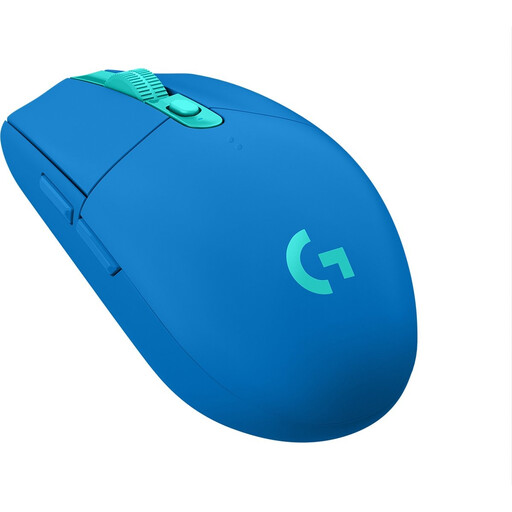 Image unavailable
A good fit if you want a compact wireless mouse and don’t want a fixed mouse cable on your desk.
Logitech Support lists dimensions of 116.6 × 62.15 × 38.2 mm, a LIGHTSPEED receiver and one AA battery. Logitech doesn’t list Bluetooth for this model.
 Image unavailable
A good fit if you’re considering a compact wireless mouse with more than one connection option.
Razer describes the Orochi V2 as offering Bluetooth and a 2.4GHz wireless connection.
No. The default controls use the scroll wheel and middle-click for camera controls, among other things. Extra buttons are useful only if you want to assign actions and the game supports those settings, according to the Transport Fever 2 Wiki.
According to Logitech Support, the G305 uses a dedicated LIGHTSPEED USB receiver, and the official specifications don’t list Bluetooth. If Bluetooth is essential for you, check the exact version and ask for clarification if the product listing says otherwise.
No. A free-spinning wheel mode isn’t needed for the default controls in Transport Fever 2: you zoom with the wheel and rotate the camera with a middle-click. Choose extra wheel modes only if you find them useful and the mouse fits in the space you have available.
Electrical and electronic products sold in the Netherlands must meet the applicable European requirements and carry the required CE marking, as explained by Ondernemersplein, the Dutch government’s business information portal. Radio equipment is also subject to applicable rules; the Dutch Authority for Digital Infrastructure explains these requirements. Check the product information for the exact version.
Take used batteries to a collection point, such as a shop or supermarket that sells batteries. The Dutch government says batteries shouldn’t go in the rubbish bin.