First, check whether your racing game uses the mouse for steering or only for features such as the camera: Forza Support describes mouse controls for the camera in Forza Horizon 5, while EA lists a keyboard, controller and steering wheel for F1 25. Then choose a mouse that suits your hand and the space available. A wireless mouse keeps cables off your desk, while a wired one doesn’t need a battery.
Who is this guide for?
Racers with limited mouse space
Your keyboard or controller takes up most of the desk. You’re looking for a mouse whose shape and cable routing work with the space you have left. Razer and SteelSeries offer compact or lightweight models, but you’ll still need room to move the mouse.
Racers who want to steer with a mouse
Before buying, you want to know whether your specific game supports mouse steering or whether the mouse can only be used for things such as menus or camera movement. Controls vary from game to game.
Racers who spend long sessions at their desk
You want a shape and button layout that suit your hand. Logitech G, Razer and SteelSeries offer models with different button layouts; a high DPI rating alone won’t tell you whether a mouse feels comfortable in your hand.
What should you look for in a gaming mouse for racing games on a small desk?
| What to consider |
What should you check? |
Who is this important for? |
| Space and cable routing |
Measure the space beside your keyboard or controller and decide where a cable or wireless receiver will go. |
If I have little space left, I want to know whether the mouse will fit and whether I can still move it freely. Around 31% of consumers make space their top priority. |
| Mouse function in the game |
Check the controls for your game and platform. Forza Support describes mouse controls for the camera in Forza Horizon 5; EA lists a keyboard, controller and steering wheel for F1 25. |
If I want to steer with a mouse, I want to know first which input my game actually supports. Around 25% of consumers put in-game controls first. |
| Shape and button reach |
Compare the dimensions and button layout with your current mouse; if possible, try the shape for yourself to see how it feels in your hand. |
If I play for long sessions, I want a comfortable grip and easy access to any side buttons. Around 25% of consumers give fit the greatest weight. |
| Connection and power |
Check which connections and ports are supported, which receiver is needed and whether the model uses a replaceable battery. |
If I don’t want a cable across my desk, I want to know in advance how the wireless mouse connects and gets its power. Around 19% of consumers choose connectivity first. |
Common mistakes when choosing a mouse
-
Buying a gaming mouse because you want to steer with it
Using the mouse to control the camera isn’t the same as using it to steer. Available controls vary from game to game.
Before buying, check the official control options for your racing game and platform.
-
Assuming compact means a good fit
A small mouse may fit on your desk without feeling comfortable in your hand. The side buttons may also be hard to reach.
Compare the space available on your desk with the mouse’s shape and button layout; if possible, try it in your hand.
-
Comparing wireless weight or battery life without checking the conditions
Razer’s stated weight for the Orochi V2 excludes the battery. Its maximum battery life is based on a specific battery condition.
Check the power source and usage mode, and only compare weight and battery life when the measurement conditions match.
-
Assuming an extended warranty is your only protection if something goes wrong
According to the Dutch government, the retailer must provide an appropriate solution if a product is faulty; there is no fixed statutory warranty period in the Netherlands.
Check what extra protection an extended warranty offers on top of your statutory rights.
Brands to consider
Logitech G
The wired G203 and wireless G305 offer different options for a small desk.
- Logitech lists six buttons and adjustable sensitivity of 200–8000 dpi for the G203.
- According to Logitech, the G305 uses one AA battery and has a stated battery life of up to 250 hours.
- The G203 has a cable, so allow enough room for it on your desk.
Razer
The Orochi V2 is a compact wireless option if you don’t want a mouse cable across your desk.
- Razer lists Bluetooth, 2.4 GHz and six programmable buttons for the Orochi V2.
- The stated weight of under 60 g excludes the battery. The maximum battery life applies under the specified battery conditions.
SteelSeries
The wired Aerox 3 focuses on low weight, while the wired Rival 5 has more programmable buttons.
- SteelSeries specifies a weight of 59 g for the wired Aerox 3 and nine programmable buttons for the Rival 5.
- Both models need room for a cable. The number of buttons doesn’t tell you whether your racing game supports mouse steering.
Corsair
The wired KATAR PRO XT is a compact option to compare if you use a claw or fingertip grip.
- Corsair lists a symmetrical shape, a weight of 73 g and six programmable buttons.
- The manufacturer describes it as suitable for certain grip styles, but fit is personal and you’ll need room for the cable on your desk.
HyperX
The Pulsefire Haste 2 Mini Wireless is a compact wireless option to compare.
- HyperX lists two wireless connection options and charging while using the mouse in wired mode.
- The product page consulted is for the US version; check the variant you intend to buy.
Joybuy product picks for a small desk
These Joybuy picks are wireless gaming mice. Check which shape, connection and power source will work for your desk and game.
 No image available
AJAZZ AJ159 PRO, white
A wireless option if you don’t want a mouse cable across your small desk and are looking for a model for small to medium-sized hands.
PAW3395 sensor; 26K DPI; 2.4G, USB-C and Bluetooth; 400 mAh battery; 56 g. The magnetic charging dock contains magnets: according to the product description, keep it away from pacemakers, medical implants and payment cards.
View at Joybuy
 No image available
AJAZZ AJ200 AI MC
A wireless model to compare if you’re looking for a mouse for medium to large hands and want to use a charging dock.
PAW3311 sensor; 24,000 DPI; Bluetooth, 2.4 GHz and USB-C; 63 g according to the product name.
View at Joybuy
 No image available
AJAZZ AJ159 APEX
A symmetrical wireless option if you’re looking for a mouse for small to medium-sized hands.
PAW3950 sensor; up to 42,000 DPI; tri-mode connectivity; 8K Hz polling rate according to the product name.
View at Joybuy
 No image available
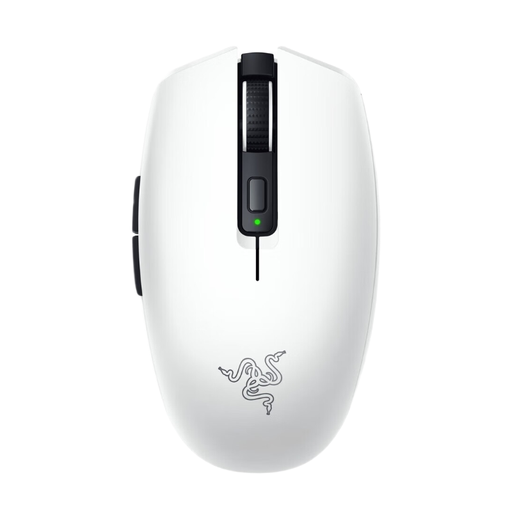
Razer Orochi V2 White Ed.
A compact wireless option if you want to avoid cable clutter and are looking for a symmetrical shape with programmable buttons.
Bluetooth and HyperSpeed connectivity; six programmable buttons; supports AA or AAA batteries. This model uses a replaceable battery and, according to the product description, does not have a rechargeable battery.
View at Joybuy
 No image available
Razer Viper V3 Pro, black
A wireless option if you’re looking for programmable controls and a right-handed shape.
54 g; 35,000 DPI; 8K polling; eight programmable buttons.
View at Joybuy
Frequently asked questions
Can I steer with a gaming mouse in my racing game?
It depends on the game and platform. Forza Horizon 5 describes using the mouse to control the camera while driving; EA’s official control information for F1 25 lists a keyboard, controller and steering wheel. Check the controls for your game before buying a mouse with steering as your main aim.
How can I stop a new mouse from taking up more space on my small desk?
Decide in advance where the cable or wireless receiver will go, and leave enough room to move the mouse. According to Razer, the Orochi V2 offers Bluetooth and 2.4 GHz connectivity; the wired Logitech G203 needs enough room for its cable.
What should I look for in a wireless mouse battery?
Check whether the model uses a replaceable or rechargeable battery, and the conditions under which its stated battery life applies. According to Logitech, the G305 uses one AA battery. Dispose of used batteries at a collection point, as advised by Milieu Centraal.
What are my rights in the Netherlands if my mouse doesn’t work properly?
According to the Dutch government, the retailer must provide an appropriate solution if a product is faulty; there is no fixed statutory warranty period in the Netherlands. For online distance purchases, the Dutch government states that you have 14 days to change your mind. A manufacturer’s warranty is in addition to your statutory rights.


