Start by considering the space available for your hand and mouse, your grip and how many commands you actually want to control with your thumb. A compact wireless mouse keeps a cable out of the way, while a model with more buttons can group commands together. With either option, check that the shape, button placement and sensitivity settings work for you. A wired mouse means no battery to manage, but you’ll need to make sure the cable can move freely.
Who is this choice relevant to?
Players with limited mouse space
You want to reach a large part of the screen from a small desk without constantly bumping into other items or the edge of your mouse mat. Compare the shape and try a comfortable sensitivity setting in your own game. Coolblue and Lenovo Netherlands cover sensitivity and available movement space as factors to consider.
Players who use lots of shortcuts
You want to assign frequently used commands to mouse buttons you can reach easily, without having to change your grip to press them. Product information from SteelSeries and Logitech G gives examples of models with several programmable controls.
Players who want a tidy connection
Your main consideration is whether a cable will get in the way on your small desk, or whether charging or replacing batteries would be more hassle. Coolblue highlights battery management as something to consider with wireless mice.
What should you look for when buying?
On a small desk, your choice comes down to space and cursor control, easy-to-reach buttons, cable clearance versus battery management, and the terms for your purchase and aftercare.
| Factor |
What should you check? |
Who is this important for? |
| Control and fit |
Compare the dimensions and shape with your grip and mouse mat. Set the sensitivity and try it in your own game; the maximum DPI doesn’t automatically tell you which setting will feel comfortable. Lenovo Netherlands explains how DPI affects cursor distance for the same mouse movement. |
If I have limited space, I want to reach the playing area without making precise selections more difficult. Around 40% of consumers prioritise space and cursor control. |
| Command buttons |
Decide which commands you actually want to move to the mouse, then check the button placement and assignments on the exact model. The number of buttons doesn’t tell you whether you can reach them comfortably with your grip. |
If I want to move recurring in-game commands to the mouse, the buttons need to be within reach without me changing my grip. Around 30% of consumers prioritise accessible command buttons. |
| Cable or battery management |
Check whether a cable can run freely across your desk. For a wireless model, check its connection options and battery or charging setup; battery-life claims depend on the stated conditions. |
If a cable limits the space I have to move my mouse, wireless matters more to me. If I don’t want to manage a battery, a wired mouse may suit my desk better. Around 20% of consumers make connection and battery management their top priority. |
| Purchase terms and aftercare |
Check who the seller is and what returns terms apply. For an online consumer purchase in the Netherlands, the cooling-off period and statutory guarantee may be separate rights; check the terms that apply to your purchase. |
If I can only properly assess the fit at home, I want to know where to find the returns terms in advance and what applies if the product is faulty. Around 10% of consumers prioritise purchase terms and aftercare. |
Common buying mistakes
-
Comparing only the maximum DPI
A high maximum setting doesn’t tell you which sensitivity will feel comfortable with the mouse space you have. Lenovo Netherlands explains that a higher DPI moves the cursor further with the same mouse movement.
Compare the available settings and try them with your own game and mouse mat, rather than focusing only on the highest figure.
-
Assuming more buttons mean better control
Extra buttons are only useful if you need them and can reach them with your grip. The models described by Razer, SteelSeries and Logitech G vary in their number and layout of buttons.
Decide in advance which commands you want to assign, then check the button placement on the exact model.
-
Comparing weight or battery life without checking the conditions
Razer lists the Orochi V2 as weighing less than 60 g without a battery. Battery-life claims depend on the stated usage and connection conditions, and aren’t a guarantee of how long the battery will last for you.
Check whether the listed weight includes the battery, and only compare battery-life claims when the conditions match.
Relevant brands to consider
Razer
The Orochi V2 and Naga V2 HyperSpeed represent different button layouts within the brand’s range. So judge each model on its own design and fit, rather than the brand name alone.
- Razer lists Bluetooth and 2.4 GHz connectivity, six programmable buttons and a weight of less than 60 g without a battery for the Orochi V2.
- The Orochi V2 has fewer individual controls than the extensive side panel on the Naga V2 HyperSpeed. The most comfortable layout depends on your grip, and battery-life claims don’t reflect your own usage.
SteelSeries
The wired Rival 5 and wireless Aerox 9 Wireless cater to different preferences for cables and button numbers.
- SteelSeries lists nine programmable buttons for the Rival 5, including five side buttons, and a 12-button side panel for the Aerox 9 Wireless.
- More side buttons are only useful if you need them and can reach them comfortably. The manufacturer’s performance claims aren’t based on independent competitive testing.
Logitech G
The G502 X LIGHTSPEED is a wireless model with several customisable controls.
- Logitech G lists thirteen customisable controls for the G502 X LIGHTSPEED.
- The number of controls doesn’t prove that the mouse will give you an advantage in ranked matches. Compare their placement and the physical fit with more compact models.
Joybuy products
This selection includes wireless and wired gaming mice. Compare the available connection options, adjustable sensitivity and buttons with the space and controls you need.
 No image available
Shark Velocity M71 wireless gaming mouse
Worth considering if you want to combine programmable buttons with wireless use.
The product name lists 8 programmable buttons, a PAW3335 sensor and 16,000 DPI. The product information states that the built-in battery provides up to 50 hours of use on a full charge.
Joybuy
 No image available
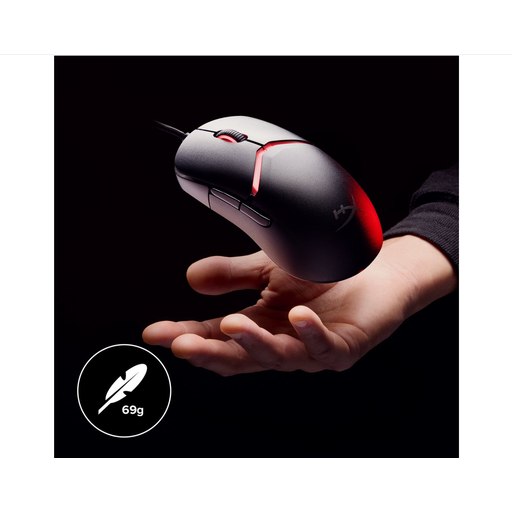
HyperX Pulsefire Haste 2 wired gaming mouse
A wired option if the cable can move freely across your desk and you don’t need a wireless connection.
The product name lists compatibility with PC, PS5, PS4, Xbox Series X|S and Xbox One. This version is white.
Joybuy
 No image available
HyperX Pulsefire Saga wired gaming mouse
A wired option if you want to avoid battery management and have room for the cable.
The product name lists RGB lighting and up to 26,000 DPI. That maximum setting alone doesn’t tell you which sensitivity is right for your game.
Joybuy
 No image available
AJAZZ AJ200 AI MC wireless gaming mouse
An option if you want to play wirelessly and adjust the sensitivity.
The product name lists a PAW3311 sensor, up to 24,000 DPI, a weight of 63 g and three connection options: Bluetooth, 2.4 GHz and USB-C. A charging dock is also listed.
Joybuy
 No image available
AULA SC620 wireless gaming mouse
Worth considering if you want a wireless connection and the ability to assign several commands to buttons.
The product name lists 7 programmable buttons, Bluetooth, 2.4 GHz and USB-C. A PAW3311 sensor and up to 12,000 DPI are also listed; this version is white.
Joybuy
Frequently asked questions
Should I choose the highest DPI for a small mouse mat?
No. A higher DPI setting moves the cursor further for the same hand movement, but try a setting that lets you reach the playing area and select commands accurately. The highest listed figure won’t automatically be right for you. Lenovo Netherlands explains how DPI affects cursor distance.
How do I set up and maintain a wireless mouse?
Check which connection options the exact mouse uses and whether your computer supports Bluetooth or the required receiver. Razer lists Bluetooth and 2.4 GHz for the Orochi V2; with this model, you’ll also need to plan for battery replacement. Follow the instructions for your chosen mouse when cleaning it.
What if the mouse shape doesn’t feel comfortable after buying online?
For an applicable online consumer purchase in the Netherlands, you generally have a statutory cooling-off period of up to 14 days after delivery, with some exceptions. Check the seller and returns information before you order. Your statutory guarantee for a faulty product is separate from the cooling-off period or any additional manufacturer’s warranty; ACM ConsuWijzer covers these topics separately.
What rules apply to selling a wireless gaming mouse in the Netherlands?
Wireless equipment placed on the market in the EU is covered by the European framework for radio equipment. The European Commission describes the Radio Equipment Directive as the framework covering areas including safety, electromagnetic compatibility and spectrum use. The CE mark indicates that the manufacturer declares the product complies with the applicable EU rules; the mark itself says nothing about a mouse’s gaming performance.


