
Players with limited mouse space
If you play tactical ranked matches on a small surface, you can choose a shape, grip and sensitivity to suit the space available. Measure your free movement area first.


Start by choosing a mouse shape that suits your hand and grip, then check how much room you really have to move it across your desk. A more compact mouse won’t give you any extra space. A wireless mouse avoids a trailing cable, while a wired one means no recharging but needs a clear cable route. Consider sensor settings and polling rate alongside your own settings, rather than focusing only on their maximum values.
If you play tactical ranked matches on a small surface, you can choose a shape, grip and sensitivity to suit the space available. Measure your free movement area first.
If a cable catches on your keyboard or the edge of your desk, compare wireless options, taking into account the receiver you need, charging and fit.
If you don’t want to recharge your mouse, a wired option may suit you, provided the cable can run freely alongside your playing area. Check which USB connection you need, too.
Start with the space available and your grip. Then decide whether you’d prefer unrestricted movement without a cable or to play without a charging routine. Test the sensitivity and settings on your own mouse mat.
| What to consider | What should you check? | Who should pay particular attention? |
|---|---|---|
| Fit and available space | Measure the space you have for mouse movements and compare the mouse’s length, width and height. Check that you can reach the buttons with your usual grip. | On a small playing area, I want a grip that lets me move precisely without making the buttons hard to reach. Around 33% of consumers give fit and space their top priority. |
| Movement without cable drag | Check that you have a free USB port and the right receiver, or route a wired mouse’s cable alongside your playing area and test the full range of movement. | If a cable gets in the way of my mouse movements, I want to move freely while playing. Around 27% of consumers put avoiding cable drag first. |
| Aiming and settings | Test aiming and turning using your own sensitivity settings and mouse mat. Check which DPI or CPI and polling settings the model offers. | I want my settings to work for both small aiming adjustments and turns within the space I have. Around 20% of consumers give control over aiming settings their top priority. |
| Connection and charging | Check which cable or receiver you need and how the mouse is charged. If it develops a fault, distinguish between your statutory rights and the manufacturer’s warranty. | If I don’t want a charging routine, I look for a clear cable route. If I choose wireless, I check the receiver and charging. Around 20% of consumers place the greatest importance on connection and reliability. |
A smaller mouse won’t change the size of your mouse mat or the space available next to your keyboard.
Measure the space you have for mouse movements first, then assess shape, grip and sensitivity separately.
A maximum specification doesn’t tell you which setting will feel comfortable on your surface or with your game settings.
Compare the available settings and test aiming and turning with your own setup.
A cable can restrict your movement, while a wireless mouse may need a compatible receiver and USB connection.
Check the connections and included accessories, and make sure a wired mouse’s cable can run freely alongside your playing area.
The Joybuy listing for the Razer Viper V3 Pro includes different sensor descriptions. It’s therefore worth carefully comparing the specifications for the exact model.
Before buying, check the full model name and compare the product information with the manufacturer’s details.
The PRO X SUPERLIGHT 2c is a compact wireless option to consider if you’re looking for a shorter design and freedom from a trailing cable.
The OP1 8k v2 is a compact wired option for players who don’t want to recharge a battery.
The Viper V3 Pro is a wireless FPS-shaped mouse to compare with more compact options.
The Aerox range includes wired and wireless versions, so compare the exact model before deciding.
This selection features wireless gaming mice. For each model, check that its shape suits your grip and that its listed connections work with your desk setup.
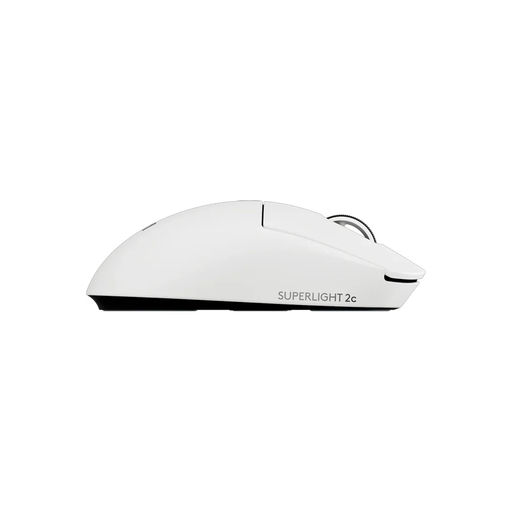 Image unavailable
A wireless option for anyone who wants to play without a trailing mouse cable and compare a compact design.
The product information lists an optical HERO 2 sensor, adjustable DPI and LIGHTSPEED wireless connectivity.
 Image unavailable
An option to compare if wireless modes and adjustable sensitivity matter to you.
The product information lists a PAW3311 sensor, adjustable DPI and Bluetooth, 2.4G and USB-C modes. The polling rate is up to 1000 Hz in 2.4G or wired mode.
 Image unavailable
A wireless option to compare if you’re looking for several connection options and programmable buttons.
The product information lists Bluetooth 5.0 and 2.4G, a PAW3311 sensor, 12000 DPI and seven programmable buttons.
 Image unavailable
A wireless option to compare if you’re weighing up LIGHTSPEED and Bluetooth connections.
The product information lists a HERO 25K sensor and up to six programmable buttons.
 Image unavailable
A model to compare if wireless connection modes and adjustable aiming sensitivity matter to you.
The product information lists 2.4GHz and Bluetooth modes, a PAW3950 sensor, DPI up to 42000 and a maximum polling rate of 8000 Hz.
Not necessarily: the physical space available for mouse movements stays the same. Test on your own mouse mat to see whether your sensitivity gives you enough room to aim accurately and turn. Assess the shape separately for grip and button accessibility.
According to Logitech, the Logitech PRO X SUPERLIGHT 2c uses a USB-A receiver and a USB-A to USB-C cable for charging or data. The Endgame Gear OP1 8k v2 has a wired USB-A connection. Keep a wired cable clear of your playing area, and plan when to recharge if you choose wireless.
For a standard online consumer purchase in the Netherlands, you generally have a statutory cooling-off period of up to 14 days after delivery; ACM ConsuWijzer lists some exceptions. Check the returns policy before buying, and handle the mouse carefully while trying it out.
According to ACM ConsuWijzer, the retailer is responsible under the statutory guarantee if the product doesn’t meet what you could reasonably expect. In the Netherlands, this doesn’t simply mean there’s one fixed two-year period; a manufacturer’s warranty is a separate promise.
Radio equipment placed on the EU market is covered by the Radio Equipment Directive, which sets requirements including safety, electromagnetic compatibility and radio spectrum use. CE marking is a manufacturer’s declaration for products that must carry it under applicable EU rules; it isn’t an independent mark of gaming performance. Check the product and conformity information for the exact model.