
Players with limited space for a mouse
You want to move your mouse around a small desk without a cable getting in the way. So focus on comparing the mouse’s shape and connection.


Start by choosing a mouse shape that suits your hand and gives you enough room to move on your small desk. A wireless mouse keeps a cable out of your way. If you often navigate maps and menus, an adjustable scroll wheel or extra buttons may matter more than having the most compact design. Also check whether your game lets you assign the commands you want, and whether the connection is compatible with your computer.
You want to move your mouse around a small desk without a cable getting in the way. So focus on comparing the mouse’s shape and connection.
You regularly navigate game maps or long menus and want to know whether scroll modes and assignable buttons suit the way you play.
You want a mouse that feels comfortable in your hand, so compare different shapes rather than looking at sensor specifications alone.
Choose this if: cable space is the biggest issue on your small desk and you’re looking for straightforward controls.
Consider: a wireless mouse needs its battery replaced or recharging, and you’ll also need to check that its shape suits your hand.
Choose this if: you often scroll through long lists or navigate maps, and can position the cable neatly on your desk.
Consider: Razer says the Basilisk V3 35K has three scroll modes, but its cable takes up space. Extra controls are only useful if you want to customise them.
Choose this if: you mainly want to compare different shapes or a stated low weight, and extra buttons aren’t a priority.
Consider: the CHERRY XTRFY M42V2 is wired, while SteelSeries lists the Aerox 3 Wireless (2022) at 68 g. Neither feature alone determines how the mouse will feel in your hand.
| What to consider | What to look for when buying | Who is this important for? |
|---|---|---|
| Space and cable | Measure the free space next to your keyboard and compare the mouse’s shape and connection. | If I play at a small desk, I want to move freely without a cable getting in the way. Around 36% of consumers prioritise space and cable-free use. |
| Scrolling and commands | Check the scroll modes, how easy the buttons are to reach, and whether your game lets you assign commands. | If I navigate maps and menus a lot, I want frequently used actions within easy reach. Around 29% of consumers give scrolling and commands top priority. |
| Shape and grip | Compare the shape with your usual grip and see where your fingers rest on the buttons. | If I’m planning longer gaming sessions, I mainly want a shape that suits my hand. Around 21% of consumers consider fit to their hand the most important factor. |
| Power and maintenance | Check whether the model uses a battery or needs recharging, and which accessories are included. | If I want to think about power as little as possible, I want to know whether I’ll need to replace a battery or recharge the mouse. Around 14% of consumers prioritise easy maintenance. |
A high DPI figure doesn’t, by itself, tell you whether the mouse’s shape, cable or controls will suit your desk and game.
First compare the space available, how the mouse fits your hand, and the scroll wheel and button controls. Treat sensor specifications as product features, not proof that the mouse is right for you.
A wireless mouse may use a replaceable battery or need recharging. That determines what maintenance is involved.
Check the power type and what’s included for the exact model you’re considering.
A customisable button is only useful for the action you want if your game lets you assign it.
Think about which commands you’d like to have within easy reach, then check whether your game supports assigning them.
The Basilisk Mobile is a compact wireless option with extra controls, while the wired Basilisk V3 35K offers adjustable scroll control.
The G305 LIGHTSPEED is a wireless mouse powered by an AA battery, for anyone who doesn’t need an advanced scroll wheel as a priority.
The Aerox 3 Wireless (2022) is a wireless option for comparing weight and connectivity.
The M42V2 is a wired option with a symmetrical shape and two interchangeable back shells.
This selection features wireless gaming mice for a small desk, with a range of shapes, connections and button customisation options.
 No image available
A good choice if you want to play wirelessly and customise the buttons to suit your controls.
The description lists an ambidextrous shape, a 2.4GHz connection and 8 programmable buttons. The rechargeable battery is said to last up to 50 hours; recharging is part of everyday use.
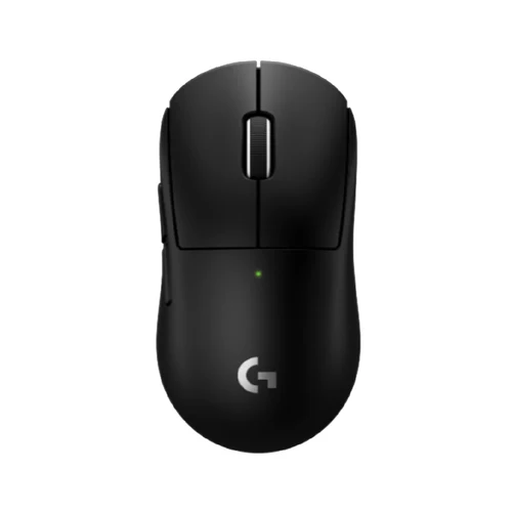 No image available
A good choice if a compact design and programmable thumb buttons suit the way you play.
The description lists a wireless LIGHTSPEED connection, a weight of 53 g and five buttons. It charges via USB-C.
 No image available
A good choice if you want customisable buttons and a wireless mouse with a charging dock.
The product name lists Bluetooth, 2.4G and USB-C as three connection options, a weight of 63 g and a charging dock. The description mentions software-based customisation for buttons and macros.
 No image available
A good choice if you’re looking for wireless connectivity and several programmable buttons.
The product name lists Bluetooth 5.0, 2.4G and USB-C, 7 programmable buttons and a weight of 67 g.
 No image available
A good choice if you want to play wirelessly and customise the controls for commands you use regularly.
The description lists LIGHTSPEED and Bluetooth connectivity, plus up to 6 programmable buttons. The model uses an AA battery.
Not necessarily. Choose extra buttons if you want to assign commands you use often and your game supports this; otherwise, a simpler mouse may be all you need.
First, check which connections the model you’ve chosen offers. Logitech lists an AA battery for the G305, while SteelSeries lists 2.4GHz and Bluetooth for the Aerox 3 Wireless. Refer to the model’s manual for pairing and button settings.
When you buy as a consumer in the Netherlands, you’re entitled to a product that works properly. The Dutch Government says that if there’s a problem, you should ask the seller to put it right. Any manufacturer’s guarantee does not replace your legal rights.
According to the Dutch Government, in many cases you have 14 days to change your mind when you buy online from a business. Check the terms that apply to your purchase. This statutory right is not the same as any more generous returns policy offered by a shop.