What should you look for?
At a small desk, first decide which mouse shape and connection will work with your setup. Then consider how many extra controls you’ll actually use while playing.
Compact and wireless
Best for: keeping room to move and avoiding a mouse cable across your desk.
Keep in mind: the shape needs to suit your hand, and you’ll need a suitable connection for the receiver. With fewer extra buttons, you’ll leave more commands on the keyboard.
Wired with extra controls
Best for: assigning a few extra actions to your mouse and routing the cable across your desk.
Keep in mind: cable space and how easy the buttons are to reach. Logitech describes the G502 X as having, among other features, an adjustable DPI-shift button and tilt controls on the scroll wheel.
Wireless with a thumb grid
Best for: assigning lots of individual commands to your mouse, provided you can reach the buttons comfortably with your thumb.
Keep in mind: a large grid takes time to get used to and won’t necessarily be useful in every game. SteelSeries lists 18 programmable buttons for the Aerox 9 Wireless, including 12 on the side; Razer lists a grid of 12 thumb buttons for the Naga V2 HyperSpeed.
| What to consider |
What should you check? |
Who is this important for? |
| Desk space |
Measure the available space next to your keyboard and compare it with the mouse’s dimensions. Consider where a cable or USB receiver will go. |
I want enough room to move my mouse on my small desk, without a cable across my work surface. Around 36% of consumers rank desk space as their top buying priority. |
| In-game buttons within reach |
Count the actions you actually want to assign, then check that you can reach the buttons and your game allows the assignments. |
When I use the same in-game actions often, I want to control them with my thumb without changing my grip. Around 29% of consumers put shortcuts first. |
| Shape and grip |
Compare the dimensions, weight and button positions. If possible, hold the mouse using your usual grip. |
For long gaming sessions, I want a mouse shape that suits my hand, even if that means choosing fewer extra buttons. Around 21% of consumers give grip comfort top priority. |
| Power and connection |
Check that you have a suitable USB port or supported wireless connection, and space to route a cable. |
If I don’t want a cable across my desk, the wireless connection needs to work with my device. With a wired mouse, I want to be able to route the cable neatly. Around 14% of consumers make power and connection their top priority. |
Gaming mice at Joybuy
This Joybuy selection features wireless gaming mice. Compare their stated connections, shapes and extra controls with the space on your desk and the commands you use in your game.
 No image available
AJAZZ AJ200 AI MC Wireless Gaming Mouse with Charging Dock
A wireless option if you want to keep a mouse cable off your desk and have a choice of connection methods.
The product name lists Bluetooth, 2.4G and USB-C, 63 g, 24,000 DPI and a PAW3311 sensor.
Joybuy
 No image available
AULA SC620 Wireless Gaming Mouse, White
This wireless version is worth considering if you want to compare programmable buttons with the commands you use in your own games.
The product name lists Bluetooth 5.0, 2.4G and USB-C, seven programmable buttons, 67 g and a PAW3311 sensor.
Joybuy
 No image available
Logitech G G309 LIGHTSPEED Wireless Gaming Mouse
A wireless gaming mouse to consider if you don’t want a mouse cable across your small desk.
Joybuy
 No image available
AJAZZ AJ159 V2 MC Wireless Gaming Mouse
A wireless option if you want to weigh up different connection methods against your desk setup.
The product name lists tri-mode connectivity, a replaceable 300 mAh battery, a PAW3311 sensor and 24,000 DPI.
Joybuy
 No image available
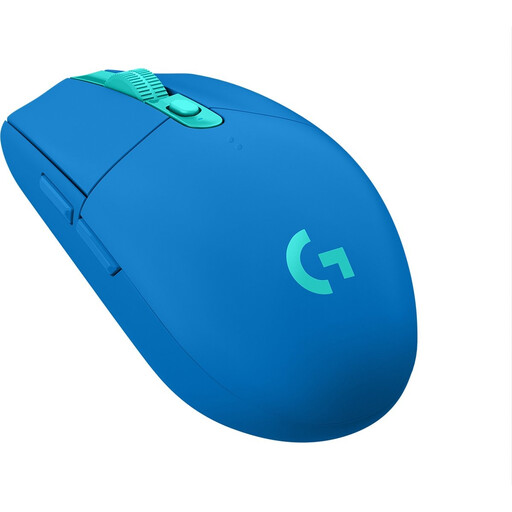
Logitech G305 LIGHTSPEED, blue
A compact wireless model to consider if you want room to move and don’t need many extra controls.
Logitech Support lists the G305’s dimensions as 116.6 × 62.15 × 38.2 mm and its weight as 99 g with one AA battery. The model uses a USB receiver; compare its size and connection with your desk and device.
Joybuy
Frequently asked questions
How can I tell if a mouse will fit on my small desk?
Measure the available space next to your keyboard and compare it with the dimensions of the exact mouse you’re considering. Allow for the space your hand needs to move and, with a wired model, the cable too. Dimensions alone don’t determine whether the grip will feel comfortable.
Do I need to configure all the extra buttons before I play?
No. Start with the in-game actions you use most often. Assign them if your game and configuration software allow it, then check that you can reach the buttons without changing your grip.
What should I check about connection and maintenance?
Check that you have a suitable USB port or supported wireless connection. Logitech says the G305 uses a USB receiver and AA battery, while the wired G502 X needs room for its cable. Follow the care instructions for your specific model when cleaning its surface and sensor.
What are my rights when buying online in the Netherlands?
When you buy from a business online, you’ll often have a 14-day cooling-off period; check whether it applies to your purchase. You also have rights if a product is faulty. According to the Dutch government, there is no fixed period for the statutory guarantee in the Netherlands, and the seller is your point of contact if there’s a problem.


