What should you look for when choosing?
First, work out how much space you have and which grip feels comfortable. Then decide whether you’d rather avoid a cable or battery maintenance.
| Consideration |
What to look for |
Who should prioritise this? |
| Movement space and cursor control |
Compare the mouse shape and adjustable DPI with the space available; choose a sensitivity setting based on control, not the highest value. |
If I want to select buildings and small interface elements without bumping into my keyboard or other items, I want to be able to adjust the cursor to suit my desk. Around 36% of consumers in this buying context prioritise movement space and cursor control. |
| Shape and extended use |
Check the dimensions, shape and reach of the side buttons; make sure the grip suits your hand. |
When I play for longer sessions, I want a shape that suits my hand and grip, even if a compact model saves space. Around 29% of consumers prioritise a comfortable grip and extended use. |
| Buttons for in-game actions |
Check the number and position of the programmable buttons, and whether your game lets you assign the actions you want to them. |
If I perform the same actions often, I want to use easily reached mouse buttons without disrupting my grip. Around 21% of consumers prioritise assigning actions to mouse buttons. |
| Cable and battery |
Check the connection type, battery or charging method you prefer, and where a cable could run; compare battery life only for the corresponding connection mode. |
If a cable gets in the way on my small work surface, wireless may be a good fit. If I don’t want to replace or charge batteries, a wired mouse may suit me better. Around 14% of consumers prioritise avoiding cables or battery maintenance. |
Gaming mice at Joybuy
This selection includes wired and wireless gaming mice, so you can weigh up whether a cable or battery maintenance is better for your small desk.
 Image unavailable
HyperX Pulsefire Haste 2 Wired, white
A good fit if you’d rather not replace or charge a battery at your desk and are happy to use a wired mouse.
The product name identifies it as a wired gaming mouse in the white variant.
View at Joybuy
 Image unavailable
AJAZZ AJ200 AI MC
Could be a good fit if you’re looking for a wireless mouse with a charging dock and several connection options.
The product name lists a weight of 63 g, seven programmable buttons, up to 24,000 DPI, a PAW3311 sensor and tri-mode BT/2.4G/USB-C.
View at Joybuy
 Image unavailable
AJAZZ AJ159 APEX
Could be a good fit if you’re looking for a wireless mouse with adjustable sensitivity and a charging base.
The product name lists a PAW3950 sensor, tri-mode connection, a magnetic charging base, a symmetrical shape and up to 42,000 DPI.
View at Joybuy
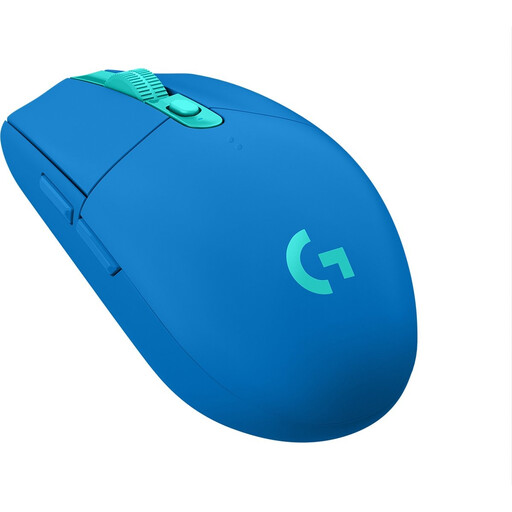 Image unavailable
Logitech G305 LIGHTSPEED, blue
A good fit if you want to play wirelessly and a USB receiver is all you need; bear in mind that it uses an AA battery.
Logitech specifies LIGHTSPEED via a receiver and an adjustable range of 200 to 12,000 DPI. The Logitech specification we consulted doesn’t confirm Bluetooth.
View at Joybuy
 Image unavailable
Razer Orochi V2, black
A good fit if you want to keep a cable off your small desk and have the option of using Bluetooth or a USB receiver.
Razer specifies six programmable buttons. Stated battery life varies by mode: 950 hours via BLE and 425 hours via Razer HyperSpeed Wireless; actual battery life depends on use.
View at Joybuy
Frequently asked questions
Is a higher maximum DPI automatically better on a small desk?
No. A higher DPI moves the cursor further with the same mouse movement, but the highest setting isn’t automatically the easiest to control. Choose a mouse with adjustable sensitivity and try different settings to find one that suits the space you have and your game interface; Megekko Academy explains this difference too.
How do I set up extra buttons for my building game?
First, check which actions your specific game lets you assign to a key or mouse button. Razer and Corsair list programmable buttons for the Orochi V2 and KATAR PRO XT; for more extensive configuration, they refer to Synapse and iCUE respectively. This doesn’t confirm that a specific game not mentioned here supports these settings.
What maintenance does a wireless or wired mouse need?
For a wireless mouse, check the battery type or charging method and follow the model’s manual for keeping the sensor and feet clean. The G305 uses one AA battery; the wired KATAR PRO XT doesn’t need its battery replaced. Take used batteries to a collection point and don’t put them in general waste, as advised by the Dutch Government.
Is the legal guarantee on a mouse in the Netherlands limited to two years?
No, the Dutch legal guarantee isn’t limited to two years for every product. According to the Dutch Government, how long a product should last depends on the product and the circumstances; if a product is faulty, contact the seller.
Where can I dispose of an old mouse?
You can take an old electric mouse to your local council’s recycling centre, among other options. The Dutch Government also states that you can return it when buying a similar new appliance.


