Who is this buying guide for?

Players with limited mouse space

You share a small desk with a keyboard or other items and want to check how much room you have to move the mouse and which shape will work for you. Razer describes the Cobra as compact, while Arboportaal offers advice on working with display screens.

Players who point and click a lot

You mainly use squares, cards and menus, and want to set the cursor speed and grip to suit you, rather than automatically choosing the highest DPI setting. Logitech G and Razer describe the adjustable sensitivity of their models.

Players who want a simpler desk and connection

You’re choosing between a receiver, Bluetooth, a charging cable or a fixed cable, and checking what your computer supports. The available connection options vary by model, as described by Logitech G, SteelSeries, Razer and Trust.

What should you look for?

Compact wired gaming mouse

A good fit if: you have a USB port and can route the cable away from your limited mouse space.

The trade-off: the cable stays on your desk, but you won’t need a battery or wireless receiver.

Wireless mouse with an AA battery

A good fit if: a clear desk matters more to you than changing batteries, and you have a USB port for the receiver.

The trade-off: you’ll need to manage a battery and receiver. The battery life quoted by Logitech G for the G305 is a manufacturer’s figure, not a guarantee of how long it will last for you.

Rechargeable wireless mouse

A good fit if: you’d rather not use a disposable AA battery and the model’s connection option works with your computer.

The trade-off: you’ll need a cable to recharge it, and connection features vary by model.

What to consider What should you check? Who is this important for?
Movement space and shape Measure the clear space next to your keyboard and check the mouse’s dimensions and shape. If your desk is crowded, you’ll want enough room to move the mouse and a shape that fits your hand. Around 36% of consumers say movement space and a manageable shape are their top priorities.
Cursor control and grip Check whether the sensitivity is adjustable and whether the shape feels comfortable for your hand and the length of time you use it. If you click frequently and target small areas, you’ll want to move the cursor with control, without making unnecessarily large hand movements. Around 29% of consumers put cursor control first.
Cable, connection and power Check the available USB ports, Bluetooth support, and the exact model’s power and charging method. If you want to choose what works best for your desk in terms of cables, receiver use or battery maintenance, first check your computer’s connections. Around 21% of consumers say connection and power are most important.
Extra controls Check whether the buttons are configurable and whether your games let you assign useful commands to them. If your game offers handy shortcuts, extra buttons may be useful. Without those commands, they might not add much. Around 14% of consumers put extra controls first.

Common pitfalls

  • Choosing based only on the highest DPI setting

    A higher maximum DPI doesn’t automatically mean the cursor speed will feel right for your screen, available mouse space and in-game targets.

    First choose a shape that suits your setup, then adjust the sensitivity to suit your needs.

  • Assuming wireless always means Bluetooth

    Wireless mice can use different connection and power options. According to the manufacturer, Trust’s GXT 110 Felox uses a 2.4GHz receiver; SteelSeries also lists Bluetooth 5.0 for the Aerox 3 Wireless.

    Check the exact model variant to see whether you need a receiver, whether Bluetooth is available and how the mouse is powered.

    A receiver can take up a USB port. Depending on the model, you may also need to manage an AA battery or recharge the mouse.

  • Confusing the manufacturer’s warranty with all your legal rights

    According to the Dutch government, there is no fixed statutory warranty period in the Netherlands. You can expect a product to meet what you could reasonably expect from that purchase; the manufacturer’s warranty is separate.

    Keep your proof of purchase and contact the seller if a product is faulty.

Brands to consider

Logitech G

The G305 is a wireless option for anyone happy to use a receiver and an AA battery.

  • Logitech G specifies an adjustable range of 200–12,000 DPI for the G305.
  • The quoted battery life of 250 hours from a single AA battery is a manufacturer’s figure, not a guarantee for every use.

Razer

The wired Cobra is worth considering if you can route its cable neatly on a small desk.

  • Razer lists a compact shape and a sensor of up to 8,500 DPI for the Cobra.
  • Razer’s claims about comfort and low cable drag are not based on an independent comparison; the model has one saved profile.

SteelSeries

According to SteelSeries, the Aerox 3 Wireless lets you choose between 2.4 GHz and Bluetooth 5.0.

  • SteelSeries lists a weight of 68 g for this model.
  • The quoted battery life of up to 200 hours is a manufacturer’s figure; you’ll need a cable to recharge it.

Trust

The GXT 110 Felox is a rechargeable 2.4GHz mouse with six buttons.

  • Trust lists adjustable sensitivity from 800–4,800 DPI and up to 80 hours of use per charge.
  • A 2.4GHz receiver is listed for this model; don’t confuse this connection with Bluetooth.

Gaming mice at Joybuy

This selection includes wired and wireless gaming mice for limited mouse space, with a focus on cursor settings and connectivity.

ASUS ROG Strix Impact III Wireless gaming mouse

ASUS ROG Strix Impact III Wireless

A wireless option if you want to keep cables off your small desk and can use the connection with your computer.

The product name lists RF and Bluetooth, an ambidextrous design and a 36,000 DPI optical sensor.

View at Joybuy

AJAZZ AJ159 PRO wireless gaming mouse in white

AJAZZ AJ159 PRO wireless gaming mouse, white

A wireless option if you want to adjust the cursor speed and a charging dock suits your setup.

The product name lists a weight of 56 g, 2.4 GHz, USB-C and Bluetooth, 26K DPI and a 400 mAh battery.

Please note: the magnetic charging dock contains magnets. According to the product warning, keep it at least 15 cm away from pacemakers, medical implants, payment cards and identity cards.

View at Joybuy

HyperX Pulsefire Haste 2 wired gaming mouse in white

HyperX Pulsefire Haste 2 wired gaming mouse, white

A wired option if you can route the cable along your small desk and don’t want to use a wireless receiver.

The product name lists compatibility with PC, PS5, PS4, Xbox Series X|S and Xbox One.

View at Joybuy
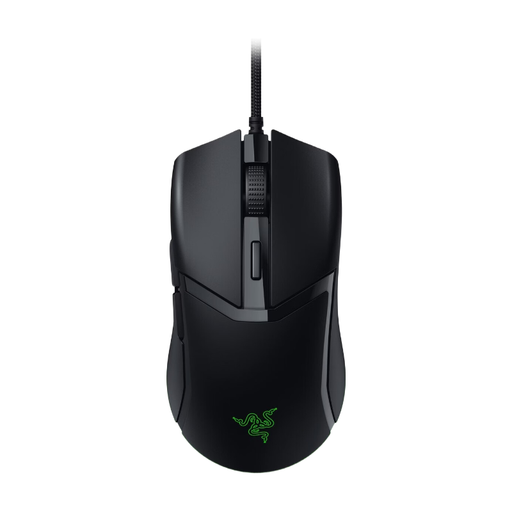
Razer Cobra wired gaming mouse in black

Razer Cobra wired gaming mouse, black

A compact wired option if you can route the cable away from your available mouse space.

Razer lists adjustable sensitivity for the Cobra; the cable remains part of your desk setup.

View at Joybuy
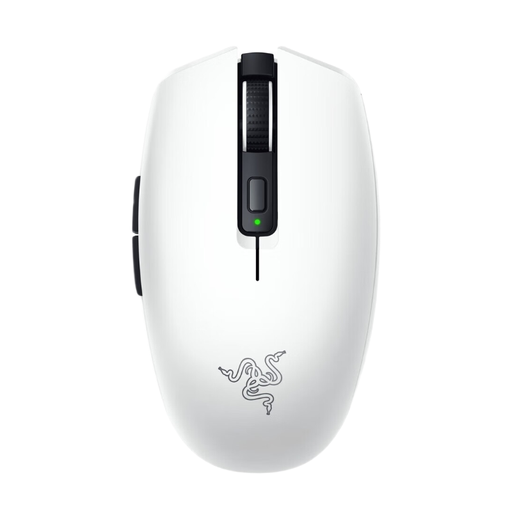
Razer Orochi V2 wireless gaming mouse in white

Razer Orochi V2, white

A compact wireless option if you want to avoid a mouse cable and can use the connection with your computer.

The product description lists DPI adjustment and connection via Bluetooth or a USB dongle. It also mentions a replaceable AA or AAA battery.

View at Joybuy

Frequently asked questions

Which setting helps you point at squares on a small desk?

Start with an adjustable cursor speed and try different settings to see which you can control well on your screen and within the space available for your mouse. The DPI ranges listed are model specifications, not recommended settings for digital board games.

Do I need Bluetooth to play without a cable?

No, not always: according to Trust, the GXT 110 Felox uses a 2.4GHz receiver, while SteelSeries also lists Bluetooth 5.0 for the Aerox 3 Wireless. Check the exact model variant and your computer’s connections.

What can I do if my hand or arm feels uncomfortable?

Take a look at your workstation setup too, and vary your posture and tasks. Arboportaal recommends taking microbreaks when working with display screens; this guidance doesn’t prove that a particular mouse model will prevent discomfort.

Does an online purchase in the Netherlands always come with exactly two years of statutory warranty?

No. According to the Dutch government, there is no fixed statutory warranty period in the Netherlands: you can expect a product to meet what you could reasonably expect from the purchase. A manufacturer’s warranty is an additional benefit.

Can I return a mouse bought online if I don’t like its shape?

According to the Dutch government, when you buy from a business online as a consumer, you often have 14 days to change your mind, but not every transaction counts as a distance sale and there are exceptions. Check the specific seller’s terms and conditions.
