Who is this choice for?

Viewer with limited desk space

You want to keep enough space beside your keyboard, so you compare a mouse’s dimensions, shape and cable. Logitech Support publishes model dimensions, while Coolblue highlights dimensions and connection type as things to consider when choosing a gaming mouse.

Footage reviewer with regular tasks

You often rewind, navigate or mark footage, and want to know whether extra buttons or scroll functions will work with your software. Adobe explains how to customise keyboard shortcuts in Premiere, including commands that can vary by panel.

For long review sessions

You consider grip and weight, but want to check for yourself whether the shape suits your hand. HyperX lists the wired Pulsefire Haste 2 at 53 g; that alone doesn’t tell you whether the mouse will feel comfortable in your hand.

What should you look for when buying?

Compact and wireless

A good fit for: a desk where you want to keep space free beside your keyboard and would rather not have a mouse cable. Razer lists Bluetooth and 2,4 GHz connectivity for the Orochi V2; Logitech lists a USB receiver for the G305.

Trade-off: check the dimensions and connection type of the exact version; a wireless mouse also needs battery management.

More buttons and scroll functions

A good fit for: tasks you use often and can assign to a mouse button in your software. Razer lists 11 programmable buttons and a multi-mode scroll wheel for the Basilisk V3.

Trade-off: Razer describes the Basilisk V3 as a larger, right-handed wired mouse; check that its shape and cable suit your desk.

Lightweight and wired

A good fit for: you’re happy to use a cable and want to consider a lightweight mouse with programmable buttons. HyperX lists the wired Pulsefire Haste 2 at 53 g, with six programmable buttons.

Trade-off: its low stated weight doesn’t keep the cable off your work surface.

What to consider What should you check? Who should give this more weight?
Space and freedom of movement Compare the length and width of the exact model with the space available beside your keyboard; also consider the cable and grip. If I want to move my mouse freely on a small desk without it taking up space for my keyboard, size matters. Around 36% of consumers give space top priority.
Repeated tasks Make a note of the tasks you use often and check whether your software lets you assign them to mouse buttons. If I keep performing the same tasks while reviewing footage, I want quick access to them without assuming every mouse button can be customised. Around 29% of consumers prioritise controlling footage.
Fit in your hand and weight Compare the shape, dimensions and weight, including the battery if required; also check how easy the side buttons are to reach. If I review footage for long periods, I want a mouse that feels comfortable in my hand and has a clearly stated in-use weight. Around 21% of consumers give hand comfort top priority.
Connection and maintenance Check that your computer supports the required connection and whether the model uses a cable, replaceable battery or another power source. If I don’t want a cable on my work surface, or would rather not replace batteries, the connection type affects how practical the mouse is. Around 14% of consumers prioritise connection and maintenance.

Avoid common buying mistakes

  • Comparing weights without including the battery

    Logitech Support lists the G305 at 75 g without a battery and 99 g with an AA battery. Razer lists the Orochi V2 at under 60 g without a battery. These figures therefore don’t describe the same ready-to-use setup.

    Where possible, compare the weight including the battery you’ll need, then consider how the mouse feels in your hand.

  • Assuming more programmable buttons will speed up footage review

    The benefits depend on the tasks in your software and whether you can comfortably assign them to mouse buttons. Adobe explains that custom keyboard shortcuts in Premiere can vary by panel.

    First, look up the shortcuts for the tasks you use most often, then check whether the mouse software supports the layout you want.

Brands to compare

Razer

The Orochi V2 and Basilisk V3 offer two different options: compact and wireless, or wired with extra buttons and scroll functions.

  • Razer lists Bluetooth, 2,4 GHz connectivity and six programmable buttons for the Orochi V2; the Basilisk V3 has 11 programmable buttons.
  • According to Razer, the Basilisk V3 has a larger, right-handed design and a cable. Manufacturer specifications can’t tell you whether a model will suit your hand.

Logitech G

The G305 LIGHTSPEED is a wireless option with a USB receiver and adjustable sensitivity.

  • Logitech Support lists the G305’s dimensions as 116,6 × 62,15 × 38,2 mm and its weight as 99 g with an AA battery.
  • Its stated weight without a battery is 75 g, so that’s not the comparable figure when using it with a battery. It connects via a compatible USB port.

HyperX

The wired Pulsefire Haste 2 is worth considering if you’re looking for a low stated weight and programmable buttons.

  • HyperX lists the wired Haste 2 at 53 g, with six programmable buttons and a flexible cable.
  • It still has a cable, and its stated polling rate alone doesn’t prove that it will save you time when reviewing footage.

SteelSeries

The Aerox 3 Wireless is another lightweight, wireless option to compare.

  • SteelSeries lists the Aerox 3 Wireless at 68 g, with 2,4 GHz or Bluetooth connectivity.
  • These details apply to this model; check the version and shape before applying them to another Aerox model or deciding whether it suits your hand.

Joybuy products

These Joybuy picks are wireless gaming mice with different combinations of buttons, connections and stated weights, for reviewing footage at a small desk.

Shark Velocity M71 wireless gaming mouse

Shark Velocity M71 Wireless Gaming Mouse

A wireless option if you don’t want a mouse cable on your work surface and want to assign tasks to buttons.

PAW3335 sensor; 16.000 DPI; eight programmable buttons; RGB lighting; black.

The listed dimensions are 123,06 × 83,98 × 41,29 mm; check that its shape suits your desk and hand.

The description mentions a rechargeable battery.

Joybuy
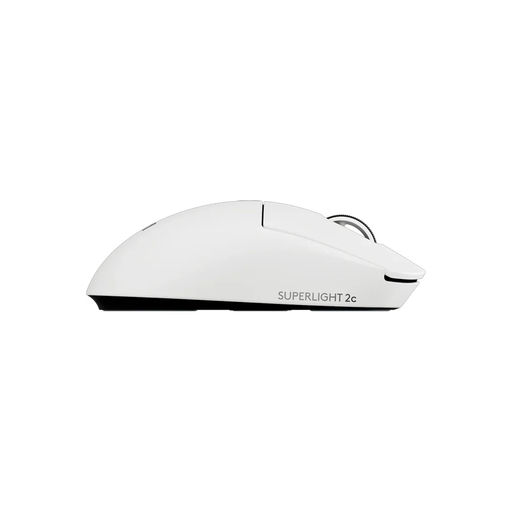
Logitech G PRO X Superlight 2c wireless gaming mouse, white

Logitech G PRO X Superlight 2c Wireless Gaming Mouse, White

A compact wireless option to compare if size and a low stated weight are important to you.

LIGHTSPEED wireless; 53 g; five buttons, including programmable thumb buttons; white.

Joybuy

AJAZZ AJ200 AI MC wireless gaming mouse

AJAZZ AJ200 AI MC Wireless Gaming Mouse

A wireless model to consider if you want to customise buttons and choose between several connection options.

PAW3311 sensor; up to 24.000 DPI; Bluetooth, 2,4 GHz and USB-C; seven programmable buttons; 63 g.

The product name mentions a charging dock and AI assistant.

Joybuy

AULA SC620 wireless gaming mouse, white

AULA SC620 Wireless Gaming Mouse, White

A wireless option with programmable buttons to compare if you want to control tasks from your mouse.

Bluetooth 5.0, 2,4 GHz and USB-C; PAW3311 sensor; 12.000 DPI; seven programmable buttons; 67 g; 400 mAh battery; white.

The title lists an 8 kHz polling rate; this specification alone doesn’t prove that it will save you time when reviewing footage.

Joybuy

Logitech G G309 LIGHTSPEED wireless gaming mouse

Logitech G G309 LIGHTSPEED Wireless Gaming Mouse

A wireless option if you want to choose between LIGHTSPEED and Bluetooth and set up buttons for tasks you repeat.

LIGHTSPEED and Bluetooth; up to six programmable buttons; HERO 25K sensor.

The description lists 86 g with an AA battery. The lower figure of 68 g applies when used with the POWERPLAY system.

Joybuy

Frequently asked questions

Do I need a mouse with the highest DPI or polling rate for reviewing footage?

Not based on those specifications alone. Choose a sensitivity that suits the space you have to move the mouse, and check whether the extra controls are useful in your software. The specifications don’t show that a higher figure will speed up your footage review.

How do I set up mouse buttons for reviewing footage?

First, find the commands and keyboard shortcuts you want to use in your video software. Adobe explains that keyboard shortcuts in Premiere can be customised and may vary by panel. Then check whether your mouse software lets you assign the keys or commands you want.

What are my rights if I buy a mouse online and don’t like it or it’s faulty?

According to the Dutch government, when you buy from a business at a distance, you’ll often have a 14-day cooling-off period. This doesn’t apply in the same way to online purchases from private sellers. For faulty products, the Dutch government refers to free repair or replacement. Check the terms that apply to your purchase.

Where can I dispose of an old mouse and used batteries in the Netherlands?

According to the Dutch government, you can hand in an old electrical appliance in several ways, including when you buy a new, similar appliance; the take-back scheme applies to private purchases. Don’t put used batteries in your general waste. Take them to a collection point, such as a shop that sells batteries.
