
Players who use menus a lot
If you often scroll through menus, look for a wheel and buttons that are easy to reach. Assign commands to buttons only if your game supports it. Razer and SteelSeries describe these controls for specific models.


Choose a mouse that feels comfortable in your hand, with a scroll wheel and buttons suited to the controls in your simulation game. Extra buttons are only useful if the game lets you assign commands to them. Then decide between wired and wireless, and try the mouse on your own desk or mouse mat. If bright light makes your screen harder to read, increasing your mouse DPI won’t solve the problem.
If you often scroll through menus, look for a wheel and buttons that are easy to reach. Assign commands to buttons only if your game supports it. Razer and SteelSeries describe these controls for specific models.
If you play for long periods, prioritise a comfortable fit and an easy-to-reach scroll wheel. A right-handed shape won’t automatically suit every hand or grip, so check how comfortably you can use the buttons.
Consider screen glare separately from whether the mouse works well on your desk or mouse mat. Arboportaal notes that bright sunlight can make a computer screen harder to read.
Start with the fit and the controls you use in your game. Then choose a connection type and sensitivity setting to suit your desk and playing surface.
| What to consider | What should you check? | Which shoppers does this matter to? |
|---|---|---|
| Menus and commands | Check that you can comfortably reach the scroll wheel and the buttons you want to use, and that the game lets you assign commands to mouse buttons. | If I work through lots of menus, I want to scroll quickly and use commands without having to keep reaching for the keyboard. Around 36% of shoppers prioritise controlling the game from the mouse. |
| Comfort during long sessions | Consider the shape, your hand and grip, and whether you can reach the buttons without moving your hand. | When I play for a long time, I want a shape that suits my hand and buttons I can use without awkward movements. Around 29% of shoppers prioritise comfort and fit. |
| Light and playing surface | Assess screen glare separately from how the mouse works on your desk or mouse mat. Adjust the sensitivity to a level you can comfortably control. | At a bright spot, I want to be able to read the screen clearly and use the mouse on my playing surface. Around 21% of shoppers prioritise visibility and the surface. |
| Cable and power | Choose between a fixed cable and wireless use. For a wireless mouse, check the connection and power source. | If I want more freedom of movement or would rather not manage a battery, the connection type affects my choice. Around 14% of shoppers prioritise freedom of movement and convenient power. |
DPI relates to mouse sensitivity, while bright sunlight can make your screen harder to read. One won’t solve the other.
First, assess the light and screen position. Then set the mouse sensitivity to a level you can comfortably control.
The advertised number of programmable buttons doesn’t tell you whether they’re easy to reach or whether your game supports the commands you want.
Decide which commands you want to control from the mouse, then check the button placement and configuration software for the exact model.
A wireless mouse may need a battery or recharging. Logitech lists a battery life of up to 250 hours from a single AA battery for the G305 LIGHTSPEED. This is a model specification, not a promise for every use case.
Check the power source used by the model you choose. If it has a replaceable battery, remember to factor in replacements.
Names such as Basilisk V3, Basilisk V3 35K and Basilisk V3 Pro don’t necessarily refer to the same version.
Compare the full model name and sensor specifications before choosing a version.
Logitech G offers the wireless G305 LIGHTSPEED and the wired G502 HERO, among other models. They are different mice.
According to Razer, the wired Basilisk V3 35K has different scroll modes; the Basilisk V3 Pro is a separate wireless model.
According to SteelSeries, the Rival 5 and wired Aerox 5 are designed for use with multiple buttons.
The wired GXT 121 Felox+ is worth considering if you’re looking for a simpler button layout.
This selection includes wired and wireless mice with features for using buttons or the scroll wheel. Check which functions your game supports.
 No image available
Consider this model if you want wired controls and scroll through long menus. Check that the button layout suits your game.
The product name specifies 35,000 DPI and 11 buttons. Razer describes different scroll modes for the Basilisk V3 35K.
 No image available
This wired version is worth considering if you want to control commands using several mouse buttons.
Logitech G lists 11 programmable buttons that can be configured via G HUB. The product name specifies 25,600 DPI and a right-handed design.
 No image available
Consider this model if you want a mouse with a fixed USB connection. Check the full control layout and version before choosing.
The product name specifies USB Type-A, an optical design and 25,600 DPI.
 No image available
The product name identifies this as a wireless Basilisk version. Carefully check the full model name and sensor specifications before comparing it with other V3 models.
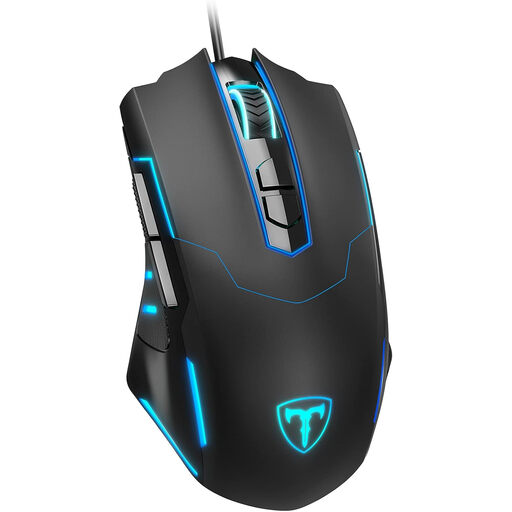 No image available
A wired option to consider if you want to assign commands to mouse buttons. Check that the button layout is easy to reach.
The product name specifies seven programmable buttons, an ergonomic shape and adjustable DPI up to 7200.
No. DPI relates to mouse sensitivity, while bright sunlight can make your screen harder to read. Assess the light and screen position separately from your mouse settings. Arboportaal describes how bright sunlight affects screen readability.
First check whether your game lets you assign the commands you want to mouse buttons, then use the software for your exact model. Logitech G recommends G HUB for the G502 HERO’s eleven buttons. Also check that the software works on your system.
Check the connection type and whether the mouse uses a replaceable battery or a rechargeable battery. According to Logitech G, the Logitech G305 LIGHTSPEED uses one AA battery; battery life can vary depending on how you use it.
When you buy as a consumer, your product must meet the expectations you’re entitled to have of it. If there’s a fault, the seller must offer an appropriate solution. The Government of the Netherlands states that there is no fixed statutory guarantee period in the Netherlands. A manufacturer’s guarantee is separate from your statutory rights.
For most online distance purchases from a business, you have a 14-day cooling-off period. The Government of the Netherlands provides information about this period; check the applicable terms and exceptions. This is separate from your statutory rights if a product is faulty.