Start with a mouse shape that suits your hand and grip, with adjustable sensitivity. Then match your aim trainer settings to your shooter. A large screen alone is no reason to choose the highest DPI setting. A wireless mouse avoids cable drag during wide swipes, but needs charging and a well-positioned receiver. A wired mouse means no battery management or wireless receiver, but the cable is still part of your available movement space.
Who is this buying guide for?
Aim trainer on a large screen
Wants to match aiming movements in their trainer and shooter, and is looking for adjustable sensitivity without treating maximum DPI as an end in itself. Aimlabs recommends starting with the sensitivity you use in the games you’re training for.
Player who makes wide swipes
Needs space on the mouse mat and is weighing up cable drag against charging and wireless receiver placement. Endgame Gear describes the OP1 8k v2 as wired; Logitech provides model-specific guidance on receiver placement for the PRO X SUPERLIGHT 2.
Player who puts grip first
Is looking for a shape that suits their hand and way of holding the mouse. RTINGS.com highlights the importance of hand size and grip; an asymmetrical shape designed for right-handed use, such as the ZOWIE EC2-DW, won’t suit everyone.
What should you look for when buying?
The Dutch Authority for Digital Infrastructure (RDI) states that electrical and electronic equipment must carry the correct CE marking. Wireless versions must also meet the applicable requirements for radio equipment. Check the product information for the exact version you intend to buy.
Wireless and mostly symmetrical
A good fit if: a cable gets in the way of your wide movements and the shape feels comfortable in your hand.
Trade-off: you’ll need to charge it and find a practical place for the receiver. Check the exact version too: Razer lists the standard Viper V3 Pro at 54 g and the white version at 55 g.
Asymmetrical design for right-handed use
A good fit if: you aim right-handed and prefer supportive palm grip over a symmetrical shape.
Trade-off: the shape won’t suit every hand or grip, so try holding the mouse first if you can. ZOWIE specifies a 4K receiver for the EC2-DW.
Wired
A good fit if: your desk has enough room for the cable to move freely and you don’t want to manage a battery or wireless receiver.
Trade-off: during wide swipes, the cable may catch on the mouse mat or desk edge. Wired doesn’t automatically mean the shape will suit every hand.
| What to consider |
What to look for |
Who is this more important for? |
| Matching sensitivity |
Check whether you can adjust the DPI and match the sensitivity in your shooter and aim trainer. |
If I practise in an aim trainer for a specific shooter, I want settings that suit my game. Around 36% of consumers put consistent sensitivity at the top of their list when buying. |
| Shape and grip |
Compare the shape, dimensions and side-button positions with your hand and grip; try holding the mouse if possible. |
If I lift and reposition the mouse a lot, I want a shape that feels comfortable and suits my grip. Around 29% of consumers give the highest priority to how well a mouse fits their hand. |
| Freedom of movement |
Weigh up cable clearance against charging and receiver placement; also check which connections your PC has. |
When making wide swipes, I don’t want a cable to restrict my movement, or I want to be able to position the wireless receiver properly. Around 21% of consumers prioritise freedom of movement and connectivity. |
| Practical considerations |
Check the full model version, included accessories and product information about the relevant markings and requirements. |
I want to know in advance what I need to arrange before using it and what managing a wireless mouse involves. Around 14% of consumers give purchase and running costs the highest priority. |
Buying pitfalls
-
Assuming the highest DPI or polling rate guarantees better aim
A higher maximum setting doesn’t prove you’ll aim better with it. Sensitivity is personal; ZOWIE also notes that a higher polling rate uses more battery power on the wireless models mentioned.
Start with a setting that works for your shooter and aim trainer. Increase the polling rate only if it suits your mouse and the way you use it.
-
Choosing based on screen size alone
A larger screen doesn’t automatically determine the maximum DPI you need. Your chosen sensitivity, the space available on your mouse mat and how well the mouse fits your hand all matter too.
First consider how much room you have to move the mouse and how the grip feels. Then match the settings in your trainer and shooter.
-
Mistaking a similar product name for the same version
Razer lists the white Viper V3 Pro at 55 g, while the Joybuy product description gives its weight as 54 g. The colour and full model name can therefore matter when comparing specifications.
Before deciding, compare the full model name and version with the manufacturer’s product information.
-
Assuming the manufacturer’s warranty limits all your rights
Statutory guarantees in the Netherlands are separate from a manufacturer’s or seller’s warranty, and depend on what you could reasonably expect from the product.
Keep your proof of purchase and contact the seller if there’s a fault.
Brands to use as a comparison
Logitech G
The PRO X SUPERLIGHT 2 is a wireless option with a mostly symmetrical FPS shape.
- Logitech G lists this model at 60 g, with a HERO 2 sensor and LIGHTSPEED.
- These specifications don’t tell you whether the shape will suit your hand; a high DPI setting doesn’t prove you’ll aim better.
Razer
The Viper V3 Pro has a mostly symmetrical wireless FPS shape.
- Razer lists an adjustable Focus Pro 35K sensor and weights of 54 g for the standard version and 55 g for the white version.
- Check the exact colour and fit; the stated specifications aren’t an independent test of aiming performance.
ZOWIE
The EC2-DW is an asymmetrical wireless option for right-handed players who want to compare palm-grip mice.
- ZOWIE lists a 4K receiver and driver-free operation for this model.
- Shape is a matter of personal preference; ZOWIE says that a higher polling rate uses more battery power.
Endgame Gear
The OP1 8k v2 is a compact, wired option for anyone who doesn’t want to manage a battery or wireless receiver.
- The manufacturer lists a weight of 49,5 g, a 180 cm USB-A cable and adjustable polling rates.
- Bear the cable and compact dimensions in mind; how they feel will depend on your desk and grip.
SteelSeries
According to SteelSeries, the Aerox 3 Wireless Onyx combines a wireless 2,4GHz connection with Bluetooth.
- SteelSeries lists the shown Onyx version at 68 g and describes 2,4 GHz for gaming and Bluetooth for flexible use.
- Check the generation and version; specifications for other Aerox models don’t automatically apply to this mouse.
Gaming mice at Joybuy
This selection includes wired and wireless gaming mice for anyone looking to match their sensitivity to how they use a shooter and aim trainer.
 No image available
Razer Viper V3 Pro - Black
A wireless option to compare if you want to practise without a cable and match the sensitivity to your shooter.
Version: Black. Wireless use requires charging.
Joybuy
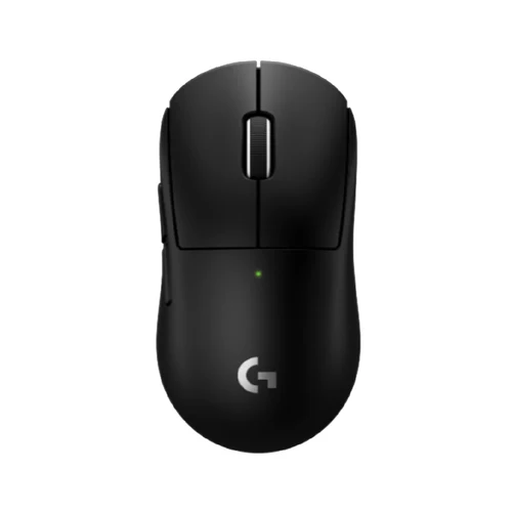 No image available
Logitech G PRO X Superlight 2c Wireless Gaming Mouse Black
A compact wireless version to compare if you want to match sensitivity to your aim trainer and shooter.
Version: Black. Wireless use requires charging.
Joybuy
 No image available
AJAZZ AJ159 PRO Wireless Gaming Mouse
A wireless version to compare if you’re looking for adjustable sensitivity and multiple connection options.
PAW3395 sensor; 26K DPI; 2.4G, USB-C and BT; 400 mAh battery; 56 g; magnetic base; White. Wireless use requires charging.
Joybuy
 No image available
HyperX Pulsefire Saga - wired
A wired option to compare if you don’t want to manage a battery and have room for the cable.
26.000 DPI; RGB lighting; black. The cable is still part of your available movement space.
Joybuy
 No image available
Turtle Beach Kone II Wired Gaming Mouse
A wired mouse to compare if you want to adjust the DPI and can accommodate the cable in your setup.
26.000 DPI; 23 buttons; black. The cable is still part of your available movement space.
Joybuy
Frequently asked questions
Should I automatically choose a mouse with the highest DPI for a large screen?
No. First match your personal sensitivity and the settings in your shooter and aim trainer. A high maximum DPI specification doesn’t prove that setting will suit your aim better.
How should I start practising if I also use an aim trainer?
Start with the sensitivity you use in your shooter. Aimlabs recommends using the settings from the game you’re training for as your starting point. Then make deliberate changes so you know what you’re practising.
How can I avoid interruptions with a wireless mouse?
Check the battery level and position the receiver as instructed for the exact model. For the PRO X SUPERLIGHT 2, Logitech recommends placing the receiver within 20 cm of the mouse and more than 2 m from sources of 2,4GHz interference. This is model-specific advice from the manufacturer.
What are my rights when buying online in the Netherlands?
For a typical online purchase, you generally have a statutory cooling-off period of up to 14 days after delivery, according to ACM ConsuWijzer. Statutory guarantees are separate from a manufacturer’s warranty. If a fault means the product doesn’t meet what you could reasonably expect, you can ask the seller for an appropriate solution.
Is CE marking relevant for a gaming mouse in the Netherlands?
Yes. The Dutch Authority for Digital Infrastructure says that electrical and electronic equipment must carry the correct CE marking; wireless radio equipment must also meet the applicable radio equipment requirements. Check the information for the version you’re actually buying: appearing in a ranking doesn’t prove that an individual product listing meets these requirements.


