If you play while someone else in your home is resting, look for a mouse whose manufacturer specifies quiet primary buttons. If you mainly want to access lots of game commands directly, a programmable gaming mouse may suit you better, but its button specifications don’t prove that it clicks quietly. Check the scroll wheel noise, the fit and whether the configuration software works on your system, too.
Who is this buying guide for?
Night-time player with someone else asleep nearby
You want to keep operating noise to a minimum while you play. Don’t just look for claims about the primary buttons; check the scroll wheel and other buttons, too. Razer, Logitech and CHERRY specify quiet features on particular models or versions.
Player who uses lots of shortcuts
You want to assign game commands to mouse buttons so they’re right at your fingertips. The number of buttons alone tells you nothing about click noise, so check their layout and whether the accompanying software supports them. Razer, Logitech and SteelSeries describe programmable buttons on specific models.
Player who enjoys long sessions
You prioritise a comfortable mouse shape and smooth scrolling. Logitech offers different M650 versions for different hand sizes and left-handed users; check which version suits your hand.
What should you look for?
Quiet operation and practical scrolling
Choose this option if: you play while someone else is resting in the same room. Razer specifies quiet switches for the Pro Click Mini; Logitech lists SilentTouch for certain M650 versions and quiet primary buttons for the MX Master 3S.
Keep in mind: quiet primary buttons don’t automatically mean that the scroll wheel and every other button are quiet. These models also differ in shape and number of gaming buttons.
Simple, quiet wired mouse
Choose this option if: low click noise matters more than lots of shortcuts, and a USB-A cable suits your setup. CHERRY specifies quiet buttons for the GENTIX SILENT.
Keep in mind: the GENTIX SILENT has three buttons and no thumb buttons, leaving less room for quick access to game commands.
Gaming mouse with extra controls
Choose this option if: you want to assign lots of game commands and don’t mind an audible click. The Logitech G502 X and SteelSeries Aerox 9 Wireless offer extra control options.
Keep in mind: the buttons listed don’t prove that the mouse clicks quietly. Check that you can reach them comfortably and that the configuration software works with your system.
| What to consider |
What to look for when buying |
Who is this important for? |
| Click and scroll noise |
Check which buttons are covered by the quiet claim, and assess the scroll wheel separately. |
If I play while someone next to me is asleep, I mainly want quieter clicks and will check the wheel, too. Around 36% of consumers prioritise quiet operation. |
| Programmable buttons |
Check where the buttons are, what configuration software is available and whether you can assign the game actions you want. |
If I want quick access to lots of game commands, I look for buttons that are comfortable to reach. Around 29% of consumers make programmable shortcuts their top priority. |
| Fit and scrolling |
Compare the hand size and version; check that the mouse offers the scrolling controls you use. |
For long gaming sessions, I want a mouse that fits my hand and scrolls comfortably through menus. For around 21% of consumers, fit and scrolling are the most important things to consider. |
| Connection and power |
Check which port or Bluetooth support is available, whether a receiver is included and how that version is powered. |
If I don’t want a cable across my desk, I check the wireless connection and power source; with a wired mouse, I check the port and cable length instead. Around 14% of consumers prioritise connection and power. |
Common buying mistakes
-
Assuming a gaming mouse is automatically quiet
Lots of programmable buttons and gaming features don’t mean that click noise is reduced. This matters if someone else is sleeping in the same room.
For the exact version, check which buttons are covered by any quiet claim, and look at the scroll wheel, too.
-
Comparing quietness percentages directly between models
Logitech’s claim for the MX Master 3S covers left and right clicks compared with the MX Master 3, measured at 1 metre. It isn’t a general comparison with all mice, or a claim about the scroll wheel.
Don’t use this percentage as a league table. Check which buttons and test conditions a noise claim applies to.
-
Choosing the wrong size or platform version
The Logitech M650, M650 L and M650 L Left are designed for different hand sizes or left-handed users. Software features may also depend on your operating system.
Before buying, check the exact version, how it fits your hand and whether its software supports your system.
Brands to consider
Razer
The Pro Click Mini is an option if you want to combine quiet features with customisable controls.
- Razer specifies seven programmable buttons, quiet mechanical switches and Bluetooth or a 2.4GHz dongle for this model.
- The specifications don’t prove that every button or the scroll wheel is quiet.
Logitech
The Signature M650 range comes in different versions; the MX Master 3S focuses on quiet primary buttons and scrolling, while the G502 X offers extra gaming controls.
- Logitech offers a choice of M650 sizes and describes the MX Master 3S as having quiet primary buttons. Logitech says the G502 X has hybrid switches.
- Quiet claims apply to the versions and conditions specified. The G502 X specifications don’t support a quietness claim.
CHERRY
The GENTIX SILENT is a simple wired option; the MC 3.1 has programmable gaming buttons.
- CHERRY specifies quiet buttons for the GENTIX SILENT and six programmable keys for the MC 3.1.
- The GENTIX SILENT has three buttons; the programmable keys on the MC 3.1 don’t support a quietness claim.
SteelSeries
The Aerox 9 Wireless is worth considering if quick access to lots of game commands is important.
- SteelSeries specifies 18 programmable buttons, including a panel of 12 side buttons, on this model.
- The cited specifications don’t support a quietness claim.
Trust
The GXT 122 Felox+ Dual is a wireless option with a limited number of customisable buttons.
- Trust specifies six programmable buttons and 2.4GHz or Bluetooth connectivity for this model.
- The stated specifications don’t support a quiet-click claim.
Joybuy products
This selection includes gaming mice with extra programmable controls and models with quieter click features. Check the features and limitations of each version.
 No image available
Turtle Beach Kone II Wired, black
A wired gaming mouse for anyone who wants quick access to plenty of features.
The product name lists 23 buttons and 26,000 DPI. The product information mentions a 4D scroll wheel with tilt function and support for palm, claw and fingertip grips.
View at Joybuy
 No image available
AJAZZ AJ159 PRO, white
A wireless gaming mouse for anyone looking for several connection options and a design suited to small-to-medium hands.
The product name lists 2.4G, USB-C and Bluetooth, a PAW3395 sensor, 26K DPI, a 400 mAh battery and a weight of 56 g. According to the product information, the magnetic charging dock contains magnets; keep it at least 15 cm away from pacemakers.
View at Joybuy
 No image available
AULA SC620, white
A wireless gaming mouse for anyone who wants to assign game commands to programmable buttons.
The product name lists seven programmable buttons, Bluetooth 5.0, 2.4G and USB-C. It also lists a weight of 67 g and a 400 mAh battery.
View at Joybuy
 No image available
Logitech Signature M650 L Left, white, 910-006240
A left-handed version for anyone looking for quiet click features and scroll controls; check that the size suits your hand.
The product information lists SilentTouch, SmartScroll and customisable side buttons. It can connect via Bluetooth Low Energy or a Logi Bolt receiver; check which accessories are included with this version.
View at Joybuy
 No image available
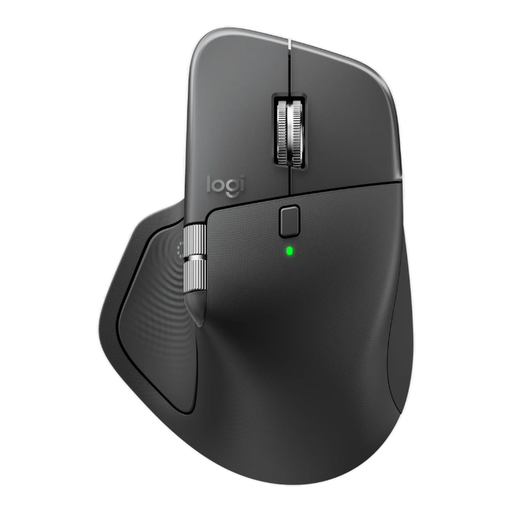
Logitech MX Master 4 for Business, graphite
A business mouse for anyone who values quiet clicks, scrolling and customisable buttons; the product details describe this model as non-gaming.
The product information lists Quiet Click, MagSpeed scrolling, eight buttons, Bluetooth or Logi Bolt and a rechargeable battery. Check that the controls suit your game.
View at Joybuy
Frequently asked questions
Is a mouse with quiet clicks completely silent?
No. A claim about the primary buttons doesn’t mean the whole mouse is silent. For the MX Master 3S, Logitech compares the sound of left and right clicks with the MX Master 3, measured at 1 metre; that claim doesn’t automatically cover the wheel or other buttons.
What do you need to set up mouse buttons for a management game?
Check that the exact mouse version has programmable buttons and that the software supports your operating system. Razer specifies seven programmable buttons and Synapse support for the Pro Click Mini; Logitech says that the M650 for Business has customisable side buttons through Logi Options+ on Windows and macOS. Then decide which game actions you want to assign.
How can you avoid problems with a wireless mouse while gaming?
Before setting it up, check which connection and power options suit your setup. According to Razer, the Pro Click Mini supports a 2.4GHz dongle or Bluetooth and runs on AA batteries; also check that any configuration software works with your system.
What can you do if a mouse bought online doesn’t feel right?
According to ACM ConsuWijzer, online purchases often come with a cooling-off period of up to 14 days after delivery, subject to applicable conditions and exceptions. If the product is faulty, the seller is responsible for the statutory guarantee; this is separate from any commercial manufacturer’s warranty.


