If click noise is your main concern, look for a specific model that Edifier says has a switchable silent mode, or one for which Logitech claims an almost silent HITS main click. These claims don’t automatically apply to the sound of the whole mouse. If aiming precision matters more, assess the shape, weight and sensitivity separately, and check the other buttons in your own setup too.
Who is this relevant for?
Night-time gamer sharing a room
You play while someone else in the same room is resting. Edifier says the G3M PRO lets you choose between gaming and silent switch modes; Logitech describes the HITS main click on the PRO X2 SUPERSTRIKE as almost silent. Check the sound of the scroll wheel and side buttons too.
Gamer who prioritises aiming precision
You’re looking for a shape and weight that suit your hand and aiming movements. Razer says the Viper V3 Pro has adjustable DPI; check its click noise separately.
Gamer with a shared workspace
You switch between gaming and other computer use. Consider the grip, supported connections and how you charge the mouse. Edifier, SteelSeries and Trust describe several connection options for different models.
What should you look for when buying?
| What to consider |
What should you check? |
Who is this important for? |
| Click noise |
Check whether the quiet-click claim applies to the exact model. Assess the scroll wheel and side buttons too. |
If I’m playing while my roommate is resting, I want to avoid repeated clicks being unnecessarily audible. Around 33% of consumers put click noise first. |
| Aiming precision |
Check the adjustable sensitivity, sensor and connection. A high maximum DPI alone doesn’t prove it’s the right fit. |
When I want to fine-tune my aiming movements, I look at the sensitivity settings and how the mouse feels in use. Around 27% of consumers give aiming precision top priority. |
| Fit |
Compare the shape and dimensions with your hand and grip. Check that you can reach the side buttons comfortably too. |
For longer gaming sessions, I want to be able to hold and use the mouse comfortably. Around 20% of consumers prioritise fit above other considerations. |
| Connection |
Check which connections are supported, which receiver you need and whether you can use the mouse while it’s charging. |
If I switch between gaming and other computer use, I want to know which connection suits my devices. Around 13% of consumers prioritise connection convenience. |
| Charging and use |
Check which charger or cable is included and whether you can use the mouse while it’s charging. |
I want to know in advance what’s involved in using the mouse and whether charging will interrupt a gaming session. Around 7% of consumers give practical considerations top priority. |
Buying pitfalls
-
Assuming an esports mouse or high DPI means quiet clicks
Aiming or weight specifications alone say nothing about the noise made by the main buttons, scroll wheel or side buttons.
Check the noise claim for the complete model, and assess the different buttons separately.
-
Confusing features across Logitech models
Logitech associates the HITS main click with the PRO X2 SUPERSTRIKE. This is a different mouse from the PRO X SUPERLIGHT 2, which Logitech describes as having LIGHTFORCE switches.
Compare the full model name and switch specification before applying a noise claim to a mouse.
-
Confusing a manufacturer’s warranty with all your warranty rights
ACM ConsuWijzer explains that your statutory rights exist alongside a manufacturer’s or seller’s warranty, and depend on what you could reasonably expect from the product.
Keep your proof of purchase and contact the seller if the product is faulty.
Relevant brands
Edifier / HECATE
According to the manufacturer, the Edifier G3M PRO combines gaming features with a choice of gaming and silent main switches.
- Edifier lists three connection modes and a PAW3395 sensor for this model.
- Silent mode doesn’t mean all the buttons make a similar amount of noise; check the click feedback and other mouse sounds too.
Logitech G
The PRO X2 SUPERSTRIKE and PRO X SUPERLIGHT 2 are different models with different switch claims.
- Logitech describes the HITS main click on the PRO X2 SUPERSTRIKE as almost silent and says its haptic feedback is adjustable.
- The HITS claim doesn’t automatically apply to the PRO X SUPERLIGHT 2 or to the sound of the whole mouse.
Razer
Razer describes the Viper V3 Pro as a lightweight wireless esports mouse with adjustable DPI and a grip-focused shape.
- Adjustable sensitivity could be useful if you want to fine-tune your aiming settings.
- A lightweight design or adjustable DPI doesn’t tell you whether the clicks are quiet; assess the noise separately.
SteelSeries
According to SteelSeries, the Aerox 3 Wireless (2022) offers both 2.4GHz and Bluetooth.
- Having a choice of connections could be useful if you use the mouse with different devices.
- Connection options don’t tell you anything about click noise, so consider whether the mouse meets that need too.
Trust
Trust says the GXT 122 Felox+ is designed for wireless use and offers several connection options.
- Trust lists 2.4GHz, Bluetooth, a rechargeable battery and programmable buttons.
- Check whether the controls and click noise are suitable for gaming in a shared bedroom.
Gaming mice at Joybuy
This Joybuy selection features gaming mice to compare for sensitivity, grip and connection options. The NAXSIR product description mentions silent micro-switches; this isn’t an independent noise measurement and doesn’t automatically tell you anything about all the buttons.
 No image available
NAXSIR 3-in-1 gaming mouse, black
The product description mentions silent micro-switches; check the sound of the scroll wheel and side buttons too.
Wired, 2.4GHz and Bluetooth; up to 12800 DPI and 7 programmable macro buttons.
Joybuy
 No image available
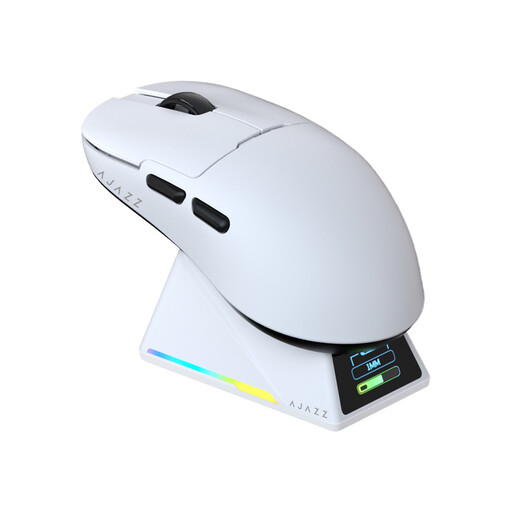
AJAZZ AJ159 PRO, white
The stated weight of 56 g could be useful if you’re looking for a lightweight mouse; also check that the shape suits your hand and grip.
PAW3395 sensor, 26K DPI, Bluetooth, 2.4G and USB-C; 400 mAh battery and magnetic charging dock. Keep the magnetic dock away from pacemakers, medical implants and credit cards.
Joybuy
 No image available
AJAZZ AJ200 AI MC with charging dock
The listed DPI settings and choice of connections are worth considering if you want to match the mouse to your aiming style and devices.
PAW3311 sensor, 24000 DPI, 63 g and tri-mode Bluetooth, 2.4G and USB-C.
Joybuy
 No image available
AULA SC620, white
The connection options could suit use with different devices; check which connection you want to use while gaming.
PAW3311 sensor, 12000 DPI, Bluetooth 5.0, 2.4G and USB-C; 67 g, 400 mAh battery and 7 programmable buttons.
Joybuy
 No image available
AJAZZ AJ159 APEX
The stated weight of 56 g and choice of connections are useful to consider if weight and connectivity matter to you; check that the shape suits your grip.
PAW3950 sensor, up to 42000 DPI and Bluetooth, 2.4GHz and wired connection.
Joybuy
Frequently asked questions
Is an optical switch automatically quiet?
No. The switch type alone doesn’t prove that a mouse clicks quietly. Logitech describes the LIGHTFORCE switches in the PRO X SUPERLIGHT 2 as hybrid optical-mechanical switches with a tactile click, while the company calls the HITS main click on the PRO X2 SUPERSTRIKE almost silent. Check the noise claim for the exact model.
How do I set up a wireless mouse for gaming?
First, check which connections the exact model supports, and plug in the supplied receiver if you’re using 2.4GHz mode. According to their manufacturers, the Edifier G3M PRO and SteelSeries Aerox 3 Wireless (2022) also support Bluetooth; choose the mode that suits the device you’re playing on.
What can I do with an old gaming mouse?
According to the Dutch government, you can hand in an old electrical appliance to a retailer when you buy a similar new one there. You can also use collection points or options provided by your local council.
What cooling-off period and warranty apply when buying online in the Netherlands?
ACM ConsuWijzer says that products bought online generally come with a statutory 14-day cooling-off period after delivery, subject to exceptions. Statutory rights are separate from any manufacturer’s warranty; what you can expect from a product is taken into account when assessing a fault.


