What should you look for when choosing?
Start with the commands you actually want to assign. Then compare the grip, connection and any microphone settings that matter for the way you play.
| What to consider |
What should you check? |
Who is this most relevant to? |
| RTS commands |
Count the commands you want to assign, then check the button layout and any software required. |
If I want to control frequently used commands with my thumb, I’ll look for buttons that are easy to reach and identify; around 33% of consumers rank commands as their top purchasing priority. |
| Grip during long matches |
Check that you can reach the buttons while holding the mouse as you normally would; consider shape and weight together. |
When I play for a long time, I want to reach the buttons without straining my grip; around 27% of consumers mainly look for a comfortable fit. |
| Connection with the headset |
Check whether your headset is wired. If both devices are wireless, test their receiver setup and connections together. |
If both my mouse and headset are wireless, I want to be able to check their connections in my own setup; around 20% of consumers rank this as their top priority. |
| Mouse clicks in voice chat |
Test your microphone while playing before making quiet mouse clicks or noise cancellation a requirement. |
If my teammates can hear clicks through my microphone, I’ll first check what the microphone is picking up; around 13% of consumers rank audible clicks as their top priority. |
| Setup and use |
Check the required software, battery type and included receiver for the exact version. |
If I want to keep maintenance to a minimum, I’ll check the software and whether the battery needs replacing; around 7% of consumers prioritise simplicity and running costs. |
Joybuy products for RTS gaming
This selection includes wired mice with programmable buttons and wireless models with different button layouts, so you can weigh up control and connectivity for RTS gaming with a headset.
 No image available
Logitech G502 HERO wired gaming mouse, 25,600 DPI, right-handed, black
A wired option if you want to use programmable buttons without managing a wireless mouse connection.
The product name lists 11 programmable buttons; software is required to programme them.
View at Joybuy
 No image available
AULA SC620 wireless gaming mouse, white
A wireless option if you want several programmable buttons and are happy to manage a battery and connection.
The product name lists 7 programmable buttons, a fire button, Bluetooth 5.0, 2.4G and USB-C.
The quoted battery capacity is 400 mAh; wireless use means keeping an eye on the battery.
View at Joybuy
 No image available
Logitech G G502 X wired gaming mouse, USB Type-A, 25,600 DPI
A wired option if you want to use programmable buttons without managing a wireless mouse connection or mouse battery.
The product information lists 13 programmable buttons and a USB Type-A connection.
View at Joybuy
 No image available
RAPOO VT9Pro 4K wireless gaming mouse, black and purple
A wireless option if you want programmable buttons and are happy to manage the receiver and battery as part of your setup.
The product name lists 10 programmable buttons, 4K polling and a quoted battery life of 180 hours.
The product description warns that 4000 Hz increases CPU load; if you experience frame drops, it suggests 1000 Hz as an alternative.
View at Joybuy
 No image available
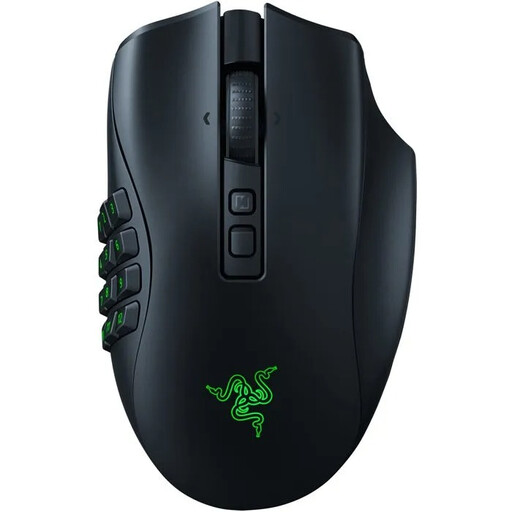
Naga V2 Pro wireless MMO gaming mouse
A wireless option if you want to change the thumb-button layout; check that the shape and buttons suit your grip.
The product description lists interchangeable side panels. Wireless use requires battery management.
View at Joybuy
Frequently asked questions
Do I need a mouse with twelve side buttons for RTS?
No. Choose the number of buttons based on the commands you actually want to control. Razer says the Naga V3 Pro has side panels with 2, 6 or 12 buttons; the right layout depends on your reach and how you use them.
What can I do if my wireless mouse stutters when I’m using a wireless headset?
Test the mouse on its own first, then test it with the headset. If tracking is erratic, Logitech Support recommends checking the battery, receiver placement and nearby wireless equipment, among other things; this doesn’t establish that the headset is the cause.
How can I reduce mouse clicks picked up by my headset microphone?
First, make a recording to check whether the microphone picks up the clicks. SteelSeries describes microphone noise cancellation in Sonar, but the software must remain active; this doesn’t prove that a particular mouse is quiet.
Can I try a mouse I’ve ordered online and return it?
For a standard online consumer purchase, you generally have a legal cooling-off period of up to 14 days after delivery. ACM ConsuWijzer outlines exceptions and the rules for trying and returning items; check the terms before you order.
Who can help if my mouse breaks too soon during normal use?
The seller is responsible for providing an appropriate remedy under the law if the product doesn’t perform as you could reasonably expect during normal use. ACM ConsuWijzer lists free repairs or replacements and, where applicable, a refund; a manufacturer’s warranty doesn’t replace these rights.


