
MMORPG player with lots of abilities
Wants to assign lots of in-game actions to their thumb. Above all, check whether a 12-button panel is easy to reach with your grip; Razer and SteelSeries describe these layouts for the MMO models mentioned here.


Choose based on how many in-game actions you want to control with your thumb, and whether the mouse feels comfortable for both gaming and everyday computer work. An MMO mouse puts more commands within easy reach, but takes some getting used to; an all-round mouse usually has a less extensive thumb button grid. Playing wired means no battery to manage, while wireless use frees up space from cables.
Wants to assign lots of in-game actions to their thumb. Above all, check whether a 12-button panel is easy to reach with your grip; Razer and SteelSeries describe these layouts for the MMO models mentioned here.
You may use the same mouse for long periods at work and while gaming. So, alongside the button layout, consider the shape, grip and whether you can alternate between tasks. TNO/CBS discusses mouse use as part of computer-based work; it does not prove that a particular model prevents discomfort.
Switches between a work and gaming setup, and weighs the freedom of movement without a cable against avoiding battery management. Razer and Logitech offer both wireless and wired versions in the product ranges mentioned here.
Right for you if: you want to control lots of abilities directly from your mouse in an MMORPG.
Consider: check whether you can distinguish between the buttons without changing your grip; an extensive grid may take some getting used to.
Right for you if: you need fewer mouse shortcuts and use the same mouse for computer work.
Consider: check that there are enough assignable buttons for your in-game actions.
Right for you if: you prefer to move around without a fixed mouse cable on a shared desk.
Consider: check the connection, receiver and power source for the specific version; the number of customisable controls is not necessarily the same as the number of thumb buttons.
| What to consider | What should you look for? | Who is this important for? |
|---|---|---|
| Abilities within easy reach | Count the actions you want to assign, then check the button layout and software settings. | If I want to activate lots of abilities from my mouse in an MMORPG, I want to be able to distinguish the thumb buttons easily. Around 36% of consumers prioritise having abilities within easy reach. |
| Grip for work and play | Compare dimensions, weight, grip and button reach; take breaks from long periods of computer-based work. | Anyone using the same mouse for work and long gaming sessions will want a shape that suits their hand. For around 29% of consumers, fit is their main concern. |
| Cable space and wireless use | Check the connection method, available USB ports and power source for the exact version. | A loose cable can get in the way on a desk used for both work and play, but the connection and power source still need to suit your needs. Around 21% of consumers prioritise freedom of movement at their desk. |
| Simple controls without battery management | Decide how many shortcuts you need and whether a cable can move freely across your desk. | If you only want to assign a few in-game actions and don’t want to manage a battery, a wired mouse with a simpler layout could suit you. Around 14% of consumers prioritise this straightforward wired option. |
The total may also include other controls. Razer and SteelSeries describe the MMO mice mentioned here as having a panel with twelve thumb buttons; that figure is not necessarily the total number of programmable buttons.
Compare the number of thumb buttons, their placement and the functions you can assign in the software separately.
A product description doesn’t prove that the shape will suit your hand or prevent discomfort. The TNO/CBS Computer-based Work 2025 factsheet, available through Arboportaal, identifies mouse use during computer-based work as a factor that may increase the risk of discomfort in the shoulders, arms, wrists and hands.
Assess the grip and button reach for yourself, and break up long periods of computer-based work with other tasks or a break.
Wireless versions differ in their power and connection methods. Razer states that the Naga V2 HyperSpeed uses batteries; the quoted battery life depends on use.
Check the power source for the exact version and weigh battery management against the convenience of a fixed cable.
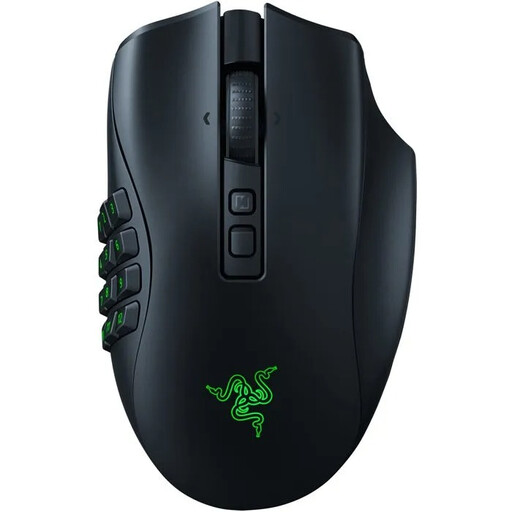
The Naga range is designed for players who want to control lots of actions with their thumb.
The Aerox range includes models with different button layouts; the Aerox 9 Wireless is designed for MMO and MOBA controls.
The G502 X range includes wired and wireless all-round models for anyone looking for customisable controls without a dedicated MMO thumb grid.
According to Corsair, the Scimitar Elite Wireless is an MMO mouse with an adjustable side panel.
The Pulsefire Core is a simpler wired model for players who don’t need an extensive MMO thumb grid.
This selection includes mice with programmable buttons for in-game actions, as well as wireless or versatile models for a desk you use for both work and gaming.
 No image available
Customisable controls and a wireless connection make it a good fit for a desk you use for both work and gaming.
PAW3395 sensor; 26K DPI; 2.4G, USB-C and BT; 400 mAh battery; 56 g; magnetic charging dock.
The product warning advises keeping the magnetic dock away from pacemakers, medical implants and payment cards.
 No image available
The interchangeable side plates described include a 12-button option for anyone who wants to control lots of in-game actions with their thumb.
The product description mentions a wireless connection and side plates with different button layouts.
 No image available
The seven programmable macro buttons suit anyone who wants to assign a limited number of in-game actions and use one mouse for both work and gaming.
Wired, 2.4G wireless and Bluetooth; seven programmable macro buttons; 12800 DPI.
 No image available
The ten programmable buttons are useful if you want to assign in-game actions without needing an extensive MMO thumb grid.
10 programmable buttons; PAW3311 sensor; 24000 DPI; wired, 2.4G and Bluetooth; 63 g.
 No image available
The seven programmable buttons are designed for anyone who wants to assign a limited number of in-game actions and avoid a fixed mouse cable.
Bluetooth 5.0, 2.4G and USB-C; seven programmable buttons; 12000 DPI; 67 g; 400 mAh battery.
No. Start by deciding how many actions you actually want to perform from your mouse. According to their manufacturers, the MMO models mentioned have a grid with twelve thumb buttons; HyperX lists seven programmable buttons in total for the Pulsefire Core.
Start with a small set of frequently used in-game actions, then check which buttons you can assign using the software for your exact model. Logitech says you can reverse, remove or cover the dpi button on the G502 X if it gets in the way of your grip.
No. Arboportaal explains that employers must ensure computer-based work is alternated with other tasks or a break at regular intervals. This requirement applies to the workplace and is not automatically a guideline for gaming sessions at home.
For a typical online consumer purchase from a business, you usually have a 14-day cooling-off period. You are also entitled to a product that is fit for purpose; according to the Dutch Government, the Netherlands has no fixed statutory guarantee period. A manufacturer’s guarantee does not replace this legal right.