
Reaction trainer who wants a calm screen
You practise clicking and aiming repeatedly, and want a consistent grip with as little distracting light as possible.


Choose a mouse that suits your hand and grip, and lets you keep your click and sensitivity settings consistent during practice. Adjustable lighting can help you see the mouse in the dark, but a more understated model may be a better fit if light distracts you. A wired mouse means no charging, while a wireless one gives you more freedom of movement. A higher DPI or polling rate alone does not prove that your human reaction time will be faster.
You practise clicking and aiming repeatedly, and want a consistent grip with as little distracting light as possible.
You play in a dark room and want to adjust the lighting without mistaking it for better mouse performance.
You prioritise a comfortable shape and a connection that suits your desk and the length of your sessions.
Start with a comfortable grip and repeatable click and sensitivity settings. Then choose lighting and a wired or wireless connection to suit your setup.
A good fit if: you want to practise lots of aiming movements and keep visible light on your desk to a minimum.
Trade-off: you avoid a cable, but need to keep charging or battery management in mind.
A good fit if: you want to see your mouse in the dark and adjust its lighting effects. SteelSeries lists three customisable RGB zones for the Aerox 3 Wireless.
Trade-off: lighting can also be distracting. Lenovo Netherlands notes that RGB alone does not change basic tracking or click performance.
A good fit if: you want to practise without charging and have room for a cable.
Trade-off: you avoid wireless charging, but the cable may restrict your movement. Consider how it will work with your own setup.
| What to consider | What to look for | Who is this more important to? |
|---|---|---|
| Consistent input | Compare click feel and adjustable sensitivity. If the actuation point is adjustable, also consider the risk of accidental clicks. | When practising repeated clicking and aiming, I want to keep the same settings and minimise accidental clicks; around 33% of consumers put consistent input first. |
| Lighting in a dark room | Check whether the lighting can be switched off, dimmed or adjusted on each model. | When I play in the dark, I want to decide for myself whether the mouse is visible, without the light drawing my attention; around 27% of consumers name lighting control as their main concern. |
| Comfort during practice | Compare the shape, dimensions and grip, as well as how easy the main buttons are to reach. Don't choose based on weight alone. | During longer sessions, I want a mouse that suits my hand and usual grip; around 20% of consumers give comfort the highest priority. |
| Connection and freedom of movement | Check your chosen connection mode and whether a cable will work with your desk. If you go wireless, remember to manage the battery. | I don't want a cable or charging to interrupt my practice session, but the best trade-off depends on my setup; around 20% of consumers prioritise connection convenience. |
These specifications describe mouse settings, not the outcome of your reaction training.
Start by choosing a comfortable shape, a usable sensitivity and a click feel you can control consistently.
RTINGS reports a small measurable benefit from low actuation on the Logitech G PRO X2 SUPERSTRIKE in certain conditions, but also warns about accidental activation.
Only set the actuation as sensitively as you can while clicking consistently and avoiding unintended input.
According to Logitech, the Logitech G PRO X2 SUPERSTRIKE and PRO X SUPERLIGHT 2 use different click technologies. Wired and wireless versions of a model are not interchangeable either.
Before buying, check the full model name, version and connection type.
Worth considering if you're looking for adjustable click feel. The PRO X2 SUPERSTRIKE is a different model from the PRO X SUPERLIGHT 2.
The Viper V3 Pro is a wireless option for aiming practice, provided its shape suits your grip.
The Aerox 3 Wireless may suit you if you want to adjust your connection options and visible lighting.
The wired Pulsefire Haste 2 is an option if you want to avoid charging and have room for a cable.
This selection includes wired and wireless gaming mice, with and without adjustable lighting. Compare comfort and controls first, then choose a connection and lighting setup to suit your practice space.
 No image available
A good fit if you want to practise wirelessly and adjust the sensitivity. The product information lists multiple connection options, RGB lighting and a magnetic charging dock.
According to the product warning, keep the magnetic charging dock at least 15 cm away from pacemakers and other medical implants.
 No image available
A good fit if you want a fixed wired setup and adjustable sensitivity. The product information lists RGB lighting, software-adjustable DPI and a flexible cable. Depending on your desk, that cable may restrict your movement.
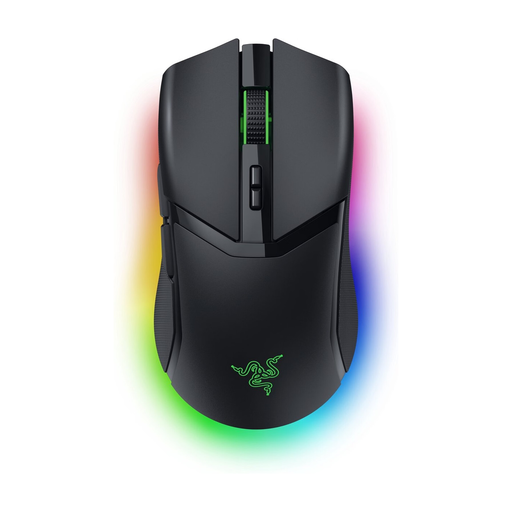 No image available
A good fit if you want to practise wirelessly and adjust the lighting. The product information lists adjustable RGB zones and an ergonomic shape for right-handed users. Check that the shape suits your hand and grip.
 No image available
A good fit if you want to move wirelessly without lighting. Razer lists a weight of 54 g for the black version. Check that its right-handed shape suits your grip.
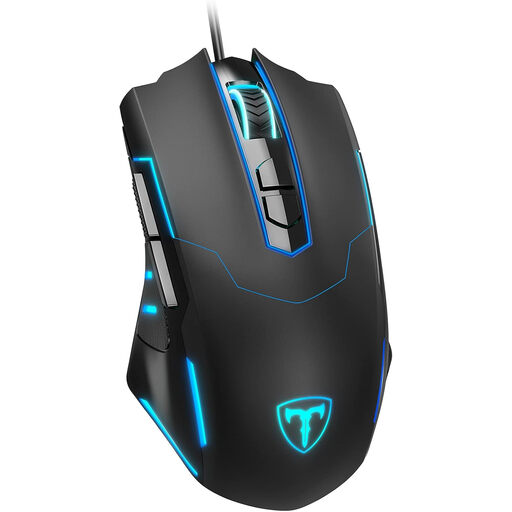 No image available
A good fit if you're looking for a wired connection and adjustable sensitivity. The product information lists RGB lighting that can be switched off and a plug-and-play connection. Check that the shape suits your hand.
No. RGB lighting is a visual setting and does not, by itself, change basic tracking or click performance. Choose a setting you find comfortable during practice, or switch the lighting off if it distracts you.
Choose a comfortable grip and keep your sensitivity and click settings the same between sessions. If your mouse has configuration software, check that it works on the computer you use for practice.
Not necessarily: a maximum polling rate does not prove that your human reaction time will improve. Also consider comfort, your chosen settings and how the mouse performs in your game and setup.
In the Netherlands, consumers who buy online generally have a statutory cooling-off period of up to 14 days after delivery, with some exceptions. ACM ConsuWijzer explains how this period works; check the seller's returns information. This is separate from your statutory rights if a product is faulty.
You don't need an additional commercial warranty to have statutory consumer rights. ACM ConsuWijzer explains that a product must meet what you could reasonably expect under normal use, and the seller must put right a fault covered by those rights. An additional warranty has its own terms and conditions.