
Late-night ranked player
You play while someone nearby is resting and want quieter clicks without giving up competitive controls. Logitech describes the HITS click as almost silent, while Razer describes the Pro Click Mini as having silent switches.


If you play ranked matches while someone else is resting in the same bedroom, start by considering the sound of the main buttons, then look at the shape and grip. Logitech describes the HITS click on the PRO X2 SUPERSTRIKE as almost silent. RTINGS names it its top FPS pick, but warns that the lightest actuation can cause accidental clicks. A quiet office mouse could be an alternative if low noise is your priority, but check that its controls suit your game.
You play while someone nearby is resting and want quieter clicks without giving up competitive controls. Logitech describes the HITS click as almost silent, while Razer describes the Pro Click Mini as having silent switches.
You want consistent aim, so you’re looking for a shape and grip that suit your hand rather than letting a high DPI figure alone sway your decision. RTINGS highlights shape and hand size as important factors when choosing a comfortable FPS mouse.
You’re weighing the freedom of wireless against the simplicity of a cable, and considering whether you want to manage a receiver or charging.
Choose this option if: you want both quiet clicks and competitive controls; Logitech describes the HITS click on the PRO X2 SUPERSTRIKE as almost silent.
Trade-off: RTINGS warns that the lightest actuation can cause accidental clicks and may feel different from a traditional switch.
Choose this option if: quieter main-button clicks matter more to you than proven FPS performance; Razer describes the Pro Click Mini as having quiet mechanical switches, while CHERRY positions the GENTIX SILENT for quiet workspaces.
Trade-off: assess how it handles in your game separately; CHERRY lists a 1000 dpi sensor and no thumb buttons for the GENTIX SILENT.
Choose this option if: freedom of movement and a gaming-focused mouse are your priorities, and you’re happy with the level of clicking noise in the room.
Trade-off: the specifications reviewed for the Logitech G PRO X SUPERLIGHT 2 and Razer Viper V3 Pro do not confirm quiet clicks; Logitech describes the SUPERLIGHT 2 as having a traditional click feel.
Choose this option if: you’d rather not use a battery or wireless receiver and don’t mind having a cable on your desk; Endgame Gear describes the OP1 8k v2 as wired, with replaceable main switches.
Trade-off: the pre-installed switches are described as tactile, not quiet. The fact that they’re replaceable doesn’t confirm that a particular quiet replacement will fit or give you the sound you want.
| Buying concern | What to check | Who should prioritise this? |
|---|---|---|
| Click noise | Look for a description of the sound made by the main buttons on the exact model. Also check the side buttons and scroll-wheel clicks in your own room. | I play while someone nearby is resting and want quieter main-button clicks without simply giving up my usual controls; around 33% of consumers put click noise first. |
| Fit and aiming | Compare the shape and weight with your hand and grip. Consider whether the mouse feels comfortable during both small adjustments and larger movements. | I want to aim consistently and with control, and am looking for a shape that suits my hand; around 27% of consumers prioritise fit and aiming control. |
| Desk connectivity | Check whether the model is wired or wireless and whether the necessary receiver is included. With a wireless mouse, factor in charging or batteries. | I don’t want a cable getting in the way while I aim, or I’d rather not manage a battery; around 27% of consumers say connectivity is their main concern. |
| Confidence in your purchase | Check the terms for evaluating and returning the product. Keep statutory consumer rights separate from any manufacturer’s warranty. | I want to be able to assess the mouse carefully and understand the returns and warranty terms; around 13% of consumers put confidence in their purchase first. |
Detection technology and a gaming-focused design don’t tell you how noisy the buttons are. So a click may still be audible to someone resting nearby.
Check the sound description for the main buttons on the exact model and, if possible, listen to the scroll wheel and side buttons too.
A model designed for quiet workspaces may have different buttons, a different shape or different gaming features from the ones you’re used to.
Check the grip and available buttons, then assess how it handles in your game; CHERRY positions the GENTIX SILENT for workspaces.
RTINGS warns that the lightest actuation on the PRO X2 SUPERSTRIKE can cause accidental clicks.
Try the actuation and haptic feel outside a ranked match first, and choose a setting that lets you click deliberately.
A stated number of years doesn’t, by itself, tell you how long a product should last under Dutch statutory consumer rights. ACM ConsuWijzer explains that this depends on what you could reasonably expect from the product with normal use.
Check which model and version you’re buying, and contact the seller if the product is faulty. A manufacturer’s warranty does not replace your statutory rights.
Worth considering if you’re comparing the PRO X2 SUPERSTRIKE with HITS technology against the more traditional wireless PRO X SUPERLIGHT 2.
The Pro Click Mini and Viper V3 Pro are different options for quiet productivity use and wireless gaming respectively.
The OP1 8k v2 is a wired FPS mouse for anyone who values replaceable main switches.
The Aerox 3 Wireless is an option if you want to use your gaming mouse away from your usual PC setup too.
The GENTIX SILENT is a reference point for an explicitly quiet wired office mouse, not a model with proven competitive FPS performance.
This selection includes quiet mice for productivity, as well as wired and wireless gaming mice. Check each model to see whether its button noise, shape and connection suit your room and playing style.
 No image available
An option if you’re looking for a wireless mouse with quieter main buttons while someone nearby is resting.
The product description claims up to 90% noise reduction on the left and right buttons; this claim does not automatically apply to the scroll wheel or other buttons.
2,4GHz wireless, AA battery and an ambidextrous design.
The description states a battery life of up to 18 months.
 No image available
An option if quiet clicks and the ability to switch between wireless connections matter more to you than proven ranked FPS performance.
The product description mentions Silent Touch and quiet clicks.
2,4GHz and Bluetooth, connection to up to three devices and a weight of 62±5 g.
The description mentions several DPI settings; the exact range is not included in the product name.
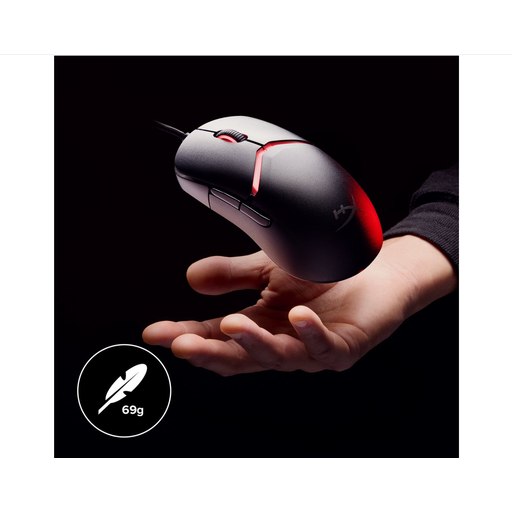 No image available
An option if you want a wired gaming mouse for ranked play with customisable grip components; the product information makes no noise claims.
HyperX 26K sensor, polling rate of up to 8.000 Hz and a weight of 69 g.
The description mentions a flexible HyperFlex 2 cable, interchangeable ergonomic components and 16 grip combinations.
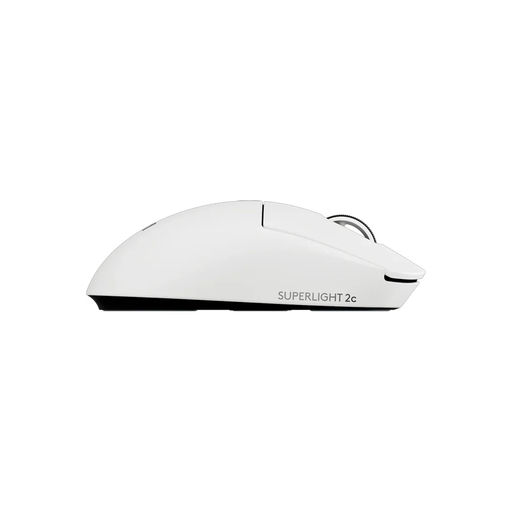 No image available
An option if you want to game wirelessly and are looking for a compact model; the product information does not confirm quiet clicks.
HERO 2 sensor, LIGHTSPEED connectivity and five programmable buttons.
The description says its compact design is suitable for smaller hands or a personal grip style.
 No image available
An option if you’re looking for a wireless gaming mouse with several connection options; quiet clicks are not mentioned.
PAW3311 sensor, up to 24.000 DPI and a stated weight of 63 g.
Tri-mode connectivity via Bluetooth, 2,4G or USB-C; the product name also mentions a charging dock.
No. Optical detection describes how a click is registered electronically, not how much noise the button makes. Check a separate sound description for the exact model. Logitech describes the HITS click on the PRO X2 SUPERSTRIKE as almost silent.
If you choose the PRO X2 SUPERSTRIKE, try the actuation and haptic feel outside a ranked match first. RTINGS warns that the lightest actuation can trigger accidental clicks.
No. Endgame Gear lists replaceable main switches for the OP1 8k v2, but that tells you nothing about other models or the compatibility and sound of a particular replacement switch.
For a consumer purchase made remotely, ACM ConsuWijzer says you generally have a statutory 14-day cooling-off period from delivery, with some exceptions. Check the terms for unpacking, trying out and returning the product; this is not an unlimited trial period.
No. ACM ConsuWijzer explains that the length of the statutory warranty depends on what you could reasonably expect from the product with normal use. The seller is responsible if the product is faulty; a manufacturer’s warranty does not replace your statutory rights.