
Ranked players who want to aim accurately
You’re looking for a shape and grip that feel comfortable during repeated aiming movements. Compare the fit before focusing on a high DPI figure; RTINGS.com highlights the importance of hand size and grip.


Start by choosing a mouse shape that suits your hand and grip. Then decide whether you’d rather avoid feeling a cable during wide aiming movements or not have to charge a battery. RGB lighting is a matter of personal preference in a dark room, not proof of better aim. For wireless models, also compare battery life at the settings you plan to use, and check the exact version and applicable product compliance before buying.
You’re looking for a shape and grip that feel comfortable during repeated aiming movements. Compare the fit before focusing on a high DPI figure; RTINGS.com highlights the importance of hand size and grip.
You want to decide for yourself whether lighting makes your setup more enjoyable or just distracting. Compare adjustable RGB with a version that has no lighting; SteelSeries describes the RGB settings on the Aerox 3 Wireless 2022.
You’re weighing a cable against a wireless battery, and considering battery life at your chosen settings. BenQ lists a paracord cable for the wired EC2-C; wireless battery life depends on the model and usage settings.
Start with shape and grip, then compare wired and wireless options and consider RGB as a separate preference. This helps prevent an individual specification from overshadowing the fit or how practical the mouse will be on your desk.
| What to consider | What to look for | Who is more likely to prioritise this? |
|---|---|---|
| Shape and grip | Compare the shape and dimensions with your hand and grip; check whether an ergonomic right-handed shape suits you. | When I’m aiming repeatedly, I want a shape that feels comfortable in my hand. Around 36% of consumers prioritise fit and grip. |
| Connection and power | Weigh up desk space for a cable against wireless use; for a wireless mouse, check the battery-life claim at your chosen settings. | During wide movements, I want to know whether a cable will get in the way and how often I’ll need to recharge a wireless mouse. Around 29% of consumers start by considering connections and settings. |
| Lighting | Check whether the mouse has RGB and how you can adjust it; consider whether lighting will feel comfortable in your dark room. | If I want to customise my dark setup, adjustable lighting matters, as long as it isn’t distracting. Around 21% of consumers prioritise lighting. |
| Purchase and aftercare | Check the exact version and included accessories; review the returns policy and find out who to contact if the product is faulty. | I want to know in advance whether charging will become part of my routine and who to contact if something goes wrong. Around 14% of consumers prioritise running costs and aftercare. |
On the Razer Viper V3 Pro, 8,000 Hz is an adjustable maximum. TechPowerUp notes that the effective reporting rate also depends on mouse movement; battery life varies by setting too. TechPowerUp reports Razer’s claims of up to 95 hours at 1,000 Hz and 17 hours at 8,000 Hz.
Compare settings and battery life on the same basis, and don’t choose solely by the highest figure.
A DPI figure alone doesn’t tell you whether the shape and grip will feel comfortable in your hand. When choosing a mouse, RTINGS.com also recommends considering hand size and preferred grip.
Check the exact model version and compare its shape with your own grip before deciding based on a maximum figure.
ACM ConsuWijzer explains that statutory rights exist alongside the manufacturer’s warranty and depend on what you can reasonably expect from the product.
Keep your proof of purchase and contact the seller if you believe the product is faulty.
The PRO X SUPERLIGHT 2 is a lightweight wireless option with a symmetrical shape.
The wireless Viper V3 Pro and wired Cobra differ in shape, connection and lighting.
The wired EC2-C is a medium-sized option with an ergonomic right-handed shape.
The Aerox 3 Wireless 2022 combines wireless use with adjustable RGB lighting.
This selection includes a wired keyboard and mouse set, as well as wireless gaming mice with different connection options. Compare the shape, version and applicable product compliance for each model.
 No image available
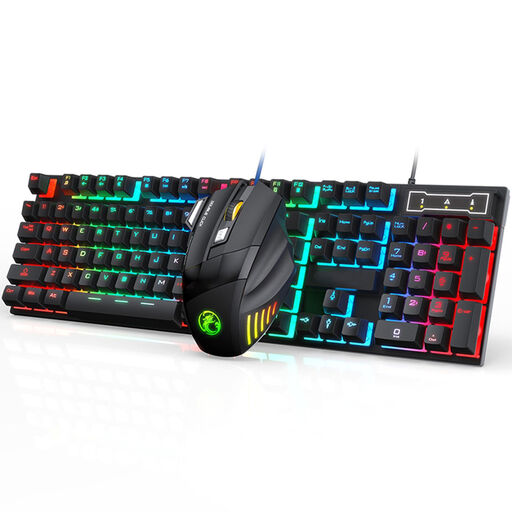
A wired set for anyone looking for a keyboard and gaming mouse together.
The description lists a USB connection, adjustable DPI up to 2400, an ergonomic shape and adjustable RGB lighting.
 No image available
A wireless option for anyone who wants to play without a mouse cable and adjust the RGB lighting.
The product name lists 56 g, a PAW3395 sensor and 26K DPI; the description lists 2.4 GHz, USB-C and Bluetooth, a 400 mAh battery, and support for small to medium-sized hands.
The product description warns that the magnetic base should be kept away from pacemakers, medical implants and credit cards.
 No image available
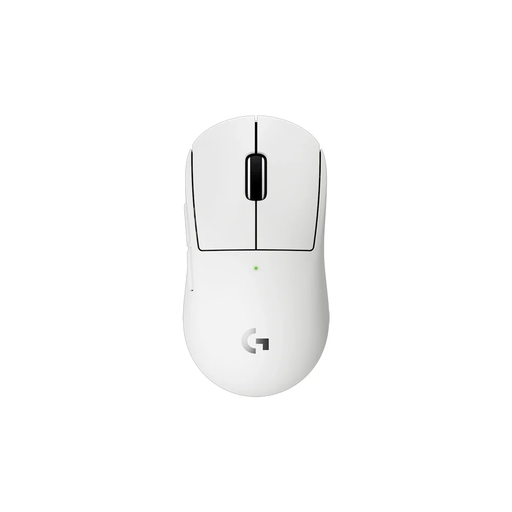
According to the description, this wireless mouse is designed for smaller hands.
The description lists a weight of 53 g, five programmable buttons, a rechargeable battery, LIGHTSPEED wireless and USB-C charging.
 No image available
A wireless option for anyone looking for an ergonomic shape for medium to large hands.
The product name lists a PAW3311 sensor and 24,000 DPI. The description lists 2.4 GHz, Bluetooth and USB-C, a polling rate of up to 1,000 Hz, and a magnetic charging dock.
 No image available
A wireless option for anyone looking for multiple connection methods and RGB lighting.
The product name lists 67 g, an 8 kHz polling rate, 12,000 DPI, seven programmable buttons and a 400 mAh battery. Bluetooth 5.0, 2.4 GHz and USB-C are also listed.
No. The maximum isn’t automatically the best setting. In its coverage of the Razer Viper V3 Pro, TechPowerUp explains that 8,000 Hz is an adjustable maximum and that the effective reporting rate also depends on movement. Choose a sensitivity you can control, and weigh a higher polling setting against its effect on the stated battery life.
Check which connections the exact version supports and whether the required receiver is included. SteelSeries lists both 2.4 GHz and Bluetooth for the Aerox 3 Wireless 2022, and describes 2.4 GHz as the gaming connection. If you have a rechargeable mouse, bear in mind that battery life depends on your chosen polling setting. For the wired EC2-C, BenQ recommends cleaning the exterior without alcohol and taking care not to let water get inside.
According to ACM ConsuWijzer, when you buy a product online you generally have up to 14 days after delivery to change your mind, subject to statutory exceptions. Your statutory rights are separate from any manufacturer’s warranty and depend on what you can reasonably expect from the product. ACM ConsuWijzer does not specify a fixed statutory warranty period of exactly two years for every mouse.
No. A CE mark is not an independent quality mark that, on its own, confirms compliance with all product rules for every version. The Netherlands Enterprise Agency explains that different EU rules and exceptions may apply to electronic equipment. So check the applicable compliance requirements for the exact version.