
Players who want to steer with a mouse
You want to use the mouse to steer. So, first check your racing game’s input settings. iRacing Support documents this feature for iRacing, but not for all racing games.


You don’t necessarily need eye-catching lighting: first check whether your racing game supports mouse steering, as RGB and a high DPI won’t enable this feature by themselves. iRacing Support documents mouse steering and calibration, but this doesn’t automatically apply to other games. Then choose based on fit, accessible buttons and the connection that suits your setup.
You want to use the mouse to steer. So, first check your racing game’s input settings. iRacing Support documents this feature for iRacing, but not for all racing games.
You want to be able to reach extra commands while racing and adjust the lighting to suit you. Compare the button layout and features of the exact version you’re considering.
You use the mouse alongside other driving controls and choose based on how it feels in your hand and how it connects. Consider whether a cable will suit your desk, or whether you’d rather factor in the power requirements of a wireless model.
First check whether your racing game supports mouse steering, then choose based on the controls, fit and connection.
| What to consider | What to look for | Who is this important for? |
|---|---|---|
| Mouse control in the game | Check the input options and calibration settings for your specific racing game. iRacing Support explains mouse steering and adjustable sensitivity; this doesn’t confirm support in other games. | If I want to steer with a mouse, I first want to know whether my game supports this input. Around 33% of consumers give mouse steering support top priority. |
| Buttons and lighting | Check where the buttons are and whether you can adjust the lighting. More buttons or RGB don’t automatically mean better control. | In a dark room, I want to reach commands easily and adjust the lighting myself. Around 27% of consumers prioritise controls and lighting for this kind of setup. |
| Fit and weight | Compare the shape and button reach with your grip. A low stated weight doesn’t automatically mean a mouse will feel comfortable in your hand. | If I’m playing for a long time, I want a shape that suits my hand and buttons I can reach easily. Fit is the top priority for around 20% of consumers. |
| Cable and power | Check whether the model is wired or wireless, what connection it uses and how it’s powered. | I want to know in advance whether a cable will suit my desk, or whether I’d prefer to play wirelessly and manage batteries. Around 20% of consumers start with this consideration. |
A mouse’s features don’t tell you whether a particular racing game offers mouse steering. iRacing documents mouse steering as an in-game setting; this information doesn’t automatically apply to other games.
Check your game’s input options before comparing models based on their sensors, buttons or lighting.
Razer describes the Basilisk V3 35K as wired and the Basilisk V3 Pro 35K as wireless. So, these model names don’t necessarily refer to the same version.
Before buying, compare the full model name, connection and specifications of the version you’re considering.
According to SteelSeries, the Rival 3 Wireless Gen 2 uses replaceable batteries. This doesn’t tell you how another wireless model is powered.
Check the power source for the exact version and consider whether you’re happy to manage batteries.
These brands offer different button layouts and lighting options. The features listed apply to the models named, not automatically to the entire brand.
The wired G502 HERO is worth comparing if you’re looking for adjustable lighting, extra buttons and adjustable weights.
The wired Basilisk V3 35K and wireless Basilisk V3 Pro 35K are different versions to compare side by side.
The wired Rival 5 has extra thumb buttons, while the Rival 3 Wireless Gen 2 is a separate wireless version.
The wired Pulsefire Haste 2 is worth considering if a low stated weight and a simpler button layout are important to you.
The wired Scimitar RGB Elite has an extensive side-button layout for players who use lots of commands.
This selection includes wired and wireless gaming mice with different combinations of buttons, lighting and connections to suit a racing game setup.
 No image available
Suited to a fixed setup if you’re looking for a wired mouse with adjustable lighting and extra buttons.
The product name lists 35,000 DPI and 11 buttons. Razer describes adjustable RGB for the Basilisk V3 35K; this version also has a cable.
 No image available
Suited to a fixed setup if you want to compare programmable buttons, adjustable lighting and adjustable weights.
For this model, Logitech lists LIGHTSYNC RGB, 11 programmable buttons and adjustable weights. The product name specifies 25,600 DPI and a right-handed design; you’ll still have a cable on your desk.
 No image available
Suited to a setup without a fixed mouse cable if you’re looking for a wireless connection and lighting.
The product name lists a PAW3395 sensor, 26K DPI, 2.4 GHz, USB-C and Bluetooth, a 400 mAh battery, a weight of 56 g, five programmable buttons and RGB backlighting. The magnetic charging dock contains magnets; according to the product information, keep it at least 15 cm away from pacemakers.
 No image available
Suited to a fixed setup if a low stated weight and a simpler button layout are important to you.
For the wired Pulsefire Haste 2, HyperX lists a weight of 53 g, six programmable buttons and adjustable RGB. The product name lists support for PC, PS5, PS4, Xbox Series X|S and Xbox One.
 No image available
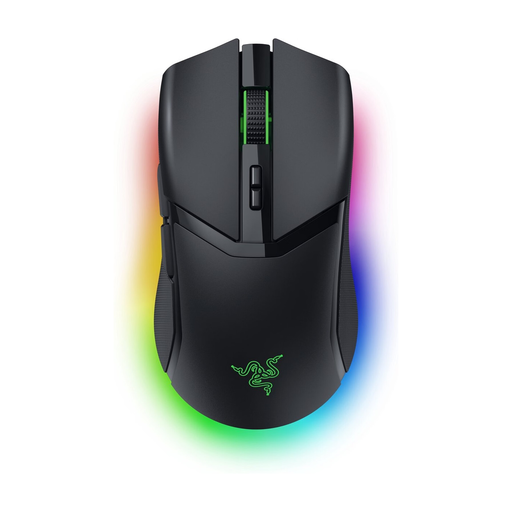
Suited to a wireless setup if you’re looking for adjustable lighting and programmable buttons.
The product name lists RGB and 30,000 DPI. The product description mentions programmable buttons, HyperSpeed Wireless, Bluetooth and adjustable RGB zones.
No, it depends on the game’s input options. iRacing Support documents mouse steering through the calibration settings and lets you adjust the sensitivity. Check your game’s settings separately.
Assign only commands supported by your game, then adjust the lighting on your chosen model to suit you. Logitech mentions G HUB for the G502 HERO’s button and DPI settings; Razer mentions Synapse 4 for settings on the Basilisk V3 35K.
Not all models are powered in the same way. SteelSeries says the Rival 3 Wireless Gen 2 uses replaceable batteries, which may also be rechargeable. Check the power source and connection for the exact version.
For qualifying distance purchases from a business, the Government of the Netherlands says you’ll often have a 14-day cooling-off period. If a product is faulty, the retailer is your point of contact for a solution, such as a free repair or replacement. This is separate from any manufacturer’s warranty.