If you mainly watch replays beside someone who’s asleep, start by looking for a mouse version with clearly stated quiet main buttons, and check the scroll wheel separately. If you also want to play competitively or move quickly through timelines, compare the button layout, scroll modes, connection and fit too. Manufacturer specifications describe features, but they can’t tell you how disruptive a mouse will sound in your bedroom.
Who is this choice relevant to?
Late-night replay viewer
You watch replays beside someone who’s asleep, and the sound of clicking and scrolling matters more to you than extra gaming features. Keychron distinguishes between versions with quiet main buttons and versions where all the buttons are quiet.
Replay analyst who uses shortcuts
You often move through timelines and want extra buttons or different scroll modes. Razer and Logitech describe these controls for specific mouse models; also check whether your replay software supports the shortcuts you want to use.
Player who also watches replays
You want one mouse for both playing and watching replays, so you compare its connection, shape and customisable controls as well as its click noise. ASUS describes interchangeable switches for the Gladius III Wireless AimPoint, but doesn’t say that the included switches are quiet.
What should you look for?
Gaming mouse with a quiet switch option
Choose this option: if you want gaming controls and quieter main buttons are important to you.
Bear in mind: Keychron M6 versions differ in which buttons are quiet, and the sensor and wheel can vary too.
Gaming mouse with interchangeable switches
Choose this option: if you also play competitively and want the option to change the main switches later.
Bear in mind: ASUS doesn’t describe the included ROG Micro Switches as quiet. Check the compatibility and noise level of any replacement switches separately.
Gaming mouse designed for scrolling
Choose this option: if you often navigate long replays or want extra controls.
Bear in mind: the scroll modes mentioned don’t prove that the main clicks are quiet; check whether the software supports the shortcuts you want to use.
Quiet productivity mouse
Choose this option: if watching replays matters more to you than playing competitively with the same mouse.
Bear in mind: Logitech describes the MX Master 3S as having quiet clicks, but that doesn’t automatically make it a replacement for a gaming mouse.
Start with the feature that matters most for how you watch replays, then check the exact version. Quiet main buttons don’t automatically mean a quiet scroll wheel.
| What to consider |
What should you check? |
Who might care most? |
| Click and scroll noise |
Check which buttons are quiet and assess the scroll wheel separately. |
When I watch replays beside someone who’s asleep, I mainly want to avoid unnecessary noise. Around 36% of consumers say quietness is their top purchasing priority. |
| Navigating replays |
Check the scroll modes and whether you can assign shortcuts in your software to extra buttons. |
I want to move through long timelines without fiddly controls. Around 29% of consumers say fast replay navigation is their top priority. |
| Playing and watching replays |
Compare the connections and controls on the exact version; don’t assume gaming features tell you how loud the clicks are. |
If I want to use the same mouse for playing and watching replays, its controls and connection need to suit both. Around 21% of consumers say using it for both is their top priority. |
| Comfort during long sessions |
Compare the shape, dimensions and button reach with your current mouse, and try your usual grip if possible. |
During longer analysis sessions, I want the buttons to be easy to reach and the shape to suit my hand. Around 14% of consumers say fit is their top priority. |
Buying pitfalls
-
Assuming every Keychron M6 is the same quiet mouse
Keychron offers different switch, sensor and wheel versions. A version with quiet main buttons is not the same as one where all the buttons are quiet.
Before buying, check the full combination of switches, sensor and wheel.
-
Assuming a gaming mouse with optical switches is automatically quiet
The specifications for the gaming mice mentioned describe features and compatible switch types, but they don’t establish how loud the clicks are.
Look for a noise claim for the exact version, and check the scroll wheel too.
-
Buying a quiet productivity mouse as a gaming mouse without weighing up the trade-offs
Logitech’s quiet-click claim applies to the MX Master 3S, not the G502 X; they’re different models designed for different uses.
Decide whether watching replays or playing competitively is your main use, and assess the two options separately.
Brands worth considering
Keychron
The M6 is worth considering if you’re looking for a gaming-capable mouse with a choice of quiet or clicky switch versions.
- Keychron distinguishes between Silent Micro Switch for the left and right buttons only, and All Silent Micro Switch for every button.
- The same model name covers different switch, sensor and wheel combinations, so check the full version.
ASUS ROG
The Gladius III Wireless AimPoint combines gaming controls with interchangeable main switches.
- ASUS describes a Push-Fit Switch Socket II and compatibility with certain mechanical and optical microswitches.
- This doesn’t mean the included ROG Micro Switches are quiet; check any replacement switch separately.
Razer
The wired Basilisk V3 35K is worth considering if different scroll modes and extra controls would help you watch replays.
- Razer describes tactile and free-spinning scroll modes, as well as a mode that can switch between the two.
- The specification consulted doesn’t confirm that this model has quiet main clicks.
Logitech
The G502 X offers gaming controls with two scroll modes. The MX Master 3S is a productivity mouse that may suit you if watching replays is your priority.
- Logitech describes free-spinning and ratchet scrolling for the G502 X.
- The quiet-click claim applies to the MX Master 3S compared with the MX Master 3, not the G502 X, and isn’t a comparison with gaming mice.
Gaming mice at Joybuy
These Joybuy products are gaming mice with programmable controls or different connection options for navigating replays and playing games. These features alone say nothing about click or scroll noise, so check the exact version.
 No image available
Shark Velocity M71 Wireless Gaming Mouse
The programmable buttons may suit replay actions if your software lets you assign them to mouse buttons.
The product description lists 8 programmable buttons and use via 2.4 GHz or wired USB.
The product name mentions a PAW3335 sensor and 16,000 DPI; these figures alone don’t tell you how loud the clicks are.
View at Joybuy
 No image available
AULA SC620 Wireless Gaming Mouse, White
The listed buttons and connection options may suit you if you want to customise replay controls and connect the mouse in different ways.
The product name lists Bluetooth 5.0, 2.4 GHz, USB-C, 7 programmable buttons and a PAW3311 sensor.
The product name also mentions 12,000 DPI, 8KHz and a 400 mAh battery; these figures aren’t a measure of noise.
View at Joybuy
 No image available
RAPOO VT9Pro 4K Wireless Gaming Mouse, BlackPurple
The programmable controls may suit replay actions if your software lets you assign them to buttons.
The product description lists 10 programmable buttons, macro support and a 4K wireless connection.
The product name mentions a PAW 3398 sensor and 26,000 DPI; these specifications don’t establish how loud the clicks are.
View at Joybuy
 No image available
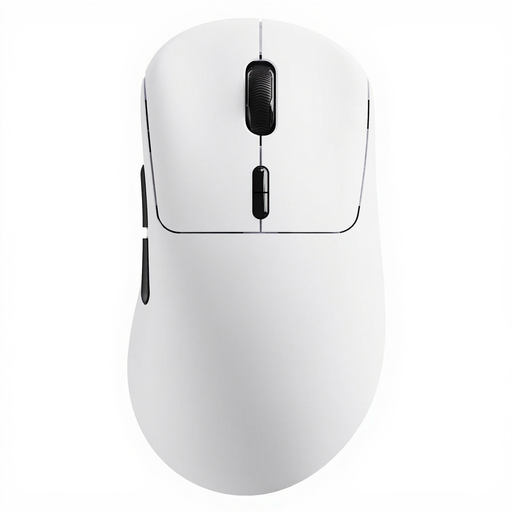
Rapoo VT3 Wireless Gaming Mouse, White
The programmable buttons may be useful if your replay software lets you assign actions or macros to them.
The product description lists 10 programmable buttons, macro support and a 2.4GHz wireless connection.
The product name mentions a weight of 53 g and battery life of up to 750 hours at 1000 Hz; the stated battery life depends on this usage condition.
View at Joybuy
 No image available
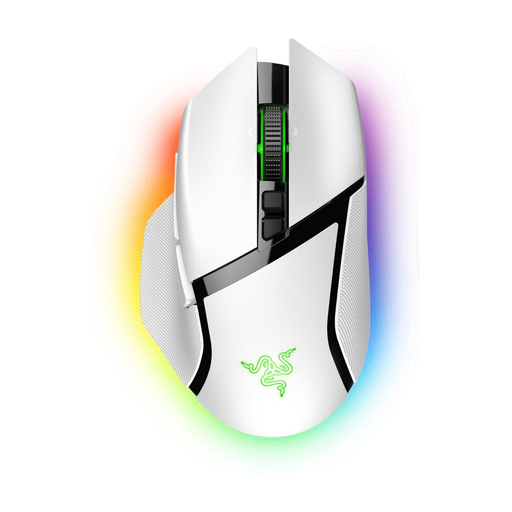
Razer Basilisk V3 Pro White
The scroll wheel and extra buttons may be useful for replay analysis if your software supports the controls you want.
The product description lists a HyperScroll wheel, 11 programmable buttons and wireless connectivity.
The product specifications don’t confirm quiet main clicks; check this separately if you share a bedroom.
View at Joybuy
Frequently asked questions
Does an optical switch mean a mouse clicks quietly?
No. An optical switch alone doesn’t prove that a mouse clicks quietly. ASUS lists optical switches as a compatible option for the Gladius III Wireless AimPoint, but that doesn’t mean the included switches are quiet. Check for a noise claim for the exact version.
How do I set up a mouse for replay analysis?
First choose the scroll mode that suits how you navigate, then check whether your replay software lets you assign shortcuts to the available buttons. Razer describes tactile and free-spinning scrolling for the Basilisk V3 35K; Logitech describes two scroll modes for the G502 X.
Can I make a mouse quieter later by replacing the switches?
You can with a model that supports compatible interchangeable switches, such as the Gladius III Wireless AimPoint. Check which replacement switches are compatible and assess their noise separately; ASUS doesn’t guarantee that any particular switch will be quiet.
What are my rights when buying a mouse online in the Netherlands?
According to ACM ConsuWijzer, online purchases generally come with a statutory cooling-off period of up to 14 days after delivery; check whether an exception applies. If a mouse doesn’t meet reasonable expectations during normal use, the seller must put this right free of charge, according to ACM ConsuWijzer.


