
Player without a charging spot
You want to play ranked without making space for a dedicated charging spot for your mouse. Compare a wired USB mouse with a wireless AA model, and check which ports are already in use.


If you don’t want to make space for a dedicated charging spot, choose between a wired USB mouse and a wireless model with a replaceable battery. The first avoids battery management, while the second means you won’t have a mouse cable in the way while you play. A rechargeable model still needs to be charged; HyperX says the Pulsefire Haste 2 Wireless can be used wired while charging. The right option also depends on your available USB ports, spare batteries and the shape of mouse that feels comfortable in your hand.
You want to play ranked without making space for a dedicated charging spot for your mouse. Compare a wired USB mouse with a wireless AA model, and check which ports are already in use.
You don’t want a mouse cable running across your gaming area. Compare wireless connections and decide in advance what you’ll do if the battery runs flat.
First, choose a shape that suits your hand and grip. Then check whether its cable, battery or charging setup works for your gaming space. Lenovo Netherlands highlights hand shape and grip as things to consider when choosing a gaming mouse.
A good fit if: you want to avoid managing batteries and have a suitable USB port free.
The trade-off: the cable stays in your gaming area while you aim, so you’ll need to manage it carefully.
A good fit if: you want to play without a cable and don’t want to plan for a mouse charger or charging time.
The trade-off: you’ll need to keep track of a USB receiver and have a spare battery ready for when the current one runs flat.
A good fit if: you don’t want to replace disposable batteries and can fit charging into your setup.
The trade-off: charging still needs a connection. HyperX says you can use the Pulsefire Haste 2 Wireless wired while it charges.
A good fit if: you have a permanent spot for a receiver that also works as a charging station, as with the ZOWIE EC2-DW, according to ZOWIE.
The trade-off: the station combines functions, but still takes up desk space and needs to be plugged in.
| What to consider | What should you check? | Who is this important to? |
|---|---|---|
| No dedicated charging spot | Check the power method, available USB ports and whether your chosen model needs a charging station. | If I have few spare sockets, I don’t want to have to set up a separate mouse charger. Around 33% of consumers say avoiding a dedicated charging spot is their top buying priority. |
| Freedom of movement | Check whether the exact model uses a 2.4GHz receiver, which port it occupies and whether Bluetooth is also available. | When I’m aiming, I don’t want a cable running through my gaming area. Around 27% of consumers give cable-free movement top priority. |
| Keep playing when the power runs out | Check the battery type, how the mouse charges and whether you can use it wired while charging. | I want to know in advance what happens when the battery runs flat. Around 20% of consumers prioritise being able to keep using their mouse when its power runs out. |
| Shape and control | Compare the shape, button placement and weight of the exact model; if possible, try it to see whether it suits your grip. | If the mouse doesn’t feel comfortable in my hand, cable-free play or a particular power method won’t make up for it. Around 20% of consumers prioritise fit and shape over the power method. |
An AA model such as the Logitech G305 needs its battery replaced. The Pulsefire Haste 2 Wireless is rechargeable and comes with a charging cable. Both can be used wirelessly, but they handle power differently.
Decide in advance whether, when the battery runs flat, you’d rather fit a spare or carry on playing with a cable.
An AA model needs replacement batteries; a rechargeable model needs charging time and an available connection.
Manufacturers quote battery life for specific models. These figures have not been independently compared using the same gaming settings.
Take the quoted battery life as a manufacturer’s claim for that particular model, and arrange a spare battery or a way to charge it if interruptions would be a problem.
According to ZOWIE, the EC2-DW has a receiver that also works as a charging station. The wired Razer Basilisk V3 is a different model from the wireless Basilisk V3 X HyperSpeed.
Check the full model name and which receiver or charging accessories are included with the version you choose.
The G305 is a wireless AA model; the G203 LIGHTSYNC is a separate wired mouse.
The Basilisk V3 X HyperSpeed is a wireless AA model; the Basilisk V3 without the X is a separate wired model.
The Pulsefire Haste 2 comes in separate wired and wireless versions.
The EC2-DW is a wireless esports mouse with an asymmetrical shape; according to ZOWIE, its receiver also works as a charging station.
This selection includes both wired models and wireless mice. Check how each version is powered and which USB connection it needs.
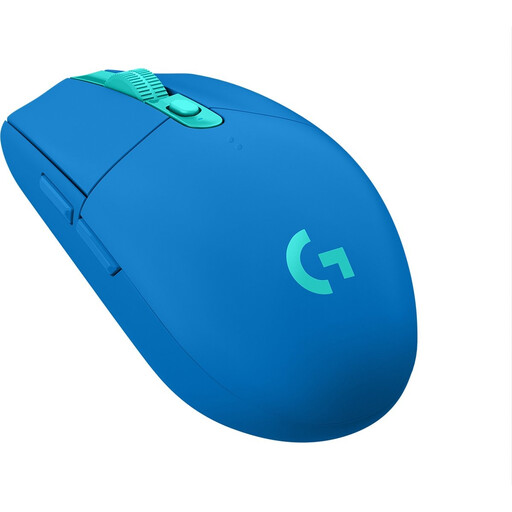 No image available
A good choice if you want to play wirelessly without a dedicated mouse charger; the mouse uses one AA battery and a USB receiver.
Logitech quotes a maximum battery life of 250 hours. Bear in mind that the battery will need replacing; the quoted figure isn’t a guaranteed playing time for every setting.
 No image available
Suited to anyone who wants to play without a mouse cable and choose between wireless connection options.
Razer lists 2.4 GHz and Bluetooth. This model uses an AA battery and a USB dongle, so bear in mind that you’ll need to replace the battery and have a USB port free.
 No image available
A wireless option if you want to aim without a mouse cable.
Before buying, check how the exact version is powered and charged to make sure it suits the connections you have available.
 No image available
A good choice if you want to avoid battery and charging management and prefer a wired mouse.
The USB cable needs desk space and an available port. The product information mentions interchangeable ergonomic parts; check whether the shape and grip suit you.
 No image available
A good choice if you’re looking for a wired mouse for right-handed use and don’t want to manage a mouse battery.
The mouse uses USB Type-A. Bear the cable in mind and check that you have a suitable port free.
No. A wireless mouse with an AA battery doesn’t need a dedicated mouse charger. Logitech lists one AA battery for the G305, while a rechargeable mouse needs a way to charge it. HyperX says the Pulsefire Haste 2 Wireless can be used wired while charging. Check the power method and available connections for the exact model.
According to ZOWIE, the receiver for the EC2-DW also works as a charging station. Set aside a permanent spot for the receiver and check which accessories come with the version you choose; this design isn’t used by all wireless mice.
For a consumer purchase in the Netherlands, contact the seller if a product doesn’t meet the terms of the agreement. The Dutch government states that there is no fixed statutory guarantee period covering all products. For distance purchases, the cooling-off period is usually 14 days; check the seller’s information for the terms that apply to your purchase.
EU rules set requirements for radio equipment placed on the EU market, but this doesn’t prove that an individual listing meets every requirement. The Dutch government says that flat batteries shouldn’t go in general waste and lists places such as shops that sell batteries as collection points. For a specific product, follow the information supplied with that model and listing.