
Player with no spare power socket
Wants to play puzzle adventures without plugging in a separate mouse charger, so compares a USB cable, replaceable batteries and recharging. Logitech G and Trust describe models with different power options.


A wired USB mouse or a model powered by replaceable AA batteries won’t need its own power socket while you play. A rechargeable mouse will need to be powered up later. If you also want to keep a USB port free, choose Bluetooth only if both your computer and the specific mouse model support it. Match the shape and buttons to the way you play your puzzle games.
Wants to play puzzle adventures without plugging in a separate mouse charger, so compares a USB cable, replaceable batteries and recharging. Logitech G and Trust describe models with different power options.
Wants to keep a port free and is checking whether Bluetooth can replace a USB receiver. Logitech G and CHERRY XTRFY describe mice with Bluetooth; also check that your computer supports it.
Looks for controls that are easy to reach and a comfortable shape. Extra programmable buttons are useful only if your game or personal settings make use of them, as the models described by Razer and CHERRY XTRFY demonstrate.
Count power sockets and USB ports separately: a mouse might not need its own power socket but could still occupy a USB port. Then decide whether you’d rather replace batteries, recharge the mouse or use a cable.
| What to consider | What to look for | Who should prioritise this? |
|---|---|---|
| Power without an extra socket | Check whether the mouse uses a USB cable, a replaceable AA battery or a rechargeable battery. If it’s rechargeable, also check whether you can keep playing while it charges. | If I don’t want to plug in a separate charger, I compare a wired connection with a replaceable battery and the charging needs of a rechargeable one. Around 36% of consumers make power without an extra socket their top buying priority. |
| Available USB ports | Check whether the model has Bluetooth and whether your computer supports it. A USB receiver and a wired connection both take up a USB port. | If I want to keep a USB port free, I check whether my computer supports Bluetooth and whether the mouse offers that mode. Around 29% of consumers give keeping a USB port free top priority. |
| Controls for puzzle games | Check whether the scroll wheel and buttons suit the actions you perform in your game. Extra programmable buttons are only relevant if you can use them. | If I mainly want to point, click and scroll, I look for controls that are easy to reach rather than extra features I won’t use. Around 21% of consumers put controls for puzzle games first. |
| Shape and fit | Compare the shape and button placement with your hand and grip; a mouse’s weight or product description can’t guarantee personal comfort. | For longer sessions, I want to know whether the mouse feels comfortable in my hand and whether I can reach the buttons easily. Around 14% of consumers name fit and comfort as their top priority. |
A wired mouse or a wireless mouse with a USB receiver won’t need a separate power socket while you use it, but it will occupy a USB port.
Count both types of connection separately, and choose Bluetooth only if the specific model and your computer support it.
Logitech describes the G305 as connecting via the supplied LIGHTSPEED USB receiver. Don’t assume this model has Bluetooth.
Check the connection mode for the full model with the manufacturer before counting a USB port as free.
Claimed battery life can vary by model and connection mode. Logitech, Trust and other manufacturers present these figures as their own specifications, not as a guarantee of how long the mouse will last for you.
First choose between replaceable batteries and recharging; then compare battery life only for the mode you actually plan to use.
Logitech G describes the G305 as using an AA battery and LIGHTSPEED USB receiver; the G309 also offers Bluetooth.
Trust offers a wired USB-A option with the GXT 113 Felox and a rechargeable wireless mouse with a USB receiver in the GXT 110 Felox.
Razer describes the Basilisk V3 X HyperSpeed as using an AA battery, with Bluetooth, a 2.4GHz mode and nine programmable controls.
CHERRY describes the M50 Wireless as supporting Bluetooth, 2.4GHz and wired use, with a tilting scroll wheel.
SteelSeries describes the Rival 3 Wireless as offering Bluetooth and 2.4GHz connectivity.
This selection focuses on gaming mice with Bluetooth, so you can keep a USB port free if your computer supports Bluetooth. Check each model’s alternative connection options and power source before choosing.
 No image available
Bluetooth can keep a USB port free if your computer supports this connection.
The product name lists RF Wireless, Bluetooth, USB Type-A and a 36000DPI optical sensor.
The description mentions five programmable buttons and a design for left- and right-handed use.
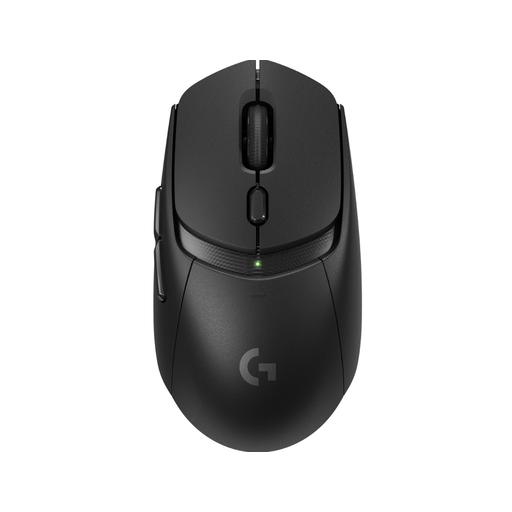 No image available
Bluetooth is an alternative to LIGHTSPEED if you want to keep a USB port free and your computer supports Bluetooth.
According to the product description, the mouse uses one AA battery; LIGHTSPEED mode uses a USB receiver.
The description mentions six programmable buttons. Remember to factor in battery replacement.
 No image available
The product name lists Bluetooth; check that your computer supports it if you don’t want to use a USB port.
The description mentions Bluetooth, 2.4GHz and wired use, as well as replaceable batteries.
It also mentions five customisable buttons and a PAW3311 sensor.
 No image available
Bluetooth can keep a USB port free if your computer supports this connection.
The description lists power from one AA or AAA battery and six programmable buttons.
Connecting via the HyperSpeed dongle requires a USB port; remember to factor in battery replacement.
 No image available
Bluetooth is an alternative to HyperSpeed Wireless if your computer supports Bluetooth and you want to keep a USB port free.
The product description lists an AA battery and nine programmable buttons.
HyperSpeed uses a USB dongle; remember to factor in battery replacement.
Not for the wired USB-A mouse described here: you plug it into a USB port on your computer. Check that the right port is available.
It depends on the model. Trust says this is possible with the GXT 110 Felox; don’t assume it’s the case with another mouse.
No. The Logitech G309 and CHERRY XTRFY M50 Wireless also offer Bluetooth. Logitech describes the G305 as connecting via the supplied LIGHTSPEED USB receiver.
A mouse powered by an AA battery will eventually need a replacement; a rechargeable model needs to be charged. ACM ConsuWijzer explains that your statutory guarantee is separate from any manufacturer’s warranty: if a product doesn’t meet what you could reasonably expect during normal use, the retailer is responsible for providing a solution.
According to ACM ConsuWijzer, online purchases generally come with a statutory cooling-off period of up to 14 days after delivery; check the applicable terms and exceptions. The Dutch Government says that used batteries must not go in general waste and can be taken to collection points.