Start by choosing a mouse shape and grip that suit your hand. Then consider whether a versatile scroll wheel or extra buttons would genuinely help you navigate maps and menus. A wired mouse avoids battery management, while a wireless one gives you more freedom of movement but needs charging. During long sessions, change your posture and take breaks too: choosing the right mouse alone won’t prevent discomfort.
Who is this guide for?
Long-session gamer
You’ll be using your mouse for extended periods, so start by choosing a grip and setup that suit you. A mouse’s shape alone won’t prevent discomfort; for screen-based work, the Arboportaal of the Ministry of Social Affairs and Employment advises, among other things, changing posture and taking micro-breaks.
Map and menu navigator
You spend a lot of time browsing in-game information and want to choose between precise and fast scrolling, perhaps with customisable commands. Check that the game and configuration software support the controls.
Gamer with a flexible setup
You want to move your mouse without a cable getting in the way, and you don’t mind keeping track of connectivity and battery management.
What should you look for?
Start with fit and the controls you’ll use in-game. Then choose between a fixed wired setup and the freedom of movement offered by a wireless mouse.
Wired with a versatile scroll wheel
A good fit if: you play in one place, want to avoid battery management and often scroll through long lists or maps. Logitech describes the wired G502 X as having a wheel with free-spin and ratchet modes; Razer describes adjustable scroll modes for the wired Basilisk V3 35K.
Bear in mind: the cable takes up desk space, and extra features are only useful if you use them.
Wireless for freedom of movement
A good fit if: a cable gets in the way of your movement or desk setup. Razer lists 2.4 GHz, Bluetooth and wired connectivity for the original Basilisk V3 Pro.
Bear in mind: you’ll need to charge it; the battery life quoted by Razer depends on the mode you use.
| What to consider |
What should you look for? |
Who is this most relevant to? |
| Fit and strain |
Try the hand position and reach of the buttons; make sure your arm is supported and your wrist isn’t forced into an awkward position. |
If I play for a long time, I want a comfortable grip and buttons I can reach without straining. Around 36% of consumers prioritise fit and strain during long sessions. |
| Maps and commands |
Try both ratchet and free-spin scrolling; check that the game supports the commands and button settings you want. |
If I navigate maps, lists and menus frequently, I want to scroll quickly and only set up commands that my game supports. Around 29% of consumers prioritise navigation. |
| Wired or wireless |
Check the connection and cable space, or find out the battery life for the wireless mode you want to use. |
If I want to move around without a cable but don’t want to be caught out by an unexpected charge, I weigh up freedom of movement against battery management. Around 21% of consumers prioritise this trade-off. |
| Features and accessories |
Check whether the features you want to use require extra equipment and whether it’s included with the version you’re considering. |
If I mainly want to use commands I genuinely need, I want to know in advance which accessories are required. Around 14% of consumers focus on the features they use and the accessories they need. |
Common buying mistakes
-
Assuming a high DPI figure means more comfort
A maximum DPI figure says nothing by itself about fit or how comfortable it is to navigate in-game menus.
Compare the grip, scroll wheel and button reach first. Treat DPI as an adjustable specification, not a comfort rating.
-
Assuming the Basilisk V3 Pro and V3 Pro 35K are the same version
They are different versions. Razer lists a Focus Pro 30K sensor for the original V3 Pro; the V3 Pro 35K is a different version.
Check the full model name before comparing versions or specifications.
-
Confusing the manufacturer’s warranty with your statutory rights
A manufacturer’s warranty doesn’t replace your statutory right to receive a product that is as it should be from the seller. According to the Dutch government, the Netherlands has no fixed statutory warranty period of two years.
Keep your proof of purchase and, if something goes wrong, check both your statutory rights and the terms of any additional warranty.
Brands to consider
Logitech G
The wired G502 X is worth considering if you play at a fixed setup and want a switchable scroll wheel and customisable controls.
- Logitech lists the wired G502 X as weighing 89 g and having a wheel with free-spin and ratchet modes. The manual describes 13 customisable controls through G HUB.
- These specifications don’t tell you whether the shape will feel comfortable in your hand.
Razer
The wired Basilisk V3 35K offers adjustable scroll modes, while the original wireless Basilisk V3 Pro has several connectivity options.
- Razer describes several scroll modes for the V3 35K and 2.4 GHz, Bluetooth and wired connectivity for the original V3 Pro.
- The original V3 Pro with a 30K sensor is not the same version as the V3 Pro 35K. Quoted battery life depends on the usage setting.
SteelSeries
The Rival 5 is worth considering if you want side buttons; the wired Aerox 3 Snow is a simpler alternative with a lower quoted weight.
- SteelSeries lists nine programmable buttons and a weight of 85 g for the Rival 5, and a weight of 59 g for the wired Aerox 3 Snow.
- The weights and button layouts apply to these specific models and don’t tell you which shape will suit your hand.
HyperX
The Pulsefire Haste 2 Wireless is an option if you’re mainly looking for a lightweight wireless mouse and an extensive button layout isn’t a priority.
- HyperX lists a weight of 61 g and two wireless connection modes for this version.
- A low quoted weight alone doesn’t determine whether the mouse will suit your grip.
Gaming mice at Joybuy
This selection covers wired and wireless gaming mice for navigating maps and menus, with options to suit different control preferences.
 No image available
Razer Basilisk V3 35K wired gaming mouse, 35,000 DPI, 11 buttons, black
A wired option if you want to switch between different scroll modes during long menu sessions; Razer describes adjustable scroll modes for the Basilisk V3 35K.
The product name lists 35,000 DPI and 11 buttons. The cable takes up desk space.
View at Joybuy
 No image available
Logitech G502 HERO wired gaming mouse, 25,600 DPI, right-handed, black
A wired option for a fixed gaming setup if you’re looking for a right-handed model.
The product name lists 25,600 DPI. Check that the shape and button positions suit your hand.
View at Joybuy
 No image available
Logitech G G502 X wired optical gaming mouse, USB Type-A, 25,600 DPI
A wired option if you often switch between precise and fast scrolling. Logitech describes the G502 X as having a wheel with free-spin and ratchet modes.
The product name lists USB Type-A and 25,600 DPI. Logitech’s manual describes 13 customisable controls through G HUB.
View at Joybuy
 No image available
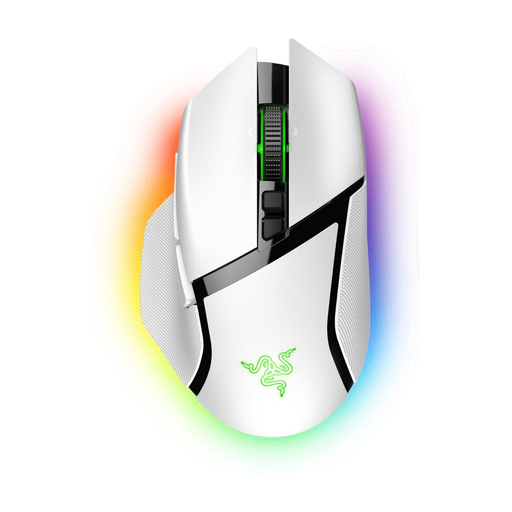
Razer Basilisk V3 Pro wireless gaming mouse, white
A wireless option if you want more freedom of movement. Razer lists 2.4 GHz, Bluetooth and wired connectivity for the original Basilisk V3 Pro.
Check which connection mode you want to use and the battery life you can expect from it.
View at Joybuy
 No image available
Razer Basilisk V3 Pro 35K wireless gaming mouse, black
A wireless version for anyone looking for a Basilisk V3 Pro 35K; the product name also mentions a rechargeable battery.
The 35K version is not the same model as the original Basilisk V3 Pro. Judge the fit based on your own hand and grip.
View at Joybuy
Frequently asked questions
Can a gaming mouse described as ergonomic prevent discomfort during a long session?
No. A product description like that isn’t proof that it prevents discomfort. Check that the shape suits your hand, and vary your posture and activity. For prolonged screen use, the Arboportaal advises taking micro-breaks, among other things. This is a consideration for leisure use, not a legal limit on playing time.
How can you set up extra mouse buttons so they’re useful?
First choose a command that your game lets you assign, then check that you can reach the button without changing your grip. For the G502 X, Logitech’s manual explains how to set up controls through G HUB.
If you buy a gaming mouse online in the Netherlands, do you have a cooling-off period and statutory warranty?
When you buy online from a business, you generally have a 14-day cooling-off period, with exceptions to the general rule according to the Dutch government. You’re also entitled to receive a product that is as it should be from the seller. The Netherlands has no fixed statutory warranty period of two years, and a manufacturer’s warranty doesn’t replace that right.


