Start with a mouse shape that feels comfortable in your hand and sensitivity you can adjust for small clickable objects; an extremely high maximum DPI isn’t automatically necessary. If you want to see your mouse in the dark, check whether its lighting is adjustable. If you choose a wireless mouse, factor charging or battery replacement into your decision too.
Who is this for?
Evening gamer who wants to control the lighting
You play in a dark room and want to be able to spot your mouse without being stuck with a bright light. Check whether the lighting can be adjusted or switched off. For example, Trust confirms that this is possible via software on the GXT 922 Ybar, while Logitech G lists adjustable lighting for the G203 LIGHTSYNC.
Gamer who plays for long sessions
You play for long stretches and prioritise comfort, a suitable shape and easy-to-reach buttons over extra RGB zones or a high maximum DPI. Razer describes the Basilisk V3 as right-handed; try the shape for yourself if possible, as that specification doesn’t tell you whether the mouse will suit your hand.
Gamer who wants a tidy desk
You don’t want a cable trailing across your play area, and are happy to charge the mouse or replace its battery instead. The Logitech G305 LIGHTSPEED uses an AA battery; according to Trust, the Trust GXT 110 Felox is rechargeable.
What should you look for?
| What to consider |
What should you check? |
Who is this important for? |
| Lighting in the dark |
Check whether you can adjust the brightness or effects, switch the lighting off, and whether you need software to do so. |
When I play in a dark room, I want to be able to see my mouse without the light becoming a distraction. Around 29% of consumers give adjustable lighting top priority. |
| Comfort during frequent clicking |
Compare the shape, handedness and button layout; try the grip for yourself if possible. |
For long gaming sessions, I want a shape that suits my hand and buttons that are easy to reach. Around 29% of consumers put hand comfort first. |
| Cursor control and in-game actions |
Check whether the sensitivity is adjustable and the buttons are easy to reach; also see whether you need software. |
When I want to click on small objects accurately, I want to be able to adjust the cursor without unnecessary extra features. Around 24% of consumers prioritise cursor settings and useful buttons. |
| Cable and power |
Check whether the mouse uses a cable, a replaceable battery or a rechargeable battery, and whether you can keep playing while it charges. |
I want to keep my play area free of a mouse cable and don’t mind managing batteries or charging. Around 18% of consumers choose going cable-free as their main consideration. |
Common things to watch out for
-
Assuming RGB zones mean comfortable lighting in a dark room
A range of lighting effects doesn’t necessarily mean you can dim or switch off the lighting. The settings available vary by model and may require software.
Check the manual for the exact mouse and make sure the settings work with your operating system. Trust confirms that the GXT 922 Ybar’s lighting can be switched off via software.
-
Choosing a wireless mouse without checking how it’s powered
The Logitech G305 uses an AA battery, while the Trust GXT 110 Felox is rechargeable. So the way you power your mouse varies by model.
Decide whether you’d rather replace a battery or recharge the mouse. Treat stated battery life as a manufacturer’s figure, not a guarantee of how long it will last for you.
-
Going by a similar product name
An extra word or suffix in a model name can indicate a different version. A similar name alone doesn’t prove that two mice are the same product.
Compare the full model name and relevant specifications before assuming that products are the same version.
Brands to consider
Logitech G
The G203 LIGHTSYNC is wired and has adjustable RGB lighting; the wireless G305 LIGHTSPEED has no RGB.
- Logitech G lists an adjustable range of 200–8.000 DPI for the G203.
- Advanced settings for the G203 require G HUB. The G305 uses an AA battery; features of one model don’t automatically apply to the other.
Trust
The wired GXT 922 Ybar has lighting that can be switched off via software; the wireless GXT 110 Felox is rechargeable and has lighting.
- Trust lists up to 80 hours per charge for the GXT 110 Felox, and says you can keep playing while it charges.
- The Ybar manual describes Windows software for adjusting the lighting and buttons. Don’t assume every operating system offers the same settings.
Razer
The wired Basilisk V3 is a right-handed model with adjustable RGB lighting and programmable buttons.
- Razer specifies 11 buttons and 11 RGB zones for the Basilisk V3.
- Extra buttons aren’t needed for every point-and-click game. Don’t confuse the Basilisk V3 with the wireless V3 Pro.
SteelSeries
According to SteelSeries, the wired Rival 3 has a right-handed shape and three adjustable RGB zones.
- SteelSeries lists a sensor range of 200–8.500 CPI and settings via Engine for this model.
- These manufacturer specifications don’t tell you on their own whether the shape will feel comfortable in your hand.
Corsair
The wired HARPOON RGB PRO is a model with a contoured grip, lighting and programmable buttons.
- Corsair lists a weight of 85 g, two RGB zones and six programmable buttons for the HARPOON RGB PRO.
- The product specifications described are for a US version. Before buying, check the exact Dutch version and software compatibility.
Joybuy product picks
This selection includes wired mice with adjustable lighting, wireless models with or without RGB, and a mouse with several connectivity options.
 No image available
Shark Velocity M71 wireless gaming mouse, PAW3335, 16.000 DPI, RGB, 8 programmable buttons, black
A wireless option if you’re looking for RGB lighting and several programmable buttons.
The product name lists a PAW3335 sensor, 16.000 DPI and eight programmable buttons.
View at Joybuy
 No image available
NAXSIR 3-in-1 gaming mouse, wired, 2,4G wireless and Bluetooth, 12.800 DPI, 7 programmable macro buttons, RGB, black
An option if you want to switch between a cable and wireless connections, with adjustable lighting.
The product description lists six DPI levels, seven programmable buttons and lighting that can be adjusted or switched off.
The product name lists wired, 2,4G wireless and Bluetooth connections.
View at Joybuy
 No image available
AJAZZ AJ159 PRO wireless gaming mouse, PAW3395, 26K DPI, 2,4G, USB-C and Bluetooth, 400 mAh, 56 g, RGB, white
A wireless option with lighting and several listed connectivity options.
The product name lists a PAW3395 sensor, 26K DPI, 2,4G, USB-C and Bluetooth, a 400 mAh battery capacity and a weight of 56 g.
View at Joybuy
 No image available
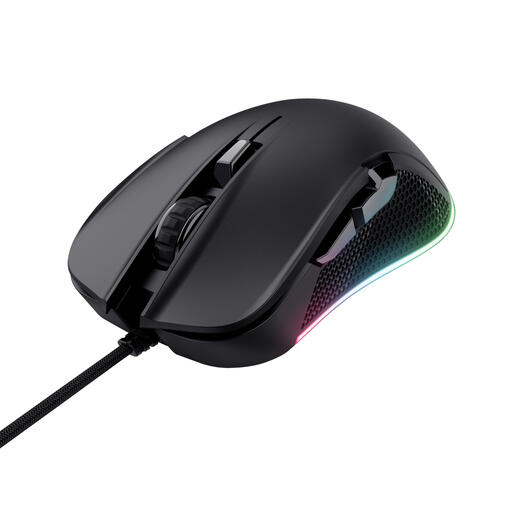
Trust GXT 922 Ybar wired gaming mouse, right-handed, USB Type-A, 7.200 DPI
A wired option if you want to be able to switch off the RGB lighting; Trust says this requires software for Windows.
The product information lists an optical sensor and 7.200 DPI. According to Trust, you need software to switch off the lighting.
View at Joybuy
 No image available
Viper V3 Pro, black
A wireless option if you’d rather not have lighting on your mouse.
The product description lists eight programmable buttons, 35.000 DPI and 8K HyperPolling.
View at Joybuy
Frequently asked questions
Do you need the highest possible DPI for point-and-click adventures?
No. What matters more is being able to set the sensitivity to suit your screen and hand movements. Logitech G lists an adjustable range of 200–8.000 DPI for the G203 LIGHTSYNC; the maximum doesn’t determine which setting will work for you.
Can you switch the lighting off if it’s distracting in the dark?
It depends on the model. Trust confirms that you can switch off the GXT 922 Ybar’s lighting via software. For another mouse, check which lighting settings are available and whether the software works with your operating system.
What should you set up after connecting the mouse?
First check that the cursor and main buttons work, then adjust the sensitivity and lighting to suit you. Trust describes a USB connection and separate software for further settings on the GXT 922 Ybar; the manual says this software is for Windows.
What if a mouse you bought online is faulty or uncomfortable to use?
For a faulty product, the Dutch government says the seller is your point of contact for an appropriate solution, such as a free repair or replacement where applicable. For online purchases from a business, you’ll also usually have a 14-day cooling-off period; check the terms and any exceptions that apply to your purchase.
How can you dispose of an old mouse or a flat battery in the Netherlands?
When buying a similar new device, a private individual can return an old electrical appliance free of charge via the shop or online retailer. According to the Dutch government, loose flat batteries should be taken to a collection point, not put in the bin.


