Start with the actions you repeat most often. Programmable buttons are especially useful if your map editor supports mouse button assignments, while a scroll wheel with stepped and free-spin modes can suit a mix of precise and rapid navigation. Then check that the shape and button layout suit your hand. Adjustable RGB lighting can make your mouse easier to spot in a dark room, but it’s no substitute for suitable lighting at your workstation.
Who is this for?
Map-maker who uses lots of tool shortcuts
If you switch tools often, check whether your map editor lets you assign shortcuts to mouse buttons and whether you can reach those buttons comfortably. Razer, SteelSeries and Corsair describe programmable controls on the models mentioned here.
Large-map creator
If you spend a lot of time navigating maps and menus, consider whether you prefer scrolling in clear steps or freely through longer sections. Razer and Logitech G both describe different scroll modes on their wired models mentioned here.
Map-maker with long evening sessions
For long sessions, hand comfort and easy-to-reach buttons matter. Arboportaal notes that poor ambient lighting can make a screen harder to read, so lighting on your mouse is no substitute for suitable room lighting.
What should you look for when choosing?
| What to consider |
What should you check? |
Who will find this most important? |
| Buttons and shortcuts |
Check whether your editor supports mouse button assignments and whether you can reach the buttons without pressing the wrong one. |
If I switch tools often, I want frequently used actions close to hand. Around 31% of consumers give programmable buttons and shortcuts top priority. |
| Scrolling through maps and menus |
Compare stepped and free-spin scrolling, and see how your editor responds to the wheel input. |
When I switch between small steps and longer navigation, I want to adjust the scroll wheel to suit the task. Around 25% of consumers prioritise precise, fast navigation. |
| Hand comfort during long sessions |
Consider the shape, your grip and how easily you can reach the side buttons; a stated weight doesn’t guarantee personal comfort. |
If I work at my screen for a long time, I want a mouse that suits my hand and how I hold it. Around 19% of consumers put hand comfort ahead of other buying considerations. |
| Lighting in a dark room |
Check whether the mouse lighting can be adjusted or turned off, and make sure your screen is easy to read and your room is suitably lit. |
If I work in a dark room, I want to adjust the mouse lighting to suit me without compromising a well-lit workspace. Around 13% of consumers give adjustable mouse lighting top priority. |
| Wired or wireless |
Check your computer’s connection options and which connection the exact model uses. |
When a cable gets in the way of moving my mouse across the desk, I want to know whether a wireless mouse will suit my computer and how I use it. Around 12% of consumers put freedom of movement without a mouse cable first. |
Common buying mistakes
-
Assuming a high DPI figure means more precise map editing
A stated sensor value doesn’t tell you whether the button layout and scroll behaviour suit your editing tasks.
First, compare the actions you repeat with the buttons you can reach and the scroll wheel. Then assess the sensor settings in your own use.
-
Relying on RGB lighting to fix a dark workspace
Arboportaal lists poor ambient lighting as a possible cause of reduced screen readability. Mouse lighting won’t change that.
Adjust the mouse lighting to suit you, but also make sure your screen is easy to read and your workspace is suitably lit.
-
Treating similarly named variants as the same product
Wired, wireless and RGB versions can differ. Product listings for the Razer Basilisk V3 35K also vary in the stated number of buttons and controls.
Before buying, check the full model name, connection type and specifications for the exact version.
Brands to consider
Razer
The wired Basilisk V3 35K is worth considering if you want to combine programmable controls, different scroll modes and adjustable RGB lighting.
- Razer describes three scroll modes and 13 controls on this version.
- It’s a wired model for right-handed use; the specifications don’t prove it offers an advantage in any specific map editor.
Logitech G
The wired G502 X suits those who value switchable scrolling and customisable controls.
- Logitech G describes free-spin and stepped scrolling, tilt controls and a stated weight of 89 grams for the wired G502 X.
- Don’t confuse this version with the wireless G502 X Plus with RGB.
SteelSeries
The Aerox 9 Wireless is worth considering if you want lots of assignable controls on a wireless mouse.
- SteelSeries specifies 18 programmable controls, including a panel with 12 side buttons.
- Whether the panel feels comfortable depends on your hand and how many assignments you actually use.
Corsair
The Scimitar Elite Wireless shows what an adjustable thumb-button panel can offer for frequently repeated commands.
- Corsair specifies 16 programmable buttons and a movable panel with 12 side buttons.
- The product description consulted is for a US version; check the exact version you want to buy.
Gaming mice at Joybuy
This selection includes wired and wireless gaming mice with programmable buttons for map-making tasks you repeat often. Compare the connection type and number of buttons with your editor and how you use it.
 No image available
Shark Velocity M71 Wireless Gaming Mouse
The eight programmable buttons may be useful if your map editor supports mouse button assignments.
Wireless; PAW3335 sensor; 16,000 DPI; RGB lighting.
View at Joybuy
 No image available
AULA SC620 Wireless Gaming Mouse
The seven programmable buttons are useful if your editor supports mouse button assignments.
Bluetooth 5.0, 2.4 GHz and USB-C; PAW3311 sensor; 12,000 DPI; 67 g; 400 mAh battery; RGB lighting.
View at Joybuy
 No image available
RAPOO VT9Pro 4K Wireless Gaming Mouse
The ten programmable buttons may suit frequently repeated actions if your editor supports mouse button assignments.
Wireless; PAW 3398 sensor; 26,000 DPI; 10 programmable buttons.
View at Joybuy
 No image available
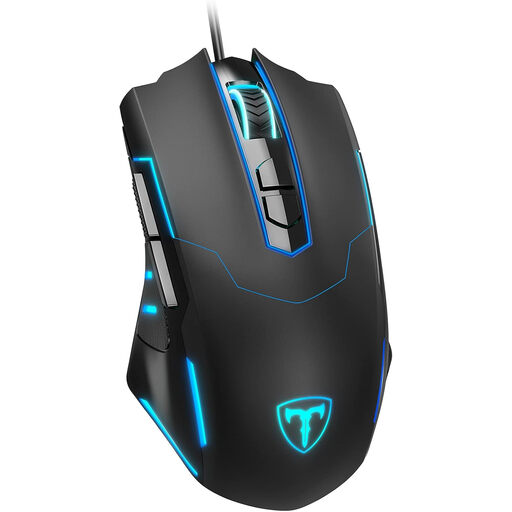
ET Gaming Mouse Wired
The seven programmable buttons can be assigned to frequently repeated actions if your editor supports this.
Wired; adjustable 7,200 DPI; seven programmable buttons; RGB lighting.
View at Joybuy
 No image available
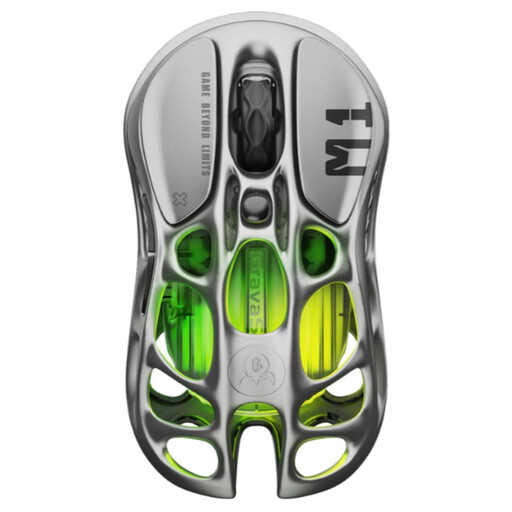
GravaStar Mercury M1 Wireless Gaming Mouse
The five programmable buttons may be useful if your editor supports mouse button assignments.
Wireless, Bluetooth and wired; PAW3395 sensor; 26,000 DPI; five programmable buttons; RGB lighting.
According to the product description, the stated 4,000 Hz polling rate requires a 4K receiver, sold separately.
View at Joybuy
Frequently asked questions
Do extra mouse buttons automatically work as shortcuts in your map editor?
No. The number of buttons doesn’t tell you whether they’ll work as shortcuts. Check your editor and the accompanying mouse software to see whether you can assign the keys or actions you want.
Do you need a mouse with RGB lighting in a dark room?
Not necessarily. Razer describes adjustable lighting zones on the Basilisk V3 35K, but Arboportaal notes that poor ambient lighting can make a screen harder to read. Consider mouse lighting and workspace lighting separately.
What should you consider when setting up and maintaining your mouse?
Check that your computer supports the connection used by the exact version and that any required configuration software is available. Keep the sensor surface clean; if you have a wireless mouse, also check how it’s powered or charged.
What if you’re unhappy with a mouse bought online or it breaks soon after purchase?
According to the Dutch government, many qualifying distance purchases from a business come with a 14-day cooling-off period. You’re also entitled to a product that works properly if the product is faulty; there’s no fixed statutory guarantee period, and the seller is your point of contact. Check the terms that apply to your purchase.


