What should you consider when buying?
Lenovo Netherlands describes programmable buttons as a way to assign functions. You should also consider fit, lighting and the power supply that best suits how you use the mouse.
| What to consider |
What to look for |
Who is this important for? |
| Fit and aiming |
Compare the shape, dimensions, weight and adjustable sensitivity. If possible, try the mouse with your usual grip. |
If I look around and aim often, I want a mouse that feels comfortable to hold and control. For consumers who prioritise fit and control, this accounts for around 37% of the decision. |
| Buttons for commands |
Check the number and position of the buttons, the software required and the game’s rules on assigned actions. |
If I often use ping or push-to-talk while exploring, I want those actions to be easy to reach. Around 27% of consumers put map and team commands like these first. |
| Lighting |
Check whether the lighting can be adjusted or switched off, and which settings are retained when the software isn’t running. |
If I play in a dark room, I want to decide whether the mouse lights up. Lighting control is the top priority for around 18% of consumers. |
| Cable and power |
Check the connection type, the port required and whether the model uses batteries or a rechargeable battery. |
If a cable gets in the way of my movement, I want to know what wireless connection and power supply the model uses. This is the top priority for around 18% of consumers who want to move without a cable. |
| Support if something goes wrong |
Check who the seller is and how to contact them if the mouse doesn’t work properly. |
If I have a problem, I want to know who to contact and what steps I can take. Around 8% of consumers put support in the event of a fault first. |
Gaming mice at Joybuy
This selection includes wired mice with different control and lighting options, plus a wireless option. Start by considering fit and sensitivity, then decide which extra features suit the way you explore maps.
 No image available
Razer Basilisk V3 35K wired gaming mouse
The wired version may suit you if you want to use buttons for commands.
The product name lists 11 buttons and 35,000 DPI.
View at Joybuy
 No image available
HyperX Pulsefire Saga wired gaming mouse
A wired option worth considering if you want RGB lighting and adjustable sensitivity.
The product name lists RGB lighting and 26,000 DPI.
View at Joybuy
 No image available
Logitech G G309 LIGHTSPEED wireless gaming mouse
The wireless version is an option if you don’t want a cable getting in the way as you move.
Before choosing, check which power supply and connection options suit your set-up.
View at Joybuy
 No image available
Logitech G G502 X wired gaming mouse
The right-handed version may suit you if you’re looking for a wired mouse with a USB Type-A connection.
The product name lists optical tracking and 25,600 DPI.
View at Joybuy
 No image available
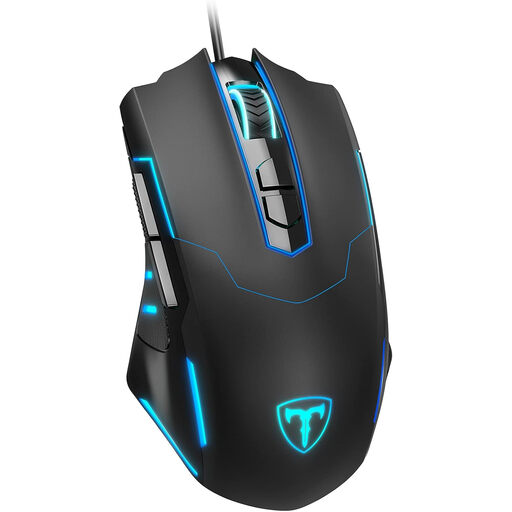
ET wired gaming mouse
A wired option worth considering if you want programmable buttons and RGB lighting.
The product name lists seven programmable buttons, 7,200 DPI and breathing RGB lighting.
View at Joybuy
Frequently asked questions
How should you set up a mouse before exploring a new multiplayer map?
Choose a sensitivity that lets you look around with control, and assign only frequently used, permitted actions to buttons you can reach easily. Which settings are saved on the mouse varies by model; SteelSeries describes the saving conditions specifically for the Rival 3.
Will a switched-off RGB setting stay that way when the software isn’t open?
It depends on the model. For the Rival 3, SteelSeries says that the lighting can be saved as switched off when all zones are off, but also notes that Engine plays a role in applying lighting changes. Check the instructions for your exact model.
What can you do if a gaming mouse breaks too soon during normal use?
Contact the seller if the product doesn’t provide what you could reasonably expect. According to ACM ConsuWijzer, depending on the circumstances, you may be entitled to a free repair, replacement or refund; a shorter commercial guarantee doesn’t take away your statutory rights.
How can you dispose of an old mouse or used AA battery in the Netherlands?
For old electrical appliances, the Dutch government lists options including the old-for-new scheme when buying a similar appliance, collection points and your local recycling centre. Don’t put used batteries in general waste; you can take them to a shop or supermarket that sells batteries, for example.
Is Razer Synapse 4 still fully supported on Windows 10?
No, full support ended on 14 October 2026. Razer reported this on 21 October 2026. The software may still work, but Razer no longer guarantees full functionality or fixes problems that affect Windows 10 only.


