What should you look for?
Start with the control you use most often: navigating the editor or repeating commands. Then consider how the mouse feels in your hand and whether you’d prefer a cable or a rechargeable battery.
| What to consider |
What should you check? |
Who is it for? |
| Repeated shortcuts |
Check whether your editor accepts assigned inputs, whether the buttons are easy to reach and what software you’ll need to assign them. |
If you often use the same editor commands, you may want to control them from your mouse; around 40% of consumers prioritise easily accessible shortcuts. |
| Map navigation |
Test the middle click and scroll wheel in your editor. The Blender Foundation describes using the middle mouse button and scroll wheel in Blender. |
If you do a lot of selecting, zooming and panning, these controls matter more than extra buttons; around 30% of consumers put navigation first. |
| How it feels in your hand |
Assess the shape, button reach and arm support alongside your grip and workstation setup. Arboportaal highlights repetitive actions and a static posture as aspects of computer work. |
For long sessions, you’ll want a mouse you can hold and use comfortably, rather than basing your choice on a product claim alone; around 20% of consumers prioritise how a mouse feels in the hand. |
| Wireless use |
Check the connection type, the port you’ll need, how it charges and which model the stated battery life applies to. |
If you’d rather keep your desk free of a mouse cable, weigh that convenience against having to manage a battery; around 10% of consumers say going wireless is their main priority. |
Gaming mice at Joybuy
This selection includes wired and wireless gaming mice for map navigation and assigning commands. Compare the features of each model to see how well they suit your editor and workstation.
 No image available
Logitech G502 HERO wired gaming mouse, 25,600 DPI
A wired model to consider if you want to assign frequently used commands to mouse buttons.
Logitech lists 11 programmable buttons for the G502 HERO. The product name specifies 25,600 DPI and a right-handed design.
View at Joybuy
 No image available
HyperX Pulsefire Saga wired gaming mouse, 26,000 DPI
A wired option to include in your comparison if you don’t need a wireless connection.
The product name specifies RGB lighting and 26,000 DPI. Check which button settings and software are available for this model and your editor.
View at Joybuy
 No image available
Logitech G G502 X gaming mouse, USB Type-A, 25,600 DPI
A wired model to consider if you want to compare navigation controls and extra mouse features.
The product name specifies USB Type-A, an optical sensor and 25,600 DPI. For the G502 X, Logitech describes a two-mode scroll wheel and a repositionable or removable dpi switch button.
View at Joybuy
 No image available
Razer Basilisk V3 Pro 35K wireless gaming mouse
A wireless model to compare if you’d rather work without a mouse cable.
The product name specifies 35K. Check the connection options, software and features required by your editor for this exact model.
View at Joybuy
 No image available
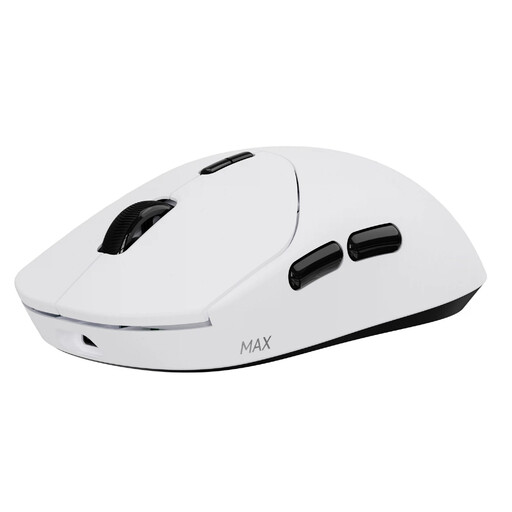
RAPOO VT2 MAX wireless gaming mouse, white
A wireless option to consider if you want to assign commands to extra mouse buttons.
The product name specifies 10 programmable buttons and macro support. Check which software and connection options work with your computer and editor.
View at Joybuy
Frequently asked questions
How can I tell whether extra mouse buttons will work in my map editor?
Check your editor’s shortcut settings and try a frequently used command with the mouse software. Corsair describes assigning keys and macros in iCUE for the Scimitar RGB Elite; this doesn’t automatically confirm compatibility with every editor.
Do I need a mouse with lots of side buttons for Blender?
No, lots of side buttons aren’t essential for the basic controls described by Blender. The Blender Foundation recommends a three-button mouse with a scroll wheel; extra buttons are a separate option for shortcuts you use frequently.
What if a mouse I buy online doesn’t feel comfortable to hold?
For online purchases from a business in the Netherlands, you’ll often have a 14-day cooling-off period, according to the Dutch government. Check the terms that apply to your purchase; any longer returns period offered by a retailer is a separate arrangement.
Is the legal guarantee in the Netherlands always exactly two years?
No. According to the Dutch government, there’s no fixed legal guarantee period in the Netherlands: you’re entitled to a product that works properly, and the retailer is your point of contact if something goes wrong. Any manufacturer’s or retailer’s guarantee is in addition to this.
Are there rules about using a mouse for paid work from home?
According to Arboportaal, employers must follow rules on safe computer work and alternating it with other work or a break. These obligations depend on the employment relationship and don’t prescribe a specific mouse model for private buyers.


