
Gaming with few spare USB ports
You’d prefer not to use a USB receiver. Check whether your computer supports Bluetooth before choosing this connection.


If you have few plug sockets, a wired USB mouse could still be a good fit: it doesn’t need a separate mouse charger, but it does use a USB port on your computer. Bluetooth can free up a USB port if your computer supports it. Then decide whether you’d rather replace a battery, recharge your mouse or avoid managing batteries altogether.
You’d prefer not to use a USB receiver. Check whether your computer supports Bluetooth before choosing this connection.
You don’t want to stop halfway through a detective game to recharge. Compare a mouse with a replaceable battery against a rechargeable model that can be used wired while charging.
You have a USB port to spare and would rather avoid batteries, charging schedules or a separate receiver. Also look for a shape and button layout that suit your hand.
| Buying concern | What should you check? | Who does this matter most to? |
|---|---|---|
| Connection and available ports | Count your spare USB ports and check for Bluetooth support and the connection required by any receiver. | If I’m short on USB ports, I want to know whether I can play without a receiver. Around 33% of consumers prioritise a connection that works with the ports they have available. |
| Battery or charging | Check the battery type, the stated battery life for each connection mode and whether you can play wired while charging. | I don’t want the battery to run out unexpectedly during a long gaming session. Around 27% of consumers prioritise avoiding or planning for a loss of power. |
| Grip and button controls | Check the dimensions, grip and button placement; compare the weight using the same battery configuration. | If I’m clicking lots of clues, I want to hold the mouse comfortably and reach the buttons easily. Around 20% of consumers choose mainly on grip and controls. |
| Ease of setup | Check whether the features you want require extra software and whether the included connection is compatible with your computer. | I’d rather not have to plan charging or deal with extra settings I don’t need. Around 20% of consumers prioritise a simple setup above all. |
A wired USB mouse doesn’t need its own mains adapter, but it does use a port on your computer. Bluetooth can free up that port if your computer supports it.
Check separately how many plug sockets and USB ports you have available before choosing between wired and wireless.
SteelSeries states that the Aerox 3 Wireless offers up to 200 hours over Bluetooth and 80 hours over 2.4 GHz. Razer bases the stated battery life of the Orochi V2 on an AA lithium battery.
Only compare manufacturers’ figures when you know the connection mode and battery configuration, and bear in mind that your own battery life may vary.
Razer lists the Orochi V2 at less than 60 g without a battery. Logitech G gives the G309’s weight as 86 g with one AA battery; its lower weight applies only when used with the separate POWERPLAY system.
Compare weights using the power configuration you actually plan to use.
The G203 is wired, while the G309 offers Bluetooth and LIGHTSPEED with battery power.
The Orochi V2 offers Bluetooth and 2.4 GHz for anyone who wants to switch between connections.
The Aerox 3 Wireless offers Bluetooth and 2.4 GHz, with a rechargeable battery.
The Pulsefire Haste 2 Wireless combines Bluetooth and 2.4 GHz with the option to play wired while charging.
This selection includes wired USB mice and wireless models with Bluetooth or other wireless connection options, to suit different preferences around ports, batteries and charging.
 Image unavailable
A wired USB mouse for anyone who doesn’t want to use a separate mouse battery or wireless receiver.
The product title lists 35,000 DPI. Wired use requires a spare USB port.
 Image unavailable
A wired USB mouse for a setup with a spare USB port and no need to manage batteries.
The product description lists seven programmable buttons and a PMW3360 sensor. The cable limits where you can position it.
 Image unavailable
Worth considering if your computer supports Bluetooth and you want to weigh up different connection options.
The product title lists RF wireless, Bluetooth and USB Type-A, as well as a 36,000 DPI optical sensor.
 Image unavailable
A wired USB mouse for anyone who doesn’t want to recharge or replace a battery.
The product title lists RGB lighting and 26,000 DPI. The product description mentions interchangeable ergonomic parts and six possible grip combinations.
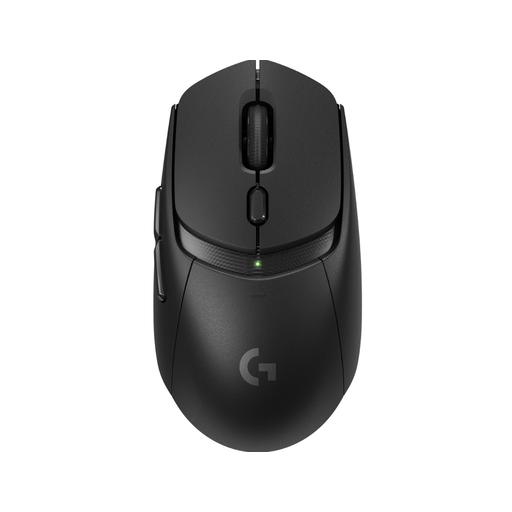 Image unavailable
Worth considering if your computer supports Bluetooth and you want to keep a USB port free for other uses.
The model specifications list Bluetooth and power from a single AA battery. Logitech G gives its weight as 86 g with that battery; the battery will eventually need replacing.
No, it depends on the model’s power source and connection. According to their manufacturers, the Logitech G309 and Razer Orochi V2 run on a battery; their Bluetooth modes don’t use a separate USB receiver while you play. A rechargeable model will eventually need to be charged, though. Also check whether your computer has Bluetooth and how many USB ports are free.
It depends on the model. HyperX states that the Pulsefire Haste 2 Wireless can be used as a wired mouse while charging via its cable. For other models, check the manual rather than assuming this is possible.
According to the Dutch government, used batteries must not be put in the bin. Take them to a collection point, such as a shop that sells batteries. You can take a discarded electrical mouse to a collection point, too. If you’re a private individual buying a similar new appliance, an old-for-new take-back scheme may also apply.
According to the Dutch government, when you buy online from a business, you’ll generally have 14 days to change your mind, although exceptions apply. There is no fixed statutory warranty period in the Netherlands; a commercial manufacturer’s warranty does not replace your statutory rights.