
Gamer with limited connections
You want to play tactical games at a desk with few power sockets or free USB ports. It helps to work out first which type of connection is actually in short supply.


With few power sockets available, both a wired and a wireless mouse can work without a dedicated mains adapter; the main thing is to check that you have a suitable USB port available. Choose 2.4 GHz if you want to play wirelessly and can connect a USB receiver, Bluetooth if you want to keep a USB port free and your computer supports Bluetooth, or a wired mouse if you don’t want to manage a battery. Also consider how much room you have for a cable, the shape of the mouse and the battery life in your chosen connection mode.
You want to play tactical games at a desk with few power sockets or free USB ports. It helps to work out first which type of connection is actually in short supply.
You want room to make quick mouse movements, so you compare the receiver, the shape of the mouse and the stated battery life for each connection mode.
You don’t want to plan charging breaks, so you compare a wired mouse with a wireless model that uses replaceable batteries.
| What to consider | What should you check? | Who is this most relevant to? |
|---|---|---|
| Connections and power | Count free USB ports separately from power sockets. Check that the receiver will fit and that your computer supports Bluetooth. | If you have few power sockets or USB ports, you’ll want to know which connection the mouse actually needs. Around 29% of consumers say access to free connections is their main concern. |
| Freedom of movement and connection | Check whether the exact model supports 2.4 GHz via a receiver and whether its shape suits your hand and grip. | If you want to move quickly during tactical games, you may find a cable gets in the way, but you’ll also need to weigh up the connection and the shape of the mouse. Around 29% of consumers put freedom of movement first. |
| Charging or replacing batteries | Compare the stated battery life for the mode you play in. Also check the battery type and whether you can keep playing while it charges. | If you don’t want to plan a charging break, look at the battery type and battery life in your chosen play mode. Around 21% of consumers make avoiding charging or battery interruptions their main priority. |
| Comfort and control | Compare the shape, grip and button placement; extra buttons are only useful if you’ll use them. | If you’re looking for a mouse that feels comfortable in your hand, choose a shape and controls that suit your hand and the game you play. Around 21% of consumers put comfort in the hand first. |
A USB receiver and a wired mouse both need a connection to your computer. Bluetooth can free up a USB port, but it only works if both your computer and the mouse support it.
Count your available power sockets and USB ports separately, then check which connection the mouse you choose needs.
Depending on the ports on your computer, you may need an adapter or hub.
SteelSeries states that the Aerox 3 Wireless offers up to 200 hours via Bluetooth and 80 hours via 2.4 GHz. Battery life therefore depends on the mode you choose.
Compare the stated battery life for the connection and settings you actually plan to use.
The wired SteelSeries Aerox 3 is a different version from the Aerox 3 Wireless. Model names such as Razer Basilisk V3 Pro and Basilisk V3 Pro 35K also refer to different versions.
Before buying, check the full model name, connection type and specifications for the version you’re considering.
According to ACM ConsuWijzer, statutory warranty in the Netherlands has no fixed duration and is separate from any commercial warranty.
Compare the terms of an extended warranty package with your statutory rights; if your product develops a fault, you can ask the seller for an appropriate solution.
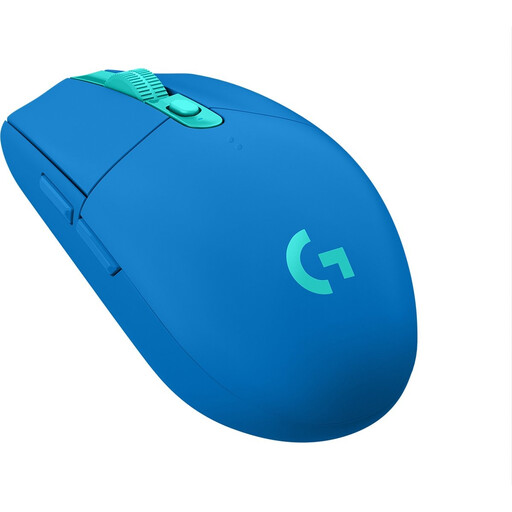
The G305 is a wireless option powered by a single AA battery, for anyone who doesn’t want to charge their mouse.
The Viper V3 Pro and Basilisk V3 Pro are designed with different priorities in mind: a lightweight shape versus an ergonomic shape with extra buttons.
The Aerox range includes both a wired Aerox 3 and an Aerox 3 Wireless (2022); check which version you’re looking at.
The Pulsefire Haste 2 Wireless is a rechargeable option with several connection choices.
The Joybuy products below are wireless mice for anyone who wants to avoid a cable and is considering different connection or power options.
 No image available
An option to consider if you want to choose between wireless and USB use; your computer needs to support Bluetooth for that connection.
The product name lists RF wireless, Bluetooth, USB Type-A and up to 36,000 DPI.
 No image available
Worth a look if you’re considering a gaming mouse with a replaceable battery.
The product name lists a PAW3311 sensor, up to 24,000 DPI, a polling rate of up to 1 kHz and a 300 mAh battery.
 No image available
An option if you want to avoid charging and don’t mind replacing an AA battery.
Logitech states that the G305 offers up to 250 hours of use from a single AA battery. The LIGHTSPEED receiver needs a free USB port.
 No image available
An option to consider if you want to play wirelessly without planning a charging break and would prefer to use an AA battery.
Check whether your chosen connection mode needs a free USB port.
 No image available
A wireless option to consider if quick mouse movements are important to you and you’re looking for a lightweight mouse.
According to Razer, the black Viper V3 Pro weighs 54 g. This stated weight applies to this colour variant.
Not necessarily: the Logitech G305 runs on an AA battery, while the SteelSeries Aerox 3 Wireless has a rechargeable battery. Check separately whether your chosen connection needs a free USB port for a receiver, and how to charge a rechargeable model.
Only if your computer supports Bluetooth and the exact mouse model has Bluetooth. The SteelSeries Aerox 3 Wireless and HyperX Pulsefire Haste 2 Wireless offer this mode; also check the battery life for the connection you want to use.
Before buying, check whether the exact model supports wired use while charging. HyperX lists this feature for the Pulsefire Haste 2 Wireless; you’ll need a cable and a suitable USB connection at the time.
No. According to ACM ConsuWijzer, statutory warranty in the Netherlands has no fixed duration: with normal use, a product should last for as long as you can reasonably expect it to. If a product develops a fault too soon, the seller is responsible for providing an appropriate solution.
According to the Dutch government, used batteries shouldn’t go in the bin; take them to a collection point, such as a shop that sells batteries. You can also hand in an old electric mouse when buying a similar new device, or take it to a local recycling centre.