
Vandaag of morgen in huis

Kwaliteit gegarandeerd

Welkomstaanbiedingen ontgrendelen: GRATIS bezorging | Tot 80% korting | Gratis 30 dagen JoyPlus-proefperiode
Download de app
A gaming mouse needs to do more than respond quickly. Its weight, shape, connection and available buttons all affect how comfortable it is during a long gaming session. A model that looks impressive on paper may not suit your hand, grip or favourite games as well in practice.
That is why it is worth looking beyond DPI or RGB lighting alone. Below, you can find out which specifications really matter and which common purchasing mistakes you can avoid.
A gaming mouse with a high DPI setting can offer high sensor sensitivity, but that does not automatically mean you will play more accurately. Many PC gamers actually use a lower DPI in FPS games alongside a larger mouse mat. Check whether the DPI can be adjusted and whether you can save multiple sensitivity levels.
Also watch out for conflicting product information. A product page may, for example, mention both 32,000 and 44,000 DPI. In that case, check the official specification table and the software settings before making a purchase.
RGB lighting does not change the click response, sensor or shape. It is mainly an aesthetic feature. Check whether the lighting can be switched off and whether the accompanying software is required. A model without lighting may therefore be the more sensible choice if performance and battery life are your main priorities.
A wireless gaming mouse usually works via a 2.4GHz receiver, Bluetooth or both. 2.4GHz is generally intended for a fast connection to a PC, while Bluetooth can be useful for laptops and other devices. Also check whether the mouse uses a built-in rechargeable battery or a replaceable battery, how charging works and whether you can continue playing via cable while it is charging.
DPI indicates how sensitively the mouse responds to movement. Adjustable DPI is more important than an extremely high maximum. For everyday use, strategy games and action games, a wide adjustment range can be useful. For an FPS gaming mouse, stable tracking, a suitable shape and predictable response are particularly important.
The polling rate indicates how often the mouse sends data to the computer. 1,000 Hz is a common value. Higher rates, such as 4,000 or 8,000 Hz, place greater demands on the computer and may require additional software or a suitable USB connection. According to the product information provided by various brands, these settings are designed to deliver faster reporting, but they do not replace properly adjusted in-game sensitivity.
A lightweight gaming mouse weighing around 50 to 65 grams can be easier to move during fast movements. A heavier model may feel more stable and sometimes provides room for more buttons or a thumb rest.
Pay attention to the dimensions in millimetres and compare them with your hand size. A compact mouse is often better suited to smaller hands or a claw grip. An ergonomic gaming mouse is usually shaped for one hand and can feel comfortable with a palm grip, but it is not always suitable for left-handed users.
Programmable buttons are useful for MMO games, simulations and productivity. For an esports mouse for FPS games, five or six buttons are often sufficient. More buttons usually also mean a larger or heavier design.
Check in advance:
A wired gaming mouse does not have a battery and connects directly via USB. A wireless gaming mouse gives you greater freedom of movement, but requires you to pay attention to charging, the receiver and battery management.
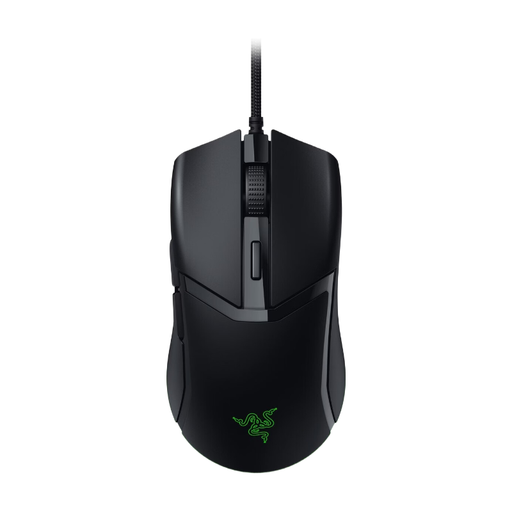
Why it suits this profile: This wired gaming mouse is easy to use via USB and does not require a battery or wireless receiver. That makes it a straightforward choice for a first gaming setup.
The 8,500 DPI can be adjusted in 50 DPI increments, so you do not have to play at the maximum setting. The cable prevents interruptions for charging.
58 grams, six buttons, programmable functions and Razer Chroma RGB according to the product listing.

Why it suits this profile: The low weight and wireless LIGHTSPEED connection are ideal for competitive players who want to lift and reposition the mouse quickly.
The product listing specifies a weight of 60 grams, USB-C charging and a rechargeable battery. Before buying, however, check the desired DPI and polling settings in Logitech G HUB.
Optical HERO sensor, wireless connection, five buttons and a stated sensor resolution of up to 44,000 DPI.

Why it suits this profile: The ergonomic shape, thumb support and large number of buttons suit MMO players and users who also want to use the same mouse for work.
The extra features serve a specific purpose: there are eleven programmable buttons. Do bear in mind the stated weight of around 112 grams.
Wireless via 2.4GHz or Bluetooth, usable with a cable, 35,000 DPI according to the specifications and Razer Chroma RGB.

Why it suits this profile: This right-handed wireless model combines an ergonomic shape with a relatively low weight for players who make frequent, fast aiming movements.
The battery and USB-C connection make charging management clearer than with a mouse that uses loose batteries. The shape is specifically designed for right-handed use.
63 grams, 30,000 DPI according to the product information, programmable buttons and use via cable or wireless connection.
We have put together a complete, up-to-date list of products that fully meet these strict selection criteria and the applicable European safety regulations.
It can be, provided the mouse has a stable 2.4GHz connection and a suitable polling rate. Also check the battery life, the weight of the receiver and whether a USB extension cable is included. Bluetooth is useful for flexible everyday use, but it is not offered as the primary gaming connection on every model.
Its lifespan depends on the switches, cable, battery and how it is used. Brands sometimes state a click lifespan, but this is not a guarantee of the product’s total lifespan. A built-in battery may hold less charge over time. Use the mouse on a suitable surface, keep the sensor clean and do not pull on the cable. The models mentioned are covered by at least the two-year statutory guarantee in the EU; additional terms may apply to individual products.
An ergonomic model can be comfortable during extended use, but shape and weight are still a matter of personal preference. Many FPS players choose a lightweight mouse with few buttons. Those who play MMOs or use lots of keyboard shortcuts may benefit from an ergonomic model with more programmable buttons. Always check the hand orientation, dimensions and grip style before placing your order.
