
Vandaag of morgen in huis

Kwaliteit gegarandeerd

Welkomstaanbiedingen ontgrendelen: GRATIS bezorging | Tot 80% korting | Gratis 30 dagen JoyPlus-proefperiode
Download de app
Buying a gaming mouse seems simple, until you have to choose between wireless, ultralight, ergonomic, RGB, high DPI and a polling rate of 4KHz or more. Manufacturers often highlight impressive figures, but not every feature makes a difference in practice for your play style.
The most common buying mistakes come down to three pitfalls:
A gaming mouse with an optical sensor tracks movement using optical technology. Alongside the maximum DPI, pay close attention to the sensor itself and how you use the mouse. For FPS games, predictable tracking, a stable connection and a suitable low or medium sensitivity are generally more important than an extreme DPI figure.
The polling rate shows how many times per second the mouse sends data to your computer:
When choosing a high-DPI wireless gaming mouse, check the specifications for 2.4GHz, Bluetooth and wired use separately. Bluetooth is handy for flexibility, while a dedicated 2.4GHz receiver is usually designed for low-latency gaming.
An ultralight gaming mouse often weighs around 50 to 70 grams, while models with extra buttons, a larger body or a battery may be heavier. A lower weight can help with quick movements, but it’s no substitute for a good fit.
Check:
A taller ergonomic gaming mouse may feel comfortable with a palm grip. A compact, more symmetrical model may suit smaller hands or a claw grip better. Always check the dimensions, as terms such as “ergonomic” won’t mean the same thing for every user.
For a wireless mouse, check whether it uses a built-in rechargeable battery or an AA battery. The stated battery life depends on the connection, lighting, polling rate and settings. A model with RGB lighting may use more power.
Also check the number of programmable buttons. Five or six buttons are often enough for FPS games. MMO players and productivity users may appreciate having more. You’ll need software to adjust DPI profiles, macros, RGB effects and button functions. Check that the software works with your operating system before you buy.
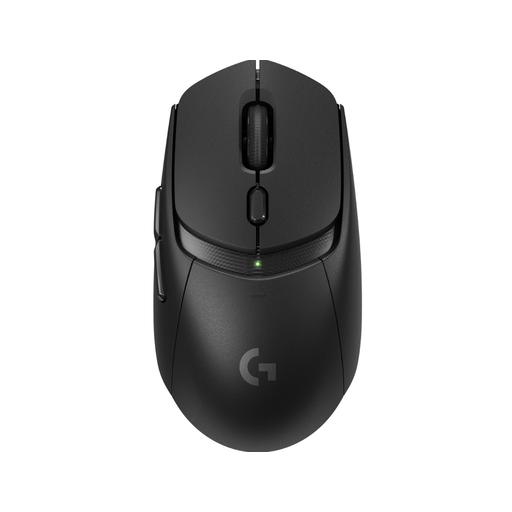
Why it suits this profile: A practical wireless gaming mouse for anyone who wants to get started without complicated settings. It supports Lightspeed and Bluetooth and comes with an AA battery.
The product information lists both wireless modes and the included battery. When buying, check which weight specification applies to your chosen configuration.
Optical HERO sensor, six programmable buttons, Bluetooth and a stated battery life of over 300 hours with an AA battery.

Why it suits this profile: Designed for users looking for a low weight and plenty of settings for fast FPS movements.
The product details list the 54-gram weight, Focus Pro 35K optical sensor and maximum polling rate of 8,000 Hz separately. Check which receiver you need to achieve your preferred polling rate.
54 grams, six programmable buttons, USB-C and a stated battery life of up to 95 hours.

Why it suits this profile: A good choice for players who value extra features, an ergonomic shape and plenty of programmable controls.
This model hasn’t been chosen on DPI alone: its specifications list 11 programmable buttons, wireless and wired connectivity, and an ergonomic shape.
Razer Focus Pro 35K optical sensor, 11 programmable buttons and Chroma RGB lighting.
Use this quick checklist:
RGB lighting is mainly a style choice. It can complement your desk setup, but it won’t automatically improve tracking, click response or comfort. For competitive FPS games, the sensor, shape, glide feet and connection are usually more relevant.
We’ve put together a complete, up-to-date list of products that meet these strict selection criteria and current European safety regulations.
Yes, it can be. Choose a model with a dedicated 2.4GHz receiver and check the stated polling rate. Bluetooth is handy for general use, but it’s usually chosen for flexibility rather than maximum gaming responsiveness.
For most players, adjustable DPI matters more than an extremely high maximum. Start with a comfortable sensitivity and adjust it for each game. A sensor with a high maximum DPI gives you more flexibility, but it doesn’t determine how accurately you play on its own.
Lifespan depends on use, switches, whether it’s wired or battery-powered, and how well it’s maintained. Keep the sensor and glide feet clean, avoid liquid damage and store a wireless mouse safely. A rechargeable battery’s capacity will decrease over time; a model with a replaceable AA battery works differently from one with a built-in lithium battery.
