
Vandaag of morgen in huis

Kwaliteit gegarandeerd

Welkomstaanbiedingen ontgrendelen: GRATIS bezorging | Tot 80% korting | Gratis 30 dagen JoyPlus-proefperiode
Download de app
A gaming mouse needs to do more than respond quickly. Its shape, weight, connection and buttons all affect how comfortable it is to use during long gaming sessions. Yet many product pages focus mainly on a high DPI figure or eye-catching RGB lighting. That means you could end up paying for features you hardly use.
In this buying guide from the Joybuy Product Recommendation Officer, you’ll find out what to look for, which common pitfalls to avoid and what type of gaming mouse suits different users in the Netherlands.
A gaming mouse with a high DPI can be set to be very sensitive, but that doesn’t automatically make it more accurate in your game. Many FPS players actually prefer a lower sensitivity setting and larger mouse movements. So, as well as DPI, look at the sensor, adjustment options and polling rate.
An optical gaming mouse tracks movement using an optical sensor. According to the manufacturers’ product information, the models in this guide have different maximum resolutions, ranging from 6,400 to 42,000 DPI. This maximum is mainly a technical upper limit; you don’t have to use that setting.
A wireless gaming mouse can connect via a 2.4GHz dongle, Bluetooth or both. A dongle is usually designed for a direct connection to a PC, while Bluetooth can be useful with laptops and for everyday use. Also check whether the mouse has a rechargeable battery or runs on AA or AAA batteries.
A wireless gaming mouse with long battery life can be practical, but check how the manufacturer defines that battery life. For example, the Razer Orochi V2 is listed in the product description as offering up to 1,000 hours via Bluetooth and up to 450 hours via HyperSpeed Wireless. Battery life depends on the connection and settings you choose.
An ergonomic gaming mouse should suit your hand size, grip and preference for left- or right-handed use. A large, heavy mouse can feel stable, but may be less suitable if you make lots of quick movements. An ultra-light gaming mouse is easier to move, but can feel too light for some users.
Check the stated dimensions, weight and shape. If you’re considering a right-handed model, also check that the thumb rest is in the right place. For long gaming and work sessions, a comfortable position matters more than extra lighting.
DPI indicates how many screen pixels the cursor moves in response to a particular physical mouse movement. Adjustable DPI is useful if you switch between games or tasks. For example, an FPS player might use a lower setting for aiming, while a higher setting can be handy for menus.
The polling rate indicates how often the mouse sends information to the computer each second. 1,000 Hz is a common rate. Some models list 8,000 Hz, but your computer, software and game also need to handle the higher frequency properly.
Choose a gaming mouse with a USB connection if you want a straightforward, reliable connection without a rechargeable battery or batteries to manage. A wireless model with a USB receiver gives you more freedom of movement. Bluetooth is especially useful if you also want to use the same mouse with a laptop or another compatible device.
A model that works both wirelessly and with a cable can still be used via USB while it charges. Check that the cable supplied is long enough for your desk.
A programmable gaming mouse can offer extra functions for MOBA and MMO games, or productivity tasks. For an FPS mouse, two side buttons are often enough. More buttons aren’t automatically more convenient: they can make the mouse heavier or get pressed by accident.
Check what software you need to customise the buttons, DPI, lighting and macros. According to the product information, various Razer models work with Synapse, Logitech models with Logitech software, and Trust models with downloadable configuration software.
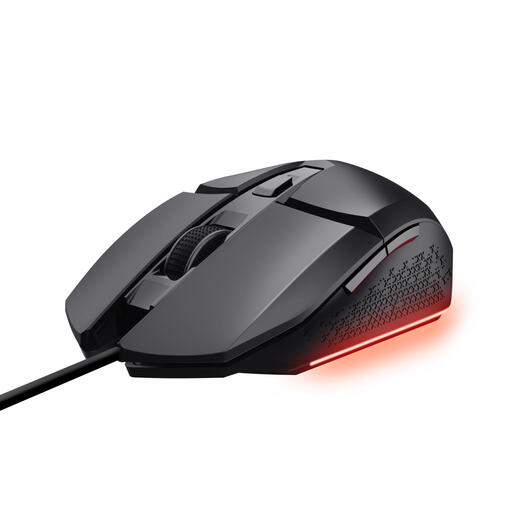
Why it suits this profile: A wired gaming mouse with adjustable DPI, six buttons and RGB lighting, for anyone who wants to get started without a battery or wireless receiver.
The fixed USB connection means there are no batteries to manage. According to the product description, DPI can be adjusted from 200 to 6,400, so you’re not restricted to a single sensitivity setting.
Optical sensor, six programmable buttons, RGB settings and a 1.5-metre cable.

Why it suits this profile: For right-handed players looking for a lightweight wireless gaming mouse for quick movements and FPS games.
As well as a high DPI figure, the product information lists a weight of 63 to 64 grams, an optical Focus Pro 30K sensor and a polling rate of 1,000 Hz.
Wireless HyperSpeed connectivity, USB-C charging, up to 90 hours of stated battery life and five programmable buttons.
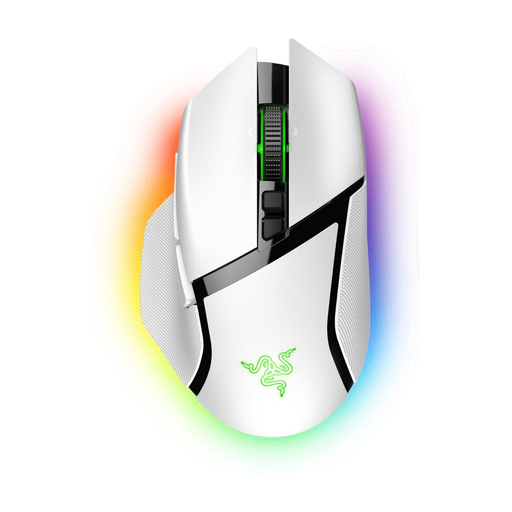
Why it suits this profile: For MOBA players, multitaskers and anyone who wants plenty of functions close to hand.
Its ergonomic right-handed shape and higher weight of 112 grams make it clear that this model isn’t designed to be as light as possible, but to offer plenty of control options.
According to the product details, it has 11 programmable buttons, 30,000 DPI, wireless RF and Bluetooth connectivity, and Chroma RGB.
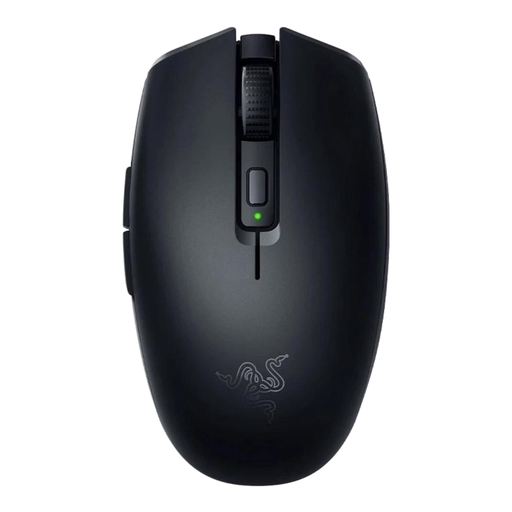
Why it suits this profile: A compact wireless gaming mouse for laptop use and travel, and for players who want Bluetooth as well as a 2.4GHz connection.
You’re not just choosing wireless convenience: according to the product information, the mouse offers two types of connection and a symmetrical shape for left- and right-handed use.
Around 60 grams, 18,000 DPI, six programmable buttons and stated battery life of up to 1,000 hours via Bluetooth.
We’ve put together a complete, up-to-date list of products that meet these strict selection criteria and the applicable European safety regulations.
It can be, provided the mouse has a suitable wireless 2.4GHz connection, a stable receiver and an appropriate polling rate. Bluetooth is handy for everyday use, but always check which connection the manufacturer recommends for gaming.
Its lifespan depends on the switches, cable, rechargeable battery or batteries, and how intensively you use it. Manufacturers sometimes state a click rating, but this doesn’t guarantee the product’s overall lifespan. Keep the sensor and mouse feet clean, and avoid pulling on the cable.
For most users, an adjustable range of up to a few thousand DPI is enough. Look for a mouse that makes it easy to adjust the sensitivity. Also consider the shape, weight and sensor, as these features have a direct impact on everyday use.
