
Vandaag of morgen in huis

Kwaliteit gegarandeerd

Welkomstaanbiedingen ontgrendelen: GRATIS bezorging | Tot 80% korting | Gratis 30 dagen JoyPlus-proefperiode
Download de app
A gaming mouse doesn’t have to be expensive to suit your setup. The difference often comes down to details you might overlook when comparing products quickly: the shape, weight, connection and how DPI is measured. A high DPI figure on the packaging, for example, means little if the mouse doesn’t feel comfortable in your hand.
PC gamers, FPS players and people who use a computer every day often fall into three common traps:
An optical gaming mouse uses a sensor to track movement across a surface. As well as the maximum DPI, check the adjustment range and polling rate. DPI determines sensitivity; the polling rate tells you how often the mouse’s position is reported to the computer.
For everyday PC gaming, an adjustable setting of a few thousand DPI is often enough. Models with 24,000, 30,000 or even 44,000 DPI mainly offer a wide adjustment range. For example, according to the product description, the Logitech G PRO X SUPERLIGHT 2 has a HERO 2 sensor with a stated resolution of up to 44,000 DPI. When adjusting settings in the software, always check which value is actually active.
For an FPS gaming mouse, many players prefer lower sensitivity and larger arm movements. In that case, a large mouse mat and smooth PTFE feet can matter more than the highest DPI setting.
A lightweight gaming mouse weighing around 60 to 75 grams will generally feel quick to move. A heavier model may feel more stable and offer more buttons or support. There’s no universally ideal weight.
Check:
According to its specifications, the Razer Orochi V2 weighs 60 grams and has a symmetrical design. At 59 grams, the Razer DeathAdder V3 is also light, but it has an ergonomic shape for right-handed users. As a result, the two models can feel quite different despite their similar weight.
A wired gaming mouse works without a battery and doesn’t need recharging. The downside is the cable, which can catch on the edge of your desk when you use low mouse sensitivity. A wireless gaming mouse usually connects via a 2.4GHz receiver, Bluetooth or both.
Look out for the differences:
Also check that the software is compatible with your operating system. Some features, such as macros or RGB settings, only work through Windows software.
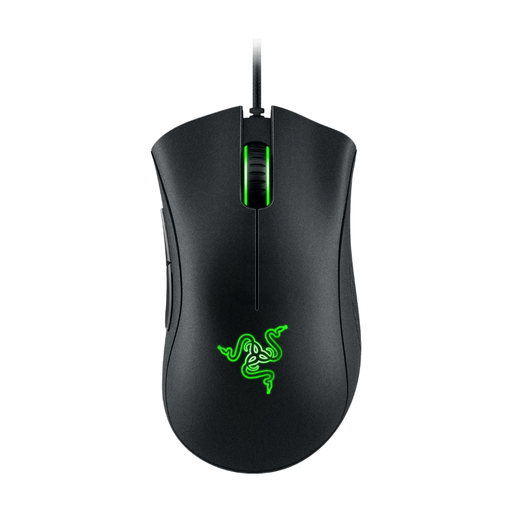
Why it suits this profile: The wired connection keeps things simple. Its ergonomic shape for right-handed users, five buttons and adjustable 6,400 DPI make it a straightforward choice if you’re buying your first gaming mouse.
You won’t pay for wireless features or extensive lighting if all you want is a straightforward plug-and-play option.
Optical sensor, adjustable DPI, ergonomic shape for right-handed users and a 2.10-metre cable.

Why it suits this profile: This wireless gaming mouse is designed for players who want to combine low weight and an advanced sensor with USB-C charging.
Its 60-gram weight and included wireless receiver let you assess the key practical features, rather than relying on marketing claims alone.
LIGHTSPEED connection, optical HERO sensor, USB-C charging and a stated resolution of up to 32,000 DPI in the product description.

Why it suits this profile: A good fit for users who need plenty of features for gaming, creative software and everyday work.
The choice isn’t just about DPI or RGB: the specifications list 11 programmable buttons and an ergonomic shape.
35,000 DPI, wireless connectivity via 2.4GHz or Bluetooth, USB connection, 11 buttons and Razer Chroma RGB.

Why it suits this profile: The combination of 2.4GHz connectivity, a rechargeable battery, low weight and six programmable buttons makes it a good match for fast-paced PC games.
Battery life is stated as up to 80 hours, and according to the product information, you can use the mouse with its cable while it charges.
Optical sensor up to 4,800 DPI, around 73 grams, 1,000Hz polling rate, USB-C and RGB lighting.
We’ve put together a full, up-to-date list of products that meet these strict selection criteria and comply with current European safety regulations.
Not necessarily. A wired mouse doesn’t need a battery and can be plugged straight into your PC. A wireless model with a 2.4GHz receiver can also be suitable for fast-paced games. Above all, check the stated connection, polling rate and software support.
It depends on your play style, screen resolution and mouse mat. Many FPS players use lower sensitivity and move the mouse further across their desk. An adjustable sensor is therefore more practical than simply choosing the highest maximum DPI.
Its lifespan depends on how you use it, the switches, cable or battery, and how well you maintain it. Manufacturers sometimes state a click rating, such as 10 or 90 million clicks. According to the brand’s own claims, this is a technical specification, not a guarantee of a particular lifespan. Keep the sensor and feet clean, avoid spills and store a wireless mouse safely when you’re not using it.
