
Vandaag of morgen in huis

Kwaliteit gegarandeerd

Welkomstaanbiedingen ontgrendelen: GRATIS bezorging | Tot 80% korting | Gratis 30 dagen JoyPlus-proefperiode
Download de app
Buying a gaming mouse seems straightforward, until you have to choose between wireless, wired, ultra-light, ergonomic or a model with dozens of programmable buttons. Marketing often focuses on high DPI, RGB lighting or an 8K polling rate. These features aren’t automatically relevant to the games you play, your hand size or your computer.
Instead, focus on what you’ll actually use. A lightweight mouse can feel comfortable in fast-paced FPS games, while extra buttons can be useful in MMO, MOBA or RTS games. For everyday office use, a stable connection and comfortable shape are often more important than an exceptionally high sensor resolution.
DPI determines how quickly the cursor moves in response to a particular hand movement. A mouse with 30,000 or 44,000 DPI isn’t automatically more accurate than one with 6,400 DPI. In practice, many players use a lower setting for better control, especially in shooters.
So look for an adjustable optical sensor, different DPI profiles and the option to change settings easily. A high-DPI mouse is most useful if you like experimenting with sensitivity or use multiple screen resolutions.
An 8K polling rate means the mouse can send information to your computer up to 8,000 times per second. This can make cursor movement appear smoother, but it also puts more demand on your processor. According to some manufacturers’ product information, a high polling rate can increase CPU load on certain systems.
For many casual gamers, 1,000 Hz is enough. A 4K or 8K setting makes most sense for competitive PC gamers with a powerful computer, a high-refresh-rate monitor and a preference for low latency.
An ultra-light gaming mouse weighing around 53 to 60 grams can feel quick, but weight isn’t the only factor. The shape, height, width and position of the thumb buttons all affect whether you find a claw, palm or fingertip grip comfortable.
A symmetrical design can suit different grip styles, but it isn’t always ideal for left-handed users. Check whether the model is genuinely suitable for both left- and right-handed use. An ergonomic gaming mouse shaped for the right hand may offer better support for a particular hand position.
An optical sensor tracks movement using a light source and image analysis. Look out for:
An esports mouse doesn’t necessarily need the highest DPI. A stable sensor, a comfortable shape and good mouse feet often make more difference to your day-to-day experience.
A wired gaming mouse works without a battery and usually connects directly via USB. This means no charging breaks and makes it a practical choice for a fixed PC setup. A wireless gaming mouse gives you more freedom of movement. For competitive gaming, it’s best to choose a model with a 2.4GHz receiver; Bluetooth is mainly useful for laptops, tablets and office work.
Also check that the software works with your operating system. Some features, such as macros and programmable buttons, may only be available in Windows software. Models that explicitly state Mac support are more practical if you use both a PC and a Mac.
Programmable buttons can activate shortcuts, macros or media controls. However, extra buttons are only useful if you can reach them without changing your grip. RGB lighting won’t affect how you play, but it may suit your desk setup. Check whether you can turn the lighting off.
For wireless models, compare the stated battery life with the mode you’ll use. For example, a manufacturer may measure battery life at 1,000 Hz, while a higher polling rate uses more power. Also look for USB-C charging, a replaceable battery or an included charging dock.
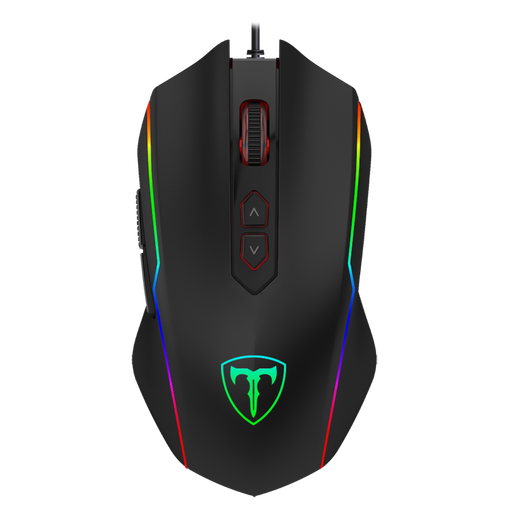
Why it suits this profile: This wired model offers adjustable DPI, RGB lighting and eight buttons, with no battery to charge. That makes it a good choice if you’re buying a gaming mouse for the first time.
The specifications list five DPI levels, from 1,200 to 7,200, and four polling rate settings up to 1,000 Hz. So you’re not just paying for an extremely high DPI figure.
USB connection, eight programmable buttons and seven RGB modes, according to the product description.

Why it suits this profile: This compact wireless mouse is designed for players who value low weight and straightforward, consistent control, without RGB lighting.
Its weight is specified as 53 grams, with battery life of up to 95 hours. Check that its compact size suits your hand.
HERO 2 optical sensor, LIGHTSPEED connectivity and a stated polling rate of up to 8,000 Hz.
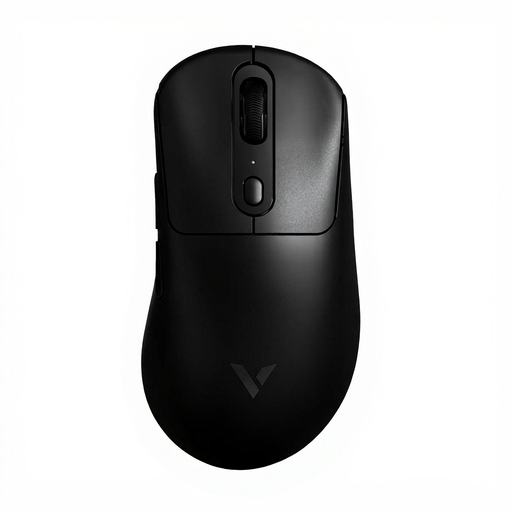
Why it suits this profile: This model is aimed at competitive players looking for very low weight, a wireless connection and extensive sensor settings.
The product information lists a weight of 59 grams, independent X/Y DPI settings and battery life of up to 200 hours. The stated 8K mode may put extra demand on your PC.
PAW 3950 optical sensor, eight programmable settings according to the product listing, and a stated 8K wireless polling rate.
Use this quick checklist:
We’ve put together a complete, up-to-date list of products that meet these strict selection criteria and the applicable European safety regulations.
It can be, especially with a 2.4GHz connection using a dedicated receiver. Check the polling rate, battery life and whether you can continue playing in wired mode while it charges. Bluetooth is usually more practical for general computer use than for competitive gaming.
Lifespan depends on the switches, cable, battery and how you use it. Manufacturers sometimes state a click rating, but this doesn’t guarantee a particular lifespan. Keep the sensor and mouse feet clean, and don’t pull on the cable.
Usually not for basic use. You may need software for DPI profiles, RGB lighting and programmable buttons. Before buying, check whether the manufacturer states that Mac is supported and which features are available.
