
Vandaag of morgen in huis

Kwaliteit gegarandeerd

Welkomstaanbiedingen ontgrendelen: GRATIS bezorging | Tot 80% korting | Gratis 30 dagen JoyPlus-proefperiode
Download de app
A gaming mouse should above all suit your hand, game and computer. Yet many buyers look first at RGB lighting or an extremely high DPI rating. This can result in a mouse that looks impressive on paper but is too heavy, uncomfortable or difficult to set up in practice.
The main pitfalls are:
An optical gaming mouse uses an optical sensor to register movement. Pay attention to how adjustable the DPI is, not just the maximum figure. DPI determines how far the cursor moves with the same hand movement. For an FPS game, a lower setting can be useful for controlled movements; in a strategy or RPG game, a higher speed may be more convenient.
A gaming mouse with adjustable DPI lets you switch between different sensitivity levels. According to Trust’s product information, the Trust GXT 110 Felox ranges from 800 to 4,800 DPI. The Trust GXT 109 Felox offers settings from 200 to 6,400 DPI. Models such as the Logitech G502 HERO and Razer Pro Click V2 Vertical have a much higher stated maximum, but that does not mean you will need that setting in practice.
The polling rate indicates how often per second the mouse sends information to the computer. 1,000Hz means up to 1,000 reports per second. Higher rates, such as 8,000Hz, may be of interest for fast-paced games, but they can sometimes require more system resources and may not be clearly noticeable to every player.
A lightweight gaming mouse is generally suitable for players who make large, fast movements, for example in FPS games. According to the product specifications, the Trust GXT 929 Helox weighs approximately 73 to 75 grams. The AJAZZ AJ159 APEX is listed in the product information as weighing 56 grams. A heavier model may feel more stable instead.
Also check:
An ergonomic gaming mouse is not automatically suitable for every hand. The Razer Pro Click V2 Vertical has a vertical shape and, according to the specifications, is designed for right-handed use. This may be a logical choice for anyone who finds a vertical mouse shape comfortable, but less suitable for left-handed gamers or players who are used to a low, symmetrical shape.
A wired gaming mouse does not require a battery and can be used directly via USB. However, the cable can move across your desk. A wireless model usually uses a 2.4GHz USB receiver or Bluetooth. Check in advance whether your PC or laptop has a free USB-A port and whether the receiver can be positioned without obstructions.
Also consider the number of buttons and the available settings. A programmable gaming mouse can be useful for MOBA, RTS and RPG games, where assigning shortcuts to the side buttons saves time. For a straightforward FPS setup, two thumb buttons are often enough.
RGB is mainly a matter of appearance. With a gaming mouse with RGB, check whether the lighting can be adjusted via a button or software and whether you can switch it off. Also look out for inconsistencies in the product information: the Corsair M55 description mentions RGB, while the technical specifications do not list built-in lighting. Always check the current product page before ordering.
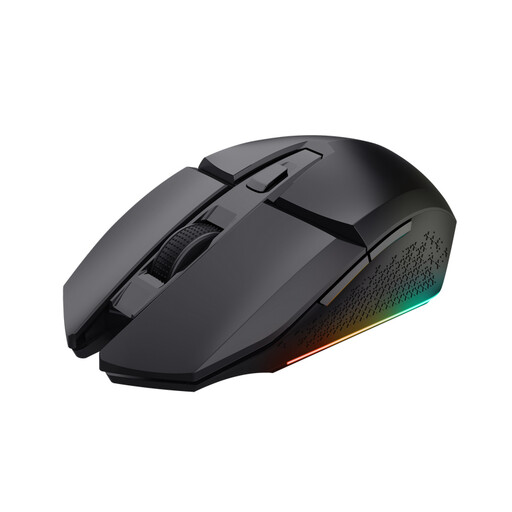
Why it suits this profile: This wireless gaming mouse combines a 2.4GHz receiver, six buttons and RGB lighting with a rechargeable battery. Trust states that it can last up to 80 hours per charge.
You do not need to buy separate AA batteries and can continue playing while it charges. The DPI is adjustable from 800 to 4,800.
2.4GHz connection, six buttons, optical sensor and a stated battery life of up to 80 hours.
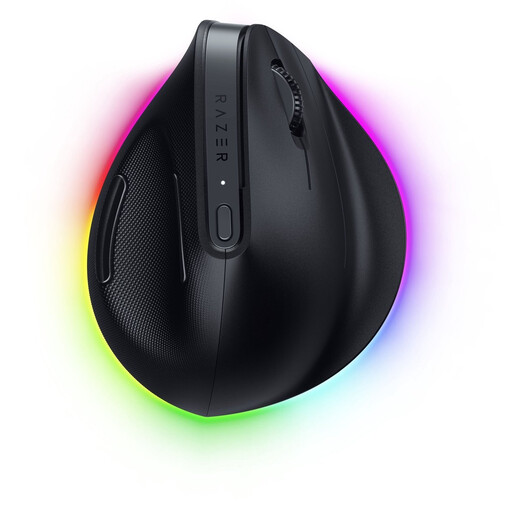
Why it suits this profile: This right-handed vertical model is aimed at users looking for an unconventional mouse shape and extensive software settings for work and gaming.
The shape and right-handed design are clearly stated in advance. This makes it easier to judge whether the model suits your grip.
According to the product information: up to 30,000 DPI, six programmable buttons and connectivity via HyperSpeed and Bluetooth.
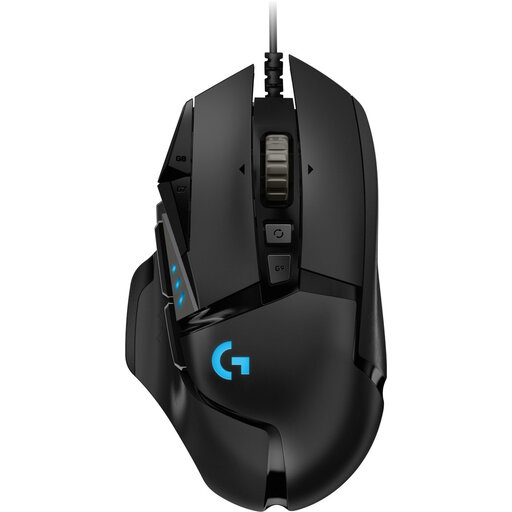
Why it suits this profile: For MOBA, RTS and RPG players, the 11 buttons provide space for commands and macros. The fixed USB cable means there is no need to recharge the mouse.
You do not pay for wireless features you do not need. However, bear in mind the stated weight of 121 grams and the right-handed shape.
Adjustable DPI up to 25,600, 11 programmable buttons, RGB lighting and an adjustable weight system.
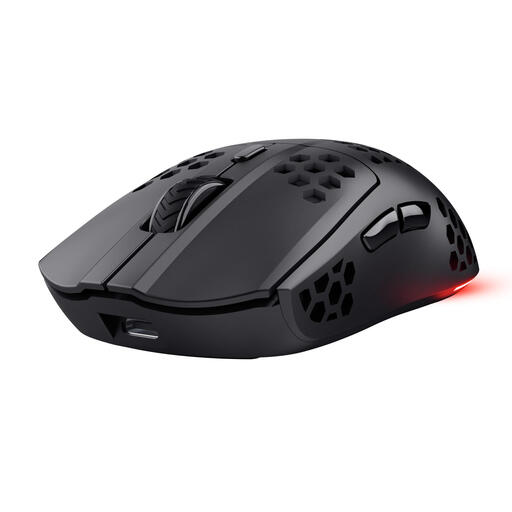
Why it suits this profile: The low weight and wireless 2.4GHz connection are ideal for players who make fast mouse movements and do not want a cable on their desk.
The product information clearly states the weight, connection and battery life. However, the model is right-handed, so check your hand preference.
Approximately 73–75 grams, adjustable 800–4,800 DPI, six programmable buttons and USB-C charging according to the product specifications.
We have compiled a complete, up-to-date list of products that fully meet these strict selection criteria and the applicable European safety regulations.
That depends on the connection. A model with a 2.4GHz USB receiver is generally a more practical starting point for gaming than Bluetooth alone. Also check the distance between the receiver and mouse, the battery status and whether you can continue playing while the mouse is charging.
For most users, an adjustable range is more important than the maximum DPI figure. A range of, for example, 800 to 4,800 DPI already provides different settings for FPS, MOBA, RTS and everyday use. Adjust the DPI to suit your screen, mouse mat and personal preference.
The lifespan depends on the switches, cable, rechargeable battery or disposable battery, and daily use. A wired gaming mouse does not have a battery that loses capacity. With a wireless model, you should consider the stated battery life and whether you can continue using it in wired mode. In the European Union, consumers are entitled to at least the legal guarantee under the applicable rules; also check the seller’s product terms before buying.
