
Vandaag of morgen in huis

Kwaliteit gegarandeerd

Welkomstaanbiedingen ontgrendelen: GRATIS bezorging | Tot 80% korting | Gratis 30 dagen JoyPlus-proefperiode
Download de app
Buying a gaming mouse sounds simple, until you have to choose between wireless connectivity, an ultra-light design, high DPI, RGB lighting and dozens of programmable buttons. Marketing copy often focuses on impressive figures, but they do not always tell you how well a mouse suits your hand, your games or your PC setup.
The most important question is therefore not which mouse has the most features, but which specifications you will actually use.
A gaming mouse with a high DPI can move the cursor across the screen more quickly. That does not automatically mean you will aim more accurately in an FPS game. Many players actually use lower sensitivity and move the mouse further across their mouse mat.
So do not just look at the maximum DPI figure. Also check:
An 8K polling rate means the mouse position can be transmitted up to 8,000 times per second. This can make movements feel smoother, but the difference compared with 1,000 Hz is not clearly noticeable for every user.
A higher polling rate can also use more processor capacity and drain the battery of a wireless gaming mouse more quickly. Check whether your PC, game and monitor can make sensible use of this setting.
An ultra-light gaming mouse weighing around 50 to 60 grams can feel comfortable for fast aiming movements. However, a compact shape may feel awkward in larger hands, while a wider ergonomic gaming mouse may be less suitable for a claw grip.
Pay attention to:
A wireless gaming mouse using 2.4 GHz usually connects via a USB receiver. This connection is designed to offer low latency while gaming. Bluetooth is convenient for laptops and everyday use, but check whether the gaming features and polling rate remain available in this mode.
A rechargeable gaming mouse eliminates the need for disposable batteries, but it needs to be connected to a USB cable regularly. A model with an AA battery may run for longer and can be made ready for use quickly, but it adds weight. Wired models are generally straightforward: plug in and play, with no need to plan when to recharge.
An optical sensor detects movement using light and is the standard choice for modern mice. A wider DPI range is mainly useful if you want to set up different sensitivity profiles. For everyday computer use, strategy games and action games, different settings may feel more comfortable than those used for competitive FPS games.
A polling rate of 1,000 Hz is sufficient for many users. Models with 4K or 8K are interesting if you are deliberately seeking maximum responsiveness and the rest of your system is set up to support it.
Programmable buttons are useful for MMO, MOBA and RTS games, as well as for keyboard shortcuts in Windows. More buttons do increase the risk of pressing one accidentally. Also check whether the configuration software works with your operating system and whether settings can be saved to the mouse’s onboard memory.
RGB lighting does not change the sensor’s performance. An RGB gaming mouse can, however, complement your desk setup. Check whether the lighting can be switched off if you prefer a more understated setup.
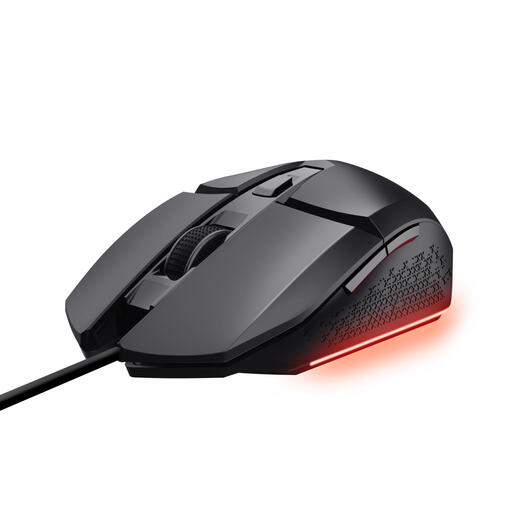
Why it suits this profile: A wired gaming mouse for PC users looking for adjustable sensitivity and essential features without having to recharge a battery.
The product information specifically lists an optical sensor, DPI settings from 200 to 6,400, six buttons and a 1.5-metre cable. You therefore do not pay for a wireless battery that you do not need.
RGB lighting with three settings, programmable buttons via software and adjustable DPI for gaming and everyday use.

Why it suits this profile: Designed for right-handed FPS players who value low weight, wireless connectivity and extensive sensor settings.
The listed specifications include a weight of 54 grams, an optical Focus Pro 35K sensor and a maximum polling rate of 8,000 Hz. Check beforehand that your PC and software support this speed.
54 grams, USB-C, usable both wirelessly and with a cable, six programmable buttons and, according to the product information, up to 95 hours of use per charge.

Why it suits this profile: For players who want to combine an ultra-light gaming mouse with an exceptionally long stated battery life and extensive customisation options.
The product information states a weight of 53 grams, a native wireless 8K polling rate and a built-in battery. According to Rapoo, the stated battery life of up to 750 hours applies at 1,000 Hz and may depend on the settings and how the mouse is used.
30,000 DPI with separate X/Y adjustment, ten programmable buttons and optical switches with a manufacturer-stated lifespan of 120 million clicks.
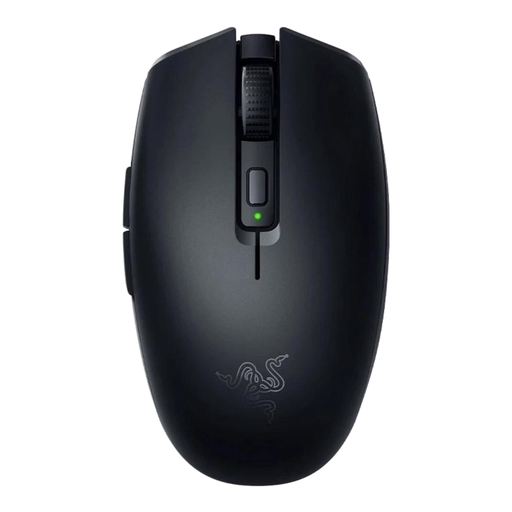
Why it suits this profile: Ideal for users who want to take a compact mouse between a dedicated gaming PC, laptop and workplace.
The mouse offers two wireless options: Bluetooth and Razer HyperSpeed Wireless. This lets you choose between low power consumption and a USB receiver connection for gaming.
Symmetrical design, six programmable buttons, an optical sensor of up to 18,000 DPI and, according to the product information, long battery life with an AA or AAA battery.
We have put together a complete, up-to-date list of products that fully meet these strict selection criteria and the applicable European safety regulations.
Use this short checklist before adding a gaming mouse to your basket:
For a notebook, a compact wireless mouse is often practical. For a dedicated gaming PC, a wired model may require less maintenance. So also check the connection, cable length and the amount of space available on your desk.
That depends on the game, resolution and personal preference. Start with a moderate setting and adjust it in your game. A mouse with a wide adjustable DPI range gives you more room to experiment, but a higher maximum does not automatically mean greater accuracy.
Yes, a wireless gaming mouse with a 2.4GHz receiver can be suitable for FPS games. Check the stated connection, polling rate and battery life. Bluetooth is mainly useful for low power consumption and devices such as laptops; the receiver is generally used for competitive gaming.
Its lifespan depends on usage, switches, the cable or battery and maintenance. Manufacturers sometimes provide a click rating, but this is not a guarantee of the product’s total lifespan. Keep the sensor and mouse feet clean, avoid contact with liquids and store a wireless receiver safely when transporting the mouse.
