
Vandaag of morgen in huis

Kwaliteit gegarandeerd

Welkomstaanbiedingen ontgrendelen: GRATIS bezorging | Tot 80% korting | Gratis 30 dagen JoyPlus-proefperiode
Download de app
A gaming mouse should suit your game, hand and desk. Yet many buyers focus mainly on a high DPI figure or eye-catching RGB lighting. This can result in a mouse that looks impressive on paper but is uncomfortable to use in practice. Use these checks to compare models more objectively and find a suitable gaming mouse for your PC, laptop or Mac.
A gaming mouse with a high DPI can move the cursor very quickly. That does not automatically mean you will aim better at a higher setting. Many players use lower sensitivity for FPS games, while a higher DPI can be useful for large screens or everyday use.
So check whether the DPI is adjustable and whether you can save multiple profiles. Also look at the sensor, such as an optical sensor, rather than focusing only on the maximum DPI figure.
A wireless gaming mouse may work via 2.4 GHz, Bluetooth or both. Bluetooth is practical for a laptop and everyday use, but an included USB receiver operating via 2.4 GHz is often the sensible choice for gaming. Also check the charging method, battery life and whether you can continue playing while the mouse is charging.
With a wired gaming mouse, you do not need to monitor the battery level. Instead, cable length, flexibility and the position of the USB port are more important.
RGB lighting changes the look of your desk, but has no direct impact on tracking. Programmable buttons can be useful for MMO, MOBA and RTS games, but are not necessary for every FPS player. A heavy model with lots of buttons may also be less suitable for fast movements.
So check the weight, dimensions, handedness and shape. An ergonomic gaming mouse designed for right-handed use will not automatically suit a left-handed user. Also check software compatibility with Windows and macOS.
An optical sensor uses light to detect movement. Product specifications usually state the sensor’s maximum resolution in DPI. More important than the highest figure are:
A polling rate of 1,000 Hz means that, according to the product specifications, the mouse position is transmitted up to 1,000 times per second. Models with 8,000 Hz may use more system resources. So check whether your computer and game can process this setting effectively.
An ultra-light gaming mouse weighing around 50 to 75 grams can be comfortable for quick flicks and broad arm movements. A heavier model may feel more stable. There is no universally correct choice.
Consider the combination of:
A compact mouse may suit smaller hands, while a wider model offers more support for your ring finger and little finger. Always check the dimensions in millimetres.
A wired gaming mouse receives power directly via USB. A wireless gaming mouse keeps your desk tidy, but requires you to pay attention to charging or batteries. Check whether the stated battery life comes from the brand’s product information and the conditions under which it applies.
For gaming, a model with a 2.4 GHz receiver is often more practical than one offering Bluetooth only. If you also want to use the mouse with a laptop and tablet, Bluetooth or tri-mode connectivity may be more useful.
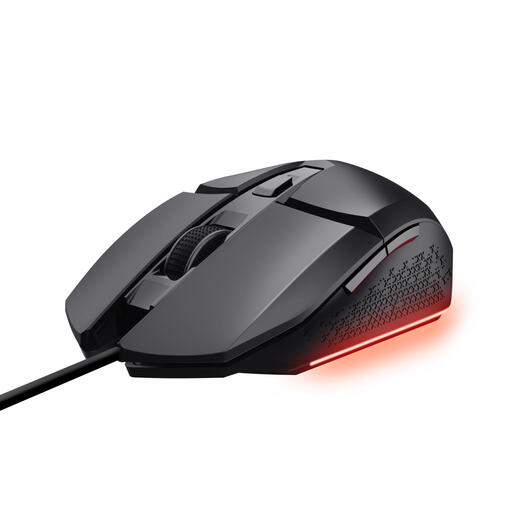
Why it suits this profile: This is a wired gaming mouse for PC and laptop gamers looking for adjustable DPI, RGB and programmable buttons without having to manage a battery.
The product specifications state an adjustable range of 200 to 6,400 DPI. The fixed cable prevents unexpected charging interruptions while gaming.
6 buttons, optical sensor, 1.5-metre cable and RGB lighting with software settings.

Why it suits this profile: The combination of low weight, wireless connectivity and a high stated sensor resolution is well suited to right-handed FPS players who prioritise fast movements.
At 54 grams, the product information places the emphasis on a lightweight design. The mouse can also be used in wired mode via USB-C.
35,000 DPI according to the specifications, a maximum polling rate of 8,000 Hz and a stated battery life of up to 95 hours.
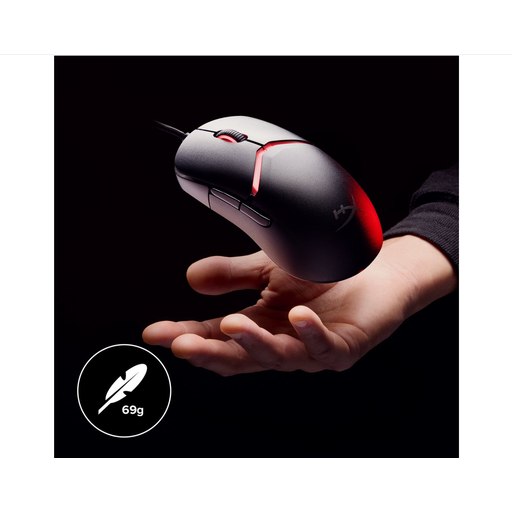
Why it suits this profile: This model is designed for users who want a lightweight wired gaming mouse with RGB and customisable components for FPS and other fast-paced games.
According to the product information, the cable is flexible and the mouse weighs 69 grams. This keeps the wired setup focused on freedom of movement.
26,000 DPI, a maximum polling rate of 8,000 Hz, RGB lighting and support for left- and right-handed use.

Why it suits this profile: The three connectivity options are practical for anyone who wants to use the same ergonomic gaming mouse with a PC, laptop and Mac.
You are not limited to Bluetooth: 2.4 GHz and a USB-C cable are also available. Please note: the product information states that the software only works in wired mode on Windows.
2.4 GHz, Bluetooth and wired USB-C mode, up to 10,000 DPI, 8 programmable buttons and adjustable RGB.
We have put together a complete, up-to-date list of products that fully meet these strict selection criteria and the applicable European safety regulations.
It can be, provided the mouse has a suitable 2.4 GHz connection and USB receiver. Also check the polling rate, battery life and whether you can continue playing in wired mode. Bluetooth is particularly useful for laptop compatibility and everyday use.
For most users, an adjustable range is more important than an extremely high maximum. FPS players often choose lower sensitivity for greater control, while a higher DPI can be useful for general computer use. Adjust the DPI to suit your screen, mouse mat and personal preference.
Its lifespan depends on usage, cable and battery care, software and the quality of the switches. Use a clean mouse mat, keep liquids away from the electronics and do not pull on the cable. With wireless models, the battery is an additional component to consider. In the European Union, consumers are generally entitled to a legal guarantee of at least two years; check the product and seller’s terms and conditions.
