
Vandaag of morgen in huis

Kwaliteit gegarandeerd

Welkomstaanbiedingen ontgrendelen: GRATIS bezorging | Tot 80% korting | Gratis 30 dagen JoyPlus-proefperiode
Download de app
Buying a gaming mouse seems simple, until you have to choose between wireless and wired, lightweight and ergonomic, high DPI or extra buttons. Marketing can make some features sound more important than they are in practice. A high DPI figure, for example, doesn’t automatically make you more accurate. And RGB lighting won’t change how the mouse performs.
Use this guide to compare gaming mice based on specifications you can check. That way, you can avoid a bad buy and choose more confidently for FPS games, everyday use or long gaming sessions.
DPI indicates how sensitive you can set the mouse to be. A high-DPI gaming mouse can be useful if you want to switch quickly between sensitivity profiles, but many players use a lower setting in practice. So pay attention to the sensor, adjustable DPI steps and polling rate too.
An optical gaming mouse with an adjustable sensor will usually suit a wider range of play styles than a model that simply boasts a high maximum DPI.
A wireless gaming mouse can use 2.4 GHz, Bluetooth or both. For competitive gaming, a USB receiver with low latency is generally more practical than Bluetooth alone. Bluetooth, on the other hand, is handy for laptops, office work and connecting to multiple devices.
Also check whether you can use the mouse with a cable while it charges. If a model uses replaceable batteries, check the battery type and expected battery life too.
An ultra-light gaming mouse weighing around 60 to 75 grams glides easily across a mouse mat. That isn’t for everyone: some players prefer a heavier, more stable model. Hand position matters too. A vertical mouse can offer a different hand position from a classic design, but it isn’t automatically suited to fast movements in FPS games.
Check the dimensions, weight, hand orientation and grip. A right-handed mouse won’t suit everyone, while an ambidextrous design can offer more flexibility.
A wired gaming mouse doesn’t need a rechargeable or replaceable battery and stays connected to your PC while you use it. The downside is the cable, which can get in the way when you use low sensitivity or make large movements.
A wireless gaming mouse with 2.4 GHz usually uses a USB receiver. It’s a sensible choice for gaming on a desktop or laptop with a spare USB port. Bluetooth is handy if you want to switch between devices, but check first that your PC or laptop supports it.
Tri-mode models often combine USB, 2.4 GHz and Bluetooth. This lets you use one mouse for gaming, laptop use and office work.
Most models in this selection have an optical sensor. Compare these features in particular:
An FPS gaming mouse doesn’t necessarily need the highest DPI. Low weight, a comfortable shape and a stable connection can matter more.
A gaming mouse with programmable buttons can be useful for MMO and MOBA games, as well as productivity tasks. For straightforward FPS controls, five or six buttons are often enough. More buttons don’t automatically make a mouse easier to use.
RGB lighting is mainly a design choice. If you’re considering a gaming mouse with RGB, check whether you can switch the lighting off or adjust it using software. For wireless models, check the battery life and charging method. According to the product description, the Trust GXT 929 Helox, for example, offers up to 80 hours of battery life; actual battery life may depend on use and settings.
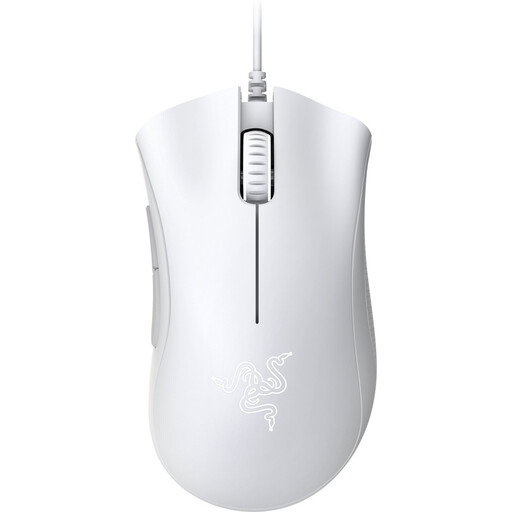
Why it suits this type of user: A wired gaming mouse with a simpler setup is a practical choice for your first gaming PC or laptop setup. According to the product details, this model has five buttons, a 6,400 DPI optical sensor and an ergonomic right-handed shape.
You don’t pay for a battery or wireless receiver, and there’s no battery status to keep an eye on. You can adjust the sensitivity using the accompanying software.
Optical sensor, five buttons, USB connection and a 1000 Hz polling rate, according to the product specifications.

Why it suits this type of user: According to Logitech, this model is designed for competitive gaming. It combines a wireless LIGHTSPEED connection with a low weight of 60 grams. The product information also lists a HERO 2 sensor, USB-C charging and a maximum DPI of 32,000.
The specifications list the weight, connection and charging method, so you can decide in advance whether wireless gaming and a lightweight design are right for you.
60 grams, LIGHTSPEED wireless connection, USB-C and an adjustable HERO 2 sensor, according to the product description.

Why it suits this type of user: This ergonomic gaming mouse is for people who combine gaming and work. According to Razer, it has a vertical shape, six programmable buttons, Bluetooth and HyperSpeed Wireless.
The vertical shape and dimensions are clearly listed, so you don’t have to judge the mouse by its RGB lighting or DPI alone. Check that the shape suits your grip and how you use your desk.
Bluetooth and wireless radio connection, six programmable buttons, 30,000 DPI and 18-zone RGB, according to the product details.
We’ve put together a complete, up-to-date list of products that meet these strict selection criteria and the applicable European safety regulations.
Yes, provided the model has a suitable 2.4 GHz connection and USB receiver. Check the weight, shape and polling rate too. Bluetooth is handy for general use, but not every Bluetooth gaming mouse is designed for competitive FPS gaming.
It depends on your screen, game and play style. A model with 6,400 to 12,000 DPI already offers plenty of adjustment for most users. Higher figures, such as 24,000 or 32,000 DPI, mainly give you a wider range; they won’t automatically make your movements more accurate.
Its lifespan depends on the switches, cable, rechargeable or replaceable battery, and how much you use it. Manufacturers sometimes give a click rating, such as 10 or 20 million clicks. This is a product specification, not a guarantee of a particular lifespan. According to the information provided, products in this selection come with at least the statutory two-year guarantee under European consumer rules.
