
Vandaag of morgen in huis

Kwaliteit gegarandeerd

Welkomstaanbiedingen ontgrendelen: GRATIS bezorging | Tot 80% korting | Gratis 30 dagen JoyPlus-proefperiode
Download de app
Buying a gaming mouse seems straightforward – until you have to choose between wireless or wired, a high DPI, extra buttons, RGB lighting and different shapes. Marketing jargon doesn't always tell you enough about day-to-day use. A high sensor resolution, for example, doesn't automatically make a mouse suitable for your play style.
Pay particular attention to three common pitfalls:
DPI indicates how sensitively the cursor responds to a physical movement. A gaming mouse with a high DPI offers more adjustment options, but a higher value isn't automatically more accurate in practice. For FPS games, many players actually use a lower sensitivity for controlled movements.
Also look at the polling rate. A value of 1000 Hz means the mouse can transmit information up to 1000 times per second, according to the product specification. Some wireless models support higher values, but check whether your computer, software and game support that setting.
An optical sensor is common in modern gaming mice. Alongside the maximum DPI, look out for:
An ultralight gaming mouse weighing around 50 to 70 grams generally feels easy to move and lift. A heavier model can feel more stable and sometimes offers more buttons or a wider shape.
Compare the dimensions with your hand and grip:
Also check whether the mouse is designed for right-handed use only. An ergonomic gaming mouse isn't automatically suitable for every hand; the shape needs to fit your grip and preference.
A wired gaming mouse receives power directly via USB. You don't need to charge it and there's no battery to replace. Pay attention to the cable length and whether the cable is flexible enough for your desk setup.
A wireless gaming mouse can work via Bluetooth or a 2.4GHz receiver. Bluetooth often uses less power and is handy for multiple devices. For FPS or esports use, an included wireless receiver is usually more practical. Also check:
According to the product information from some brands, battery life and performance can vary depending on settings, usage and computer configuration. Therefore, treat stated times as product specifications under certain conditions, not as a guarantee for every usage scenario.
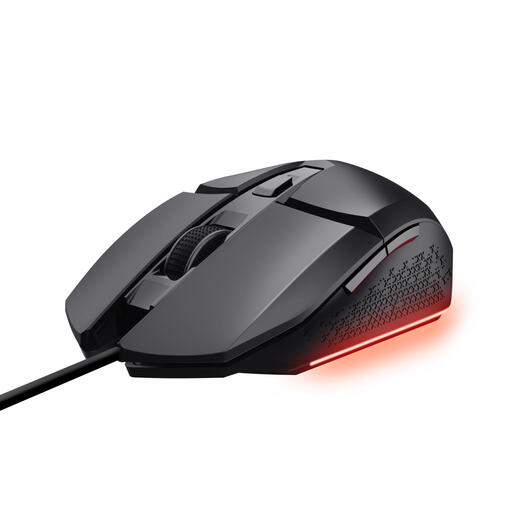
Why this fits the profile: This wired gaming mouse keeps setup simple and offers adjustable DPI, six buttons and RGB lighting without a wireless battery. The 1.5-metre cable is suitable for a standard PC desk.
You're not paying for a wireless battery or complicated connection. The DPI is adjustable from 200 to 6400 and the buttons can be customised via software.
Optical sensor, six programmable buttons, three RGB settings and support for Windows and Mac according to the product information.

Why this fits the profile: If you're after a lightweight wireless gaming mouse with a competitive focus, this model delivers 60 grams with LIGHTSPEED connection, USB-C charging and an optical HERO 2 sensor.
The specifications don't just list a high DPI; they also include the weight, connection, charging method and a polling rate of up to 4000 Hz. That makes comparisons more concrete.
60 grams, up to 32,000 DPI according to the product description, USB-C and a rechargeable battery. According to Logitech, the mouse is designed for esports use.

Why this fits the profile: This model is aimed at FPS players who want to combine a low weight, wireless freedom and adjustable performance. The shape is designed for right-handed use.
Alongside the stated DPI, the product information includes concrete details about 54 grams weight, 2.4GHz wireless operation, USB-C and a battery life of up to 95 hours according to Razer.
54 grams, up to 35,000 DPI according to the specifications, programmable buttons and a polling rate of up to 8000 Hz.
We've put together a full, up-to-date list of products that fully meet these strict selection criteria and comply with current European safety regulations.
It can be, especially when the model uses a 2.4GHz receiver with low latency. Bluetooth is mainly practical for everyday use and multiple devices. Always check the connection, polling rate and battery life before you buy.
The lifespan depends on the switches, cable, battery and usage. Manufacturers sometimes state a specified click durability, but that's a product specification under certain test conditions. Clean the sensor and mouse feet regularly, don't pull on the cable and store a wireless model in a dry place.
For most PC games, an adjustable value up to a few thousand DPI is sufficient. A sensor of 18,000, 24,000 or more DPI mainly provides extra range. More important are a stable sensor, a suitable shape and settings you can easily adjust.
