Start with a mouse that feels comfortable in your hand and has a scroll wheel you can use easily. Then choose between wired and wireless, and decide whether extra buttons would genuinely be useful for your game and work. Logitech G describes two scroll modes on the wired G502 X, while Razer lists a tilt wheel and programmable buttons among the features of the wired Basilisk V3. Before buying, check the handedness, connection and software compatibility of the exact model.
Who is this mouse guide for?
Home worker who clicks and scrolls for long periods
You use the same workspace for screen-based work and a management game. Consider the shape, hand position and scroll wheel. Simply switching to another mouse won’t automatically prevent problems caused by prolonged computer use. The Arboportaal points out that screen use can also take place in your free time.
Player who wants to customise the controls
Only consider extra buttons or different scrolling behaviour if you have a specific use for them in your game or day-to-day work.
User of a shared home-working space
You switch between your laptop, work and gaming, or want fewer cables on your desk. Check which connection and connection type suit your devices. For example, Trust lists both wired and wireless versions of the Ybar.
What should you look for when choosing?
Simple wired mouse
A good fit if: you mainly point, click and scroll, and have a spare USB port.
Bear in mind: the cable takes up space, and you’ll need to find a shape that suits your hand.
Wireless mouse
A good fit if: a cable gets in the way in a shared workspace, or you want to switch between devices.
Bear in mind: the connection type and power supply required for the exact model.
Mouse with extra controls
A good fit if: you have a specific use for extra buttons or different scroll modes.
Bear in mind: extra controls may take some getting used to or need configuring, and won’t help if you don’t use them.
| What to consider |
What should you check? |
Who is this important for? |
| Comfort when clicking repeatedly |
Check the shape and handedness, and see whether you can reach the buttons without straining. |
If you work and play in the same place, you’ll want a shape that suits your hand. Around 36% of consumers prioritise comfort during repeated use. |
| Scroll wheel and extra buttons |
Check which wheel modes and inputs your game supports, and whether you can customise the functions. |
If you spend a lot of time navigating menus, extra controls are only useful if they suit the way you work. Around 29% of consumers prioritise practical controls. |
| Connection on a shared desk |
Check whether your device supports the required USB connection, receiver or Bluetooth. |
If you switch between devices or want to free up desk space, the connection type matters. Around 21% of consumers choose mainly based on cable space and connectivity. |
| Cost and aftercare |
Compare the exact model and the items included. If you’re buying online, check the returns policy too. |
If you want to weigh up the purchase price and potential running costs first, the power supply and terms are relevant. Around 14% of consumers prioritise cost. |
Things to watch out for when buying
-
Assuming a high maximum DPI means a better gaming experience
A stated maximum DPI doesn’t tell you how the mouse will feel in your hand or how comfortable its scroll wheel is to use.
Compare the shape and controls of the exact models, then adjust the pointer speed to suit you.
-
Assuming models in the same range are identical
The wired Razer Basilisk V3 is a different model from the wireless Basilisk V3 X HyperSpeed. Trust also uses different GXT Ybar model numbers for different connection types.
Check the full model number, connection type and which accessories are included with that model.
-
Assuming more buttons are automatically useful
How useful the buttons are depends on the game, the settings and the way you work.
First decide which actions you’d like to control differently, then check whether you can configure the mouse to do that.
-
Confusing the manufacturer’s warranty with your full statutory rights
ACM ConsuWijzer distinguishes between a manufacturer’s warranty and your statutory right to a product that meets expectations.
Keep your proof of purchase. If a fault occurs, remember that the retailer’s responsibilities are also important.
Brands to consider
Logitech G
The wired G502 X is worth considering if you’re looking for a switchable scroll wheel and extra controls.
- Logitech G lists free-spinning and notched scroll modes, and a stated weight of 89 g for the wired G502 X.
- These features don’t prove that the model will work better for every hospital game. Don’t confuse it with the wireless G502 X models.
Razer
The wired Basilisk V3 is an option to consider if you’re looking for a tilt wheel and customisable buttons.
- Razer specifies 11 programmable buttons, a tilt wheel and a weight of 101 g without the cable for this right-handed model.
- These are manufacturer specifications, not the results of an independent comfort or effectiveness test. The Basilisk V3 X HyperSpeed is a different model.
Trust
The GXT 922 Ybar and GXT 931 Ybar show the wired and wireless connection options available from the brand.
- Trust lists a scroll wheel and two side buttons for the GXT 922; for the GXT 931, the brand specifies a 2.4GHz receiver and Bluetooth.
- The features of one model don’t automatically tell you about the buttons, power supply or performance of the other. Check the full model number.
SteelSeries
The wired Rival 3 Gen 2 is worth considering if an extensive cluster of buttons isn’t a priority.
- SteelSeries describes this model as symmetrical, designed for right-handed use and weighing 77 g.
- Check the UK model and sales terms. These shape details alone don’t prove that it will be more comfortable for every user.
Corsair
The wired KATAR PRO XT is a compact option for anyone who uses a claw or fingertip grip.
- Corsair specifies a weight of 73 g and six programmable buttons for this model.
- Check the UK model and terms. A symmetrical outer shape doesn’t prove that the mouse will suit every hand.
Gaming mice at Joybuy
This selection at Joybuy includes wired and wireless gaming mice for a home-working space, including models with extra scrolling or customisation options.
 No image available
Turtle Beach Kone II Wired Gaming Mouse
A good fit if you’re looking for a wired mouse with extra scrolling and customisation options. Check that the controls suit your game and the way you work.
Wired; 4D wheel for vertical scrolling and tilting; 23 buttons; 26.000 DPI; black.
View at Joybuy
 No image available
AJAZZ AJ200 AI MC wireless gaming mouse
A good fit if you’re looking for a wireless mouse to use with different devices. Check which connection types your devices support first.
The product name lists Tri-Mode BT/2.4G/USB-C, a charging dock, 63 g and 24.000 DPI.
View at Joybuy
 No image available
Logitech G G309 LIGHTSPEED Wireless Gaming Mouse
A good fit if you want to work wirelessly and customise extra controls. Check that the required software and features suit your device and the way you work.
Wireless; the product information lists Bluetooth, a LIGHTSPEED receiver, a scroll wheel and programmable buttons.
View at Joybuy
 No image available
Logitech G G502 X
A good fit if you’re looking for a wired mouse with different scroll modes and programmable controls. Logitech G lists free-spinning and notched scroll modes for the wired G502 X.
Right-handed; USB Type-A; optical; 25.600 DPI.
View at Joybuy
 No image available
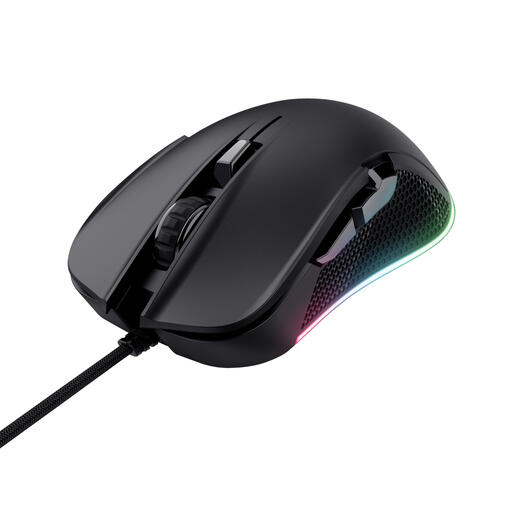
Trust GXT 922 YBAR
A good fit if you’re looking for a wired gaming mouse mainly for clicking and scrolling, with a few extra controls.
Right-handed; USB Type-A; optical; 7.200 DPI. Trust lists a scroll wheel and two side buttons.
View at Joybuy
Frequently asked questions
Should I choose the highest DPI for a hospital management game?
No. There’s no established minimum DPI for the game if you haven’t specified which one you play. Check that you can set the pointer speed to a comfortable level and that the shape, wheel and buttons suit what you do.
How do I customise extra mouse buttons?
First check which inputs your game supports and what software the exact mouse requires for your operating system. Corsair lists button customisation via iCUE for the KATAR PRO XT; that doesn’t confirm that the software or features will work with every game.
Can a gaming mouse described as ergonomic help prevent problems when working from home for long periods?
There’s no guarantee. The Arboportaal also offers advice on intensive mouse use and setting up your workspace for computer use outside working hours. So, consider your posture and how long you use the mouse, as well as its shape.
What are my rights when buying online in the Netherlands?
According to ACM ConsuWijzer, online purchases generally come with a cooling-off period of up to 14 days after delivery, subject to legal exceptions. You also have a statutory guarantee for as long as the product must meet the standard you can reasonably expect with normal use. A manufacturer’s warranty doesn’t replace this right.
Do Dutch health and safety rules apply to my personal gaming?
The screen-work obligations described by the Arboportaal apply to employers and employees; they aren’t legal product specifications for a gaming mouse bought for personal use. The advice on using a mouse may still be relevant if you also use the same workspace in your free time.


