
Vandaag of morgen in huis

Kwaliteit gegarandeerd

Welkomstaanbiedingen ontgrendelen: GRATIS bezorging | Tot 80% korting | Gratis 30 dagen JoyPlus-proefperiode
Download de app
Buying a gaming mouse might seem straightforward, until you have to choose between DPI, polling rate, weight, wireless connectivity and programmable buttons. Manufacturers often quote impressive figures, but a bigger number doesn’t automatically mean a mouse will work better for you.
For PC gamers, esports fans and people working from home, there are three common pitfalls to watch out for:
DPI indicates how sensitive the sensor is set to be. A high-DPI wireless mouse can be useful if you work across multiple screens or prefer to move the mouse a shorter distance. For FPS gaming, many players choose a lower sensitivity for more controlled movements.
As well as the maximum DPI figure, check:
For example, the Rapoo VT3 Wireless Gaming Mouse lists 26,000 DPI and separate X/Y settings. According to Rapoo’s own product information, the model also has a native wireless 8000Hz polling rate. Check that your PC and game can handle this setting properly.
The polling rate tells you how often the mouse reports its position each second. 1000Hz is a common setting for gaming. 4000Hz and 8000Hz may appeal to competitive players, but the difference depends on your screen’s refresh rate, game, system and personal preference.
Wireless gaming mice usually offer three connection options:
Always check whether the receiver is included, where it can be stored and whether the software works with your operating system. According to the product description, the Rapoo VT3 uses A HUB for Windows and Mac and has built-in memory for settings.
A weight of around 50 to 70 grams can feel comfortable for quick movements, especially with a mouse for FPS gaming. Heavier models can offer more stability and room for extra features. An ergonomic mouse with a thumb rest may be more comfortable for long days at your desk, while a symmetrical model can suit different grip styles.
Check:
More buttons aren’t always more convenient. If they’re too close together, you’re more likely to press the wrong one while gaming.
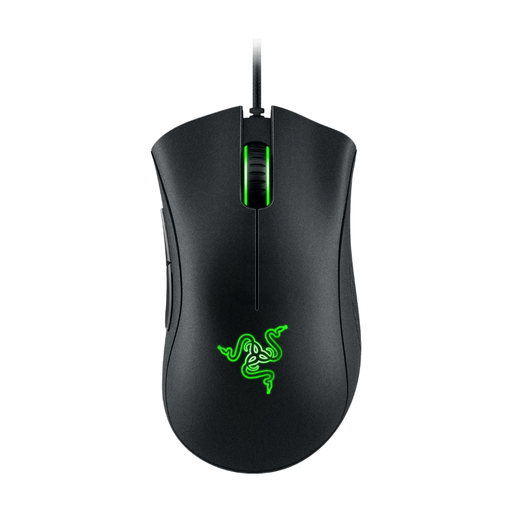
Why it suits this profile: A wired gaming mouse keeps things simple: there’s no battery, receiver or Bluetooth pairing to worry about. It’s suitable for PC gaming and everyday use at a fixed desk.
The cable avoids charging issues, and the product specifications list an adjustable optical sensor up to 6400 DPI, rather than relying on a big marketing number alone.
Ergonomic right-handed shape, 5 programmable buttons and a 1000Hz polling rate according to the product details.
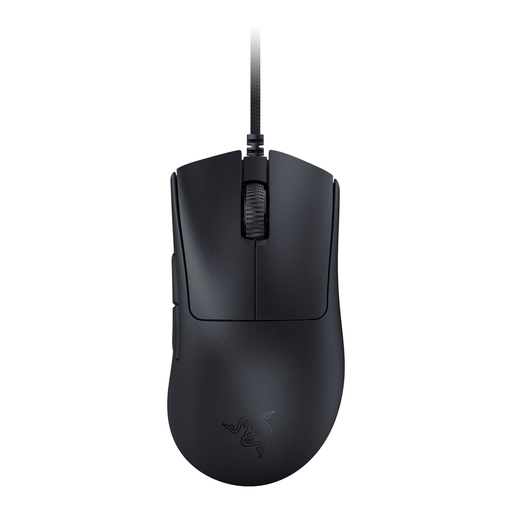
Why it suits this profile: This wired model is designed for players who value low weight and a fast response in competitive games.
The cable means battery life isn’t a concern during long sessions. The listed specifications state a weight of 59 grams and an 8000Hz polling rate.
Razer Focus Pro optical sensor up to 30,000 DPI, ergonomic right-handed shape and 6 programmable buttons according to the product information.

Why it suits this profile: For players who want to game wirelessly and customise plenty of features, this model combines a low weight, a long stated battery life and extra buttons.
According to Rapoo’s own product information, the battery lasts up to 750 hours at 1000Hz. The mouse also has 10 programmable buttons and built-in memory.
53 grams, native wireless 8000Hz polling rate according to Rapoo, and macro support through A HUB.

Why it suits this profile: The vertical shape is designed for everyday computer work and multitasking via Bluetooth or a USB receiver, rather than maximum esports speed.
The focus here is on shape and comfort, not exaggerated DPI or polling rate claims. The 57-degree angle and 4000 DPI are listed in the product specifications.
Vertical ergonomic shape, Bluetooth, 2.4GHz receiver and rechargeable battery with up to four months’ use according to the product information.
We’ve put together a full, up-to-date list of products that meet these strict selection criteria and the current European safety regulations.
It can be, as long as the mouse has a stable 2.4GHz connection and a suitable polling rate. Bluetooth is especially handy for everyday use and devices without a spare USB port. Check the battery level and charging options too before choosing a wireless model.
Its lifespan depends on the switches, cable or battery, how heavily it’s used and how well it’s maintained. Manufacturers sometimes list a click rating, such as 10 million, 90 million or 100 million clicks. This is a product specification, not a guarantee of a particular lifespan. Keep the sensor and mouse feet clean, and avoid getting them wet.
For most users, 1000Hz is enough. An 8000Hz model may interest competitive PC gamers with a high-refresh-rate screen and a system that can handle the extra load. Lower the polling rate if you notice dropped frames or inconsistent performance.
