
Vandaag of morgen in huis

Kwaliteit gegarandeerd

Welkomstaanbiedingen ontgrendelen: GRATIS bezorging | Tot 80% korting | Gratis 30 dagen JoyPlus-proefperiode
Download de app
A gaming mouse should suit your hand, playing style and equipment. Yet many gamers choose mainly based on a high DPI figure or striking RGB lighting. This can result in a mouse that is too heavy, does not connect properly to your console or becomes uncomfortable after a few weeks.
In this buying guide from the Joybuy Product Recommendation Officer, you’ll find out what to look for. We compare verifiable specifications, highlight common pitfalls and match different gaming mice to recognisable user profiles.
DPI indicates how sensitively the cursor responds to movement. A gaming mouse with adjustable DPI can, for example, switch between low sensitivity for precise aiming and a higher setting for fast camera movements.
However, a maximum of 25,600 or 30,000 DPI does not mean you need to play at such a high setting in every game. Many users choose a lower setting in practice. So also consider:
RGB makes a setup more personal, but it does not change tracking, weight or compatibility. A gaming mouse with RGB is particularly appealing if you want to synchronise the lighting with other devices or set up different effects.
Also check whether you need software for this. With Razer, Logitech and HyperX models, among others, lighting, profiles and button functions are adjusted using the accompanying software.
A lightweight gaming mouse is not automatically suitable for every hand. Some players want to move quickly with a model weighing around 50 to 70 grams. Others prefer a heavier model with broad palm support.
Pay attention to the following points:
An optical sensor registers movement across a surface. A gaming mouse for PC generally performs most predictably on a clean, even mouse mat. Maximum DPI is a technical upper limit; practical usability depends on your settings and screen resolution.
The polling rate indicates how often the mouse sends information to the computer. 1,000 Hz is a common value. Some models state up to 8,000 Hz, but your computer must be able to handle the additional data processing. The difference is not noticeable to every user.
A wired gaming mouse works via USB and does not need a battery. Check the cable length and whether your device has a suitable USB port. A wireless gaming mouse can work via Bluetooth or a wireless USB receiver. These two connection types do not always offer the same features, speed or compatibility.
For console use, checking beforehand is important. According to the product specifications, the HyperX Pulsefire Haste 2 is supported on PC, PS5, PS4, Xbox Series X|S and Xbox One. Other models in this selection mainly mention PC, Mac or Windows compatibility. Therefore, always check the latest product information before buying a gaming mouse for PS5 and Xbox.
A programmable gaming mouse can provide extra functions for MMO, strategy and simulation games. For a simple FPS setup, five or six buttons are often enough. More buttons expand the possibilities, but can also make the mouse heavier or more complex.
An ergonomic gaming mouse often has a shape that supports the palm. The Razer Pro Click V2 Vertical Edition differs from this with a vertical design and a weight of 150 grams. According to the product description, this model is intended for work and gaming and features six programmable buttons, Bluetooth and Razer HyperSpeed.
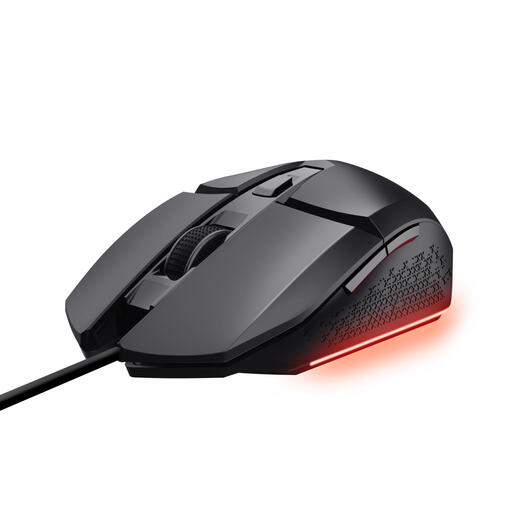
Why it suits this profile: This wired gaming mouse offers a simple USB connection, six buttons and adjustable DPI up to 6,400. This makes it suitable for PC gamers comparing their first gaming mouse without immediately choosing a wireless model.
The product specifications clearly state the DPI button, 1.5-metre cable and software settings. You are therefore not paying for lighting alone, but also get practical adjustment options.
Optical sensor, six buttons, RGB with three settings and a weight of 102 grams. The mouse is designed for right-handed use.
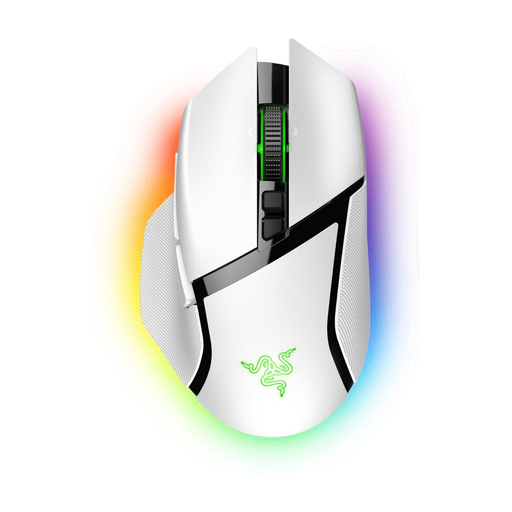
Why it suits this profile: If adaptability is important to you, this wireless mouse offers Bluetooth, Razer HyperSpeed, RGB and multiple programmable buttons. According to the specifications, its shape is ergonomic and designed for right-handed use.
The choice is not based solely on 30,000 DPI: the product information also lists the wireless options, 11 buttons, software and battery life of up to 90 hours via HyperSpeed.
Sensor resolution up to 30,000 DPI, 11 buttons, RGB lighting and a stated weight of 112 grams.
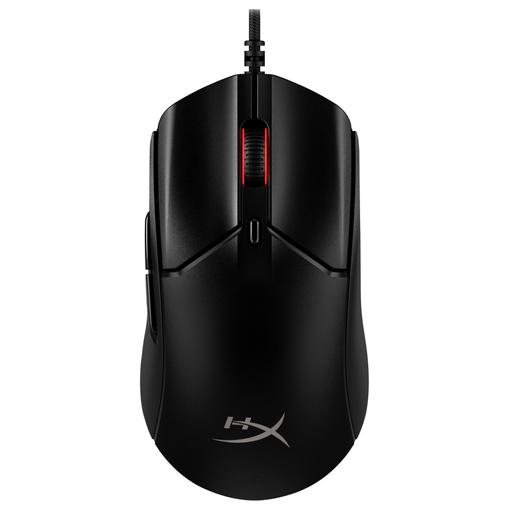
Why it suits this profile: This model is aimed at players looking for a lightweight, wired mouse with a high polling rate and console compatibility. According to the product description, the mouse weighs 52 grams without the cable.
The model combines a low stated weight with a flexible cable. Its stated compatibility with PC, PS5, PS4 and Xbox helps prevent choosing the wrong platform.
HyperX 26K sensor, polling rate of up to 8,000 Hz, six programmable buttons, RGB lighting and PTFE feet.
We have compiled a complete, up-to-date list of products that fully meet these strict selection criteria and the applicable European safety regulations.
It depends on how you use it. A wired gaming mouse does not need a battery and works directly via USB. A wireless model provides greater freedom of movement, but needs to be recharged or fitted with batteries. Bluetooth is convenient for multiple devices; a wireless USB receiver may be more suitable for a fixed gaming setup.
There is no single setting that suits every player. Choose a mouse with adjustable DPI and start with a moderate value. Then adjust the sensitivity for each game. Remember that a higher maximum does not automatically provide greater control.
Its lifespan depends on usage, cable strain, cleaning and the quality of the switches and feet. Brands may state click durability; according to the product description, Razer, for example, lists millions of clicks for certain models. Treat this as a product specification rather than a guaranteed service life. Clean the sensor with a suitable dry cloth and keep moisture away from the electronics.
