
Vandaag of morgen in huis

Kwaliteit gegarandeerd

Welkomstaanbiedingen ontgrendelen: GRATIS bezorging | Tot 80% korting | Gratis 30 dagen JoyPlus-proefperiode
Download de app
A gaming mouse should suit your hand, games and preferred connection. Yet many buyers focus mainly on a high DPI figure or eye-catching RGB lighting. This can result in a mouse that looks impressive on paper but is uncomfortable to use in practice.
When comparing gaming mice, pay particular attention to these three common pitfalls:
An optical sensor tracks mouse movement using a light source and image analysis. Sensor resolution is expressed in DPI. A gaming mouse with a high DPI offers more adjustment options, but you do not need to play at the maximum setting. Many players actually use lower sensitivity for FPS games to make their movements more controlled.
The polling rate indicates how often the mouse position is sent to the computer per second. 1000 Hz means a maximum of 1000 reports per second. Higher values, such as 4000 or 8000 Hz, may be of interest to competitive players, but they place a greater demand on the computer. According to the product information for some models, a high polling rate can increase CPU usage. So make sure your PC has sufficient capacity.
A lightweight gaming mouse weighing around 56 to 75 grams can be comfortable for quick flicks and large movements in FPS games. A model weighing around 100 grams may feel more stable. There is no universally suitable weight.
Also check:
An ergonomic gaming mouse is particularly worthwhile when its shape suits your hand. A marketing term such as “ergonomic” is no substitute for checking the dimensions.
A wired gaming mouse connects directly via USB and does not need to be charged. However, the cable can create resistance if it runs along the edge of your desk. Ideally, choose a flexible cable with sufficient length.
A wireless gaming mouse usually works via a 2.4GHz USB receiver. Check the stated battery life and whether you can continue playing while it is charging. Also consider the button layout. Programmable buttons are useful in MOBA and RTS games, but extra buttons may be unnecessary on an FPS mouse if you prefer straightforward controls.
RGB is primarily an appearance feature. With an RGB gaming mouse, you can sometimes adjust colours and lighting effects using software. Check that the software works with your operating system and that the lighting can also be switched off completely.
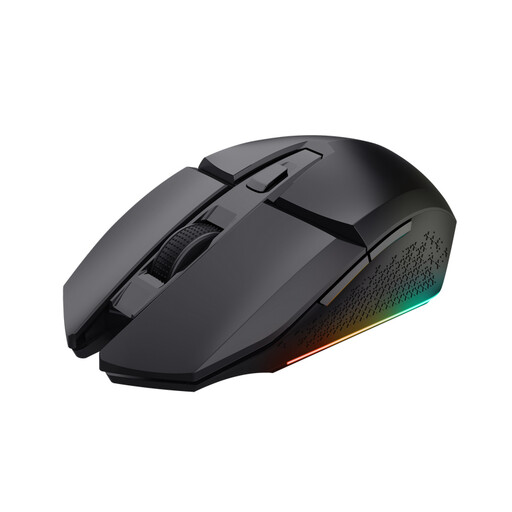
Why it suits this profile: An accessible wireless gaming mouse for PC gamers looking for adjustable DPI, lighting and a rechargeable battery without immediately moving on to advanced specifications.
The product description states a range of 800 to 4800 DPI, a 2.4GHz receiver and up to 80 hours of battery life. This makes the key practical features clear.
Six buttons, RGB lighting, rechargeable battery and the ability to play while charging.

Why it suits this profile: This model is aimed at players looking for a lightweight, right-handed mouse with a wireless connection and high sensor resolution.
The weight of approximately 63 to 64 grams, the right-handed shape and the 2.4GHz connection are clearly stated in the product specifications. However, check that the shape suits your grip.
Razer Focus Pro sensor up to 30,000 DPI, 1000Hz polling rate and, according to the product description, up to 90 hours of battery life.

Why it suits this profile: Designed for users looking for a lightweight, symmetrical mouse with tri-mode connectivity, a charging dock and extensive settings.
In addition to high DPI, the product information also lists a weight of 56 grams, an 8K polling rate, USB-C, Bluetooth and 2.4GHz. At 8K, CPU usage may increase, so check your system performance.
PAW3950 sensor up to 42,000 DPI, magnetic RGB charging dock and adjustable profiles via software.
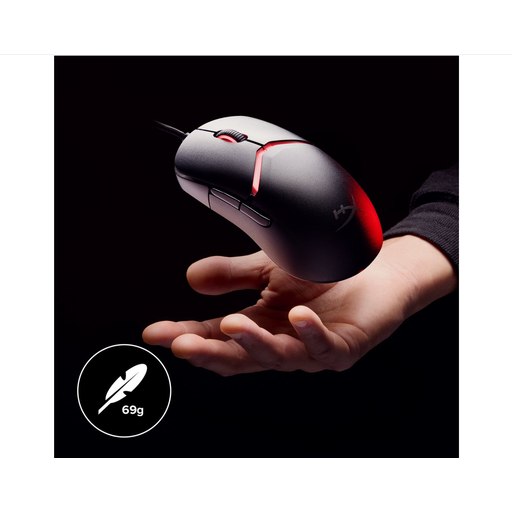
Why it suits this profile: A wired gaming mouse for players who do not want to manage a battery and value low weight and customisable components.
The fixed USB connection eliminates the need to charge while gaming. The product specifications also list a weight of 69 grams, a flexible cable and support for both left- and right-handed use.
HyperX 26K sensor, adjustable up to 26,000 DPI and a polling rate of up to 8000 Hz according to the product information.
We have put together a complete, up-to-date list of products that fully meet these strict selection criteria and the applicable European safety regulations.
It can be, particularly when the model has a 2.4GHz connection and a suitable polling rate. Also check the distance between the receiver and mouse, the battery life and whether you can continue playing while charging. Bluetooth is mainly practical for everyday use and laptops.
There is no fixed value that suits every player. An adjustable range starting at around 800 DPI generally gives you plenty of scope to try different genres. For FPS games, many players choose lower sensitivity than the maximum DPI setting. The right setting depends on your screen, mouse mat, playing style and personal preference.
Its lifespan depends on the switches, cable or battery, cleaning and intensity of use. A model with a rechargeable battery will need charging more frequently over time. Keep the sensor and mouse mat free from dust and do not use liquid on the mouse. Products with a battery must not be opened yourself; follow the manufacturer’s safety instructions. Many products are covered by a minimum two-year legal guarantee under EU consumer rules, while additional rights may apply under national legislation.
