
Vandaag of morgen in huis

Kwaliteit gegarandeerd

Welkomstaanbiedingen ontgrendelen: GRATIS bezorging | Tot 80% korting | Gratis 30 dagen JoyPlus-proefperiode
Download de app
A gaming mouse should suit your hand, games and playing style. Yet the choice is often driven by terms such as high DPI, RGB and wireless. These features may sound appealing, but they do not automatically mean that a mouse is right for your PC or playing style.
So pay particular attention to these three common pitfalls:
DPI indicates how sensitive the sensor is. A gaming mouse with a high DPI often offers several adjustable levels. This is useful if you switch between, for example, low sensitivity for shooters and higher sensitivity for desktop use.
The polling rate, measured in hertz, indicates how often the mouse position is sent to the computer. 1,000 Hz means up to 1,000 reports per second. According to the product information, some wired gaming mice support 8,000 Hz. This may be particularly interesting for users whose PC, monitor and game settings are configured accordingly. For casual gaming, a lower polling rate is often sufficient.
A weight of approximately 50 to 90 grams is considered light by many players. Also look at:
An ergonomic gaming mouse with a clear thumb rest can be comfortable for larger hands. A symmetrical model makes more sense if you want to be able to play with either hand. Always check this in the product specifications: a mouse may be compact, but still be intended for right-handed use only.
A wireless gaming mouse usually works via 2.4 GHz, Bluetooth or both. A 2.4 GHz gaming mouse generally uses a USB receiver. Therefore, check whether your PC or laptop has a free USB-A port. Bluetooth is useful for laptops and devices without a free receiver, but not every model offers the same functions via Bluetooth.
For a rechargeable model, check the stated battery life and whether you can continue playing while it charges. With a wired gaming mouse, you do not need to charge a battery, but cable weight and friction can affect your freedom of movement.
Programmable buttons are useful for MMO, MOBA and strategy games, but only if the associated software works with your operating system. RGB lighting does not change performance. Treat RGB as a personal preference rather than a technical necessity.

Why it suits this profile: This wireless gaming mouse combines a 2.4 GHz receiver with a rechargeable battery and six programmable buttons. It offers a straightforward introduction without immediately moving to a model with lots of extra features.
The product specifications mention not only RGB and DPI, but also the weight of approximately 73 grams, USB-C charging and a stated battery life of up to 80 hours.
75 grams according to the product listing, adjustable from 800 to 4,800 DPI, six buttons and the ability to play while charging.

Why it suits this profile: This model is aimed at players looking for a lightweight wireless gaming mouse with USB-C charging and a high-resolution sensor.
Alongside the marketing claim about speed, the weight, connection, USB-C and sensor resolution are listed as verifiable specifications.
60 grams, LIGHTSPEED wireless connection, USB-C and a HERO sensor of up to 32,000 DPI, according to the product information.
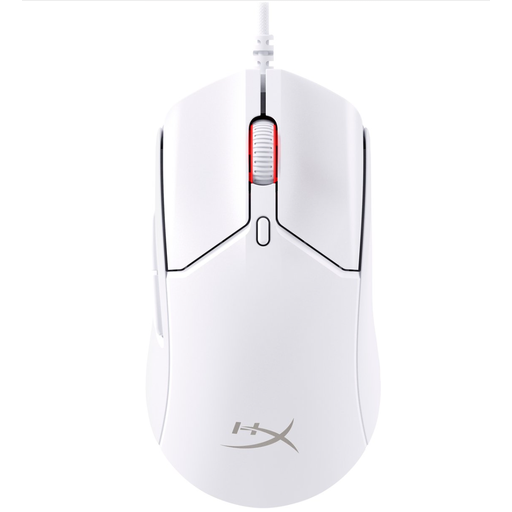
Why it suits this profile: A wired gaming mouse is ideal for users who do not want to charge a battery and prefer a direct USB connection for their PC or console.
The cable is part of the choice, and the stated specifications make it clear that this is not a wireless model. This helps prevent any misunderstanding about battery use.
52 grams without the cable, six programmable buttons, RGB lighting and a stated polling rate of up to 8,000 Hz.

Why it suits this profile: The vertical shape is designed for users who want to use the same mouse for everyday work and light gaming.
The product information clearly states the vertical shape, weight of 135 grams and right-handed design. This allows you to assess in advance whether it suits your grip.
Bluetooth and 2.4 GHz via receiver, an adjustable sensor of up to 4,000 DPI and a rechargeable battery with a stated battery life of up to four months according to Logitech.
We have put together a complete, up-to-date list of products that fully meet these strict selection criteria and the applicable European safety regulations.
That depends on the connection. A 2.4 GHz receiver is designed for a direct wireless connection to the computer. Bluetooth is particularly useful for laptops and multiple devices. Also check whether the receiver is included and whether you have enough USB ports.
There is no fixed value that suits every player. An adjustable gaming mouse with multiple DPI levels gives you room to choose. A lower sensitivity may be more comfortable for precision players, while a higher setting may be more convenient for general use. As well as DPI, consider the sensor settings, polling rate and mouse mat.
The lifespan depends on the switches, cable or battery, cleaning and daily use. A wired gaming mouse has no battery that can deteriorate. With a wireless model, it is worth checking whether you can continue playing while it charges and what warranty terms apply. In the EU, consumers are entitled to the statutory guarantee in any case; the products mentioned also come with a stated warranty period of at least two years.
