
Vandaag of morgen in huis

Kwaliteit gegarandeerd

Welkomstaanbiedingen ontgrendelen: GRATIS bezorging | Tot 80% korting | Gratis 30 dagen JoyPlus-proefperiode
Download de app
A gaming mouse should suit your games, your hand and your desk. Yet people often make their choice based on eye-catching features such as extremely high DPI, RGB lighting or a large number of buttons. These can be useful, but they don’t automatically tell you how comfortable a mouse will be to use every day.
The main pitfalls to watch out for when choosing a gaming mouse are:
An optical sensor tracks movement using light and is common in modern gaming mice. Don’t just look at the maximum DPI. Check:
A mouse with adjustable DPI is handy if you play different games. In an FPS game, a lower sensitivity can make controlled movements easier. In a MOBA or RTS game, higher cursor sensitivity can save time.
According to the product specifications, the Razer Cobra Wired Gaming Mouse has an optical sensor of up to 8.500 DPI, adjustable in increments of 50 DPI. The listed specifications for the Logitech G G502 X go up to 25.600 DPI. That higher figure is mainly useful if you use very specific sensitivity settings; not everyone needs such a high maximum.
A lightweight gaming mouse can make quick movements easier, especially in FPS games. A heavier model may feel more stable. Also consider your grip:
Also check which hand the mouse is designed for. An ambidextrous mouse isn’t always fully symmetrical; sometimes it simply means the shape can be used with either hand. An ergonomic mouse with a vertical design is usually made specifically for one hand.
A wired gaming mouse works without a battery and usually connects directly via USB. Check the cable length and flexibility. A wireless gaming mouse keeps your desk tidier, but be sure to check:
Programmable buttons are especially useful for MMO, MOBA and RTS games, as well as for productivity. However, more buttons also mean a greater chance of pressing the wrong one while you play. Check where the buttons are placed, not just how many there are.
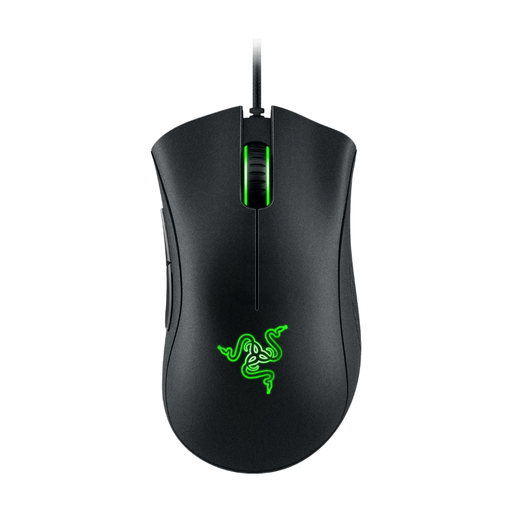
Why it suits this profile: This wired gaming mouse offers a straightforward setup for PC gamers who don’t want to manage a battery or wireless receiver.
The fixed USB connection means there’s no battery to manage. The product specifications list a 6.400 DPI optical sensor and five programmable buttons.
Ergonomic, right-handed design, adjustable DPI and compatibility with Windows and Mac OS, according to the product information.
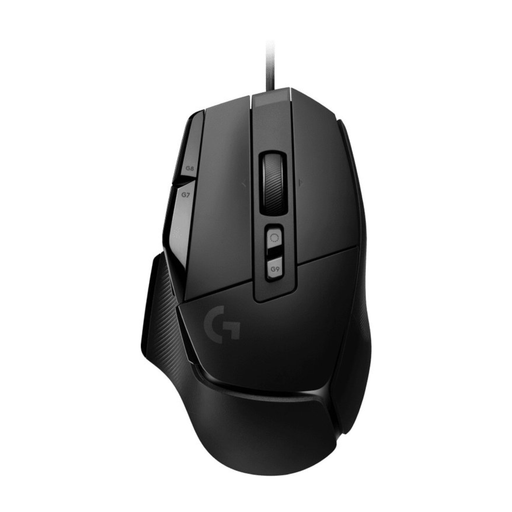
Why it suits this profile: A good choice for right-handed gamers who want plenty of features close to hand for different genres and uses.
The wired USB connection provides a reliable power supply. Before buying, though, consider whether you’ll actually use all those buttons.
Optical sensor up to 25.600 DPI, polling rate up to 1.000 Hz and several programmable functions, according to the product specifications.

Why it suits this profile: A wireless gaming mouse for players who want to combine freedom of movement and a lightweight design with RGB lighting.
The product specifications list a 2,4GHz receiver, a USB-C charging cable and the ability to play while charging. That means you don’t have to wait for a single charging session before going cable-free again.
Weighs 73 grams, with an optical sensor up to 4.800 DPI, six programmable buttons and a stated battery life of up to 80 hours.

Why it suits this profile: Its vertical shape is designed for right-handed users who spend a lot of time working on a PC or Mac and want a different hand position.
The shape and intended hand are clearly specified. Before ordering, check that a vertical mouse suits your grip and playing style.
Bluetooth and 2,4GHz via USB receiver, rechargeable battery, adjustable DPI up to 4.000 and support for Windows and Mac.
We’ve put together a complete, up-to-date list of products that meet these strict selection criteria and current European safety regulations.
A wired mouse doesn’t need a battery and connects directly via USB. Modern wireless models with a 2,4GHz receiver can also be suitable for gaming. Check the polling rate, connection and whether you can keep playing while the mouse charges. Bluetooth is particularly convenient for everyday use, but not every Bluetooth connection is designed for low latency.
There’s no single DPI setting that works for every player. Start with a moderate setting and adjust it to suit your screen size, game and available space. A mouse with adjustable DPI gives you flexibility; also consider the sensor, software and whether you can save profiles.
A mouse’s lifespan depends on its switches, cable, feet, how intensively it’s used and how well it’s maintained. Manufacturers sometimes state a rated click lifespan. According to Razer’s own information, certain optical switches are rated for up to 90 million clicks. This is a brand claim, not a guarantee for every situation. Keep the sensor and PTFE or other mouse feet clean, keep liquids away and avoid pulling on the cable.
