
Vandaag of morgen in huis

Kwaliteit gegarandeerd

Welkomstaanbiedingen ontgrendelen: GRATIS bezorging | Tot 80% korting | Gratis 30 dagen JoyPlus-proefperiode
Download de app
A gaming mouse should respond accurately, feel comfortable in your hand and suit the way you play. Yet many buyers focus mainly on marketing claims such as extremely high DPI, RGB lighting or a large number of buttons. These features are not automatically useful for every gamer.
The most common pitfalls:
An optical gaming mouse uses an optical sensor to track movement. DPI indicates how sensitive the mouse can be set. A higher maximum DPI mainly gives you more adjustment options; on its own, it does not determine how accurately you play.
Many players choose a lower sensitivity and make larger mouse movements for FPS gaming. A higher setting can be more practical for office work, high-resolution displays or fast navigation. Also check the polling rate, such as 1,000 Hz or 8,000 Hz. This indicates how often the mouse sends data to your computer. A higher rate can improve responsiveness, but your PC and game need to support it.
A lightweight gaming mouse weighing around 60 to 70 grams moves easily across a large mouse mat. This can suit fast-paced FPS games. A heavier model may offer more stability and feel steadier for everyday use.
Also check:
An ergonomic gaming mouse is particularly worth considering if you play for long sessions or also use the mouse for work. A vertical mouse positions your wrist differently from a traditional model. It comes down to preference and getting used to it; it is not a one-size-fits-all solution.
A wired gaming mouse does not need a battery and connects directly via USB. This makes it a straightforward choice for a dedicated gaming PC. A wireless gaming mouse can connect via 2.4 GHz, Bluetooth or both. A 2.4 GHz connection with a USB receiver is generally designed for low latency, while Bluetooth is handy for laptops and multiple devices.
Check the difference between programmable buttons and buttons with a fixed function. A programmable gaming mouse can be useful for MOBA, RTS and MMO games, as well as for shortcuts in productivity software. Make sure the configuration software supports your operating system.
RGB lighting does not affect performance. An RGB gaming mouse can complement your desk setup, but switch off the lighting if you mainly want a functional model or want to save battery power.
The recommendations below are based on the product information provided, including sensor resolution, weight, buttons, connection and shape. According to the brands’ own information, the values shown may vary depending on the mode of use.
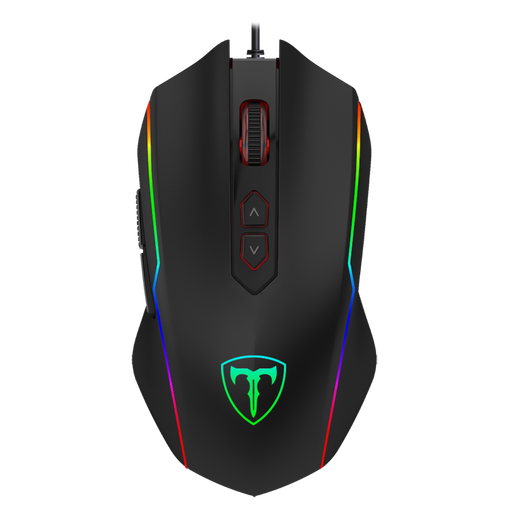
Why it suits this user: This wired model is a straightforward starting point for PC gamers, with 8 programmable buttons, adjustable DPI from 1,200 to 7,200 and several polling rate settings.
The USB connection means there’s no battery to manage. Five DPI levels make it easier to choose a practical setting without focusing solely on an extremely high maximum.
8 programmable buttons, RGB modes and an adjustable polling rate of up to 1,000 Hz, according to the product description.
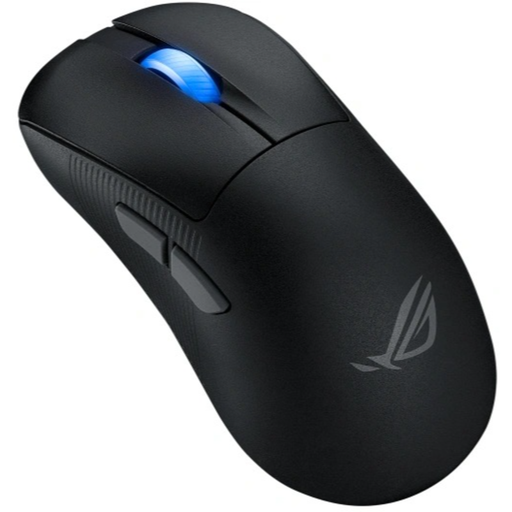
Why it suits this user: This lightweight, right-handed model combines RF wireless, Bluetooth and USB connectivity with a sensor resolution of up to 42,000 DPI.
The three connection options give you an alternative if you don’t always want to use the same connection. The product information clearly states a battery life of up to 134 hours.
54 grams, up to 8,000 Hz in wired mode and support for Windows 10 and Windows 11.
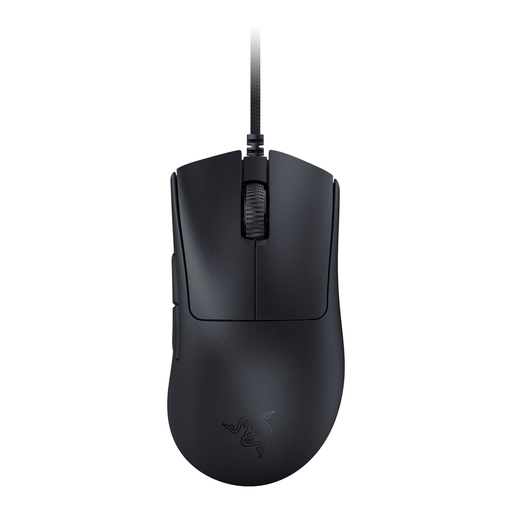
Why it suits this user: At 59 grams, this model combines an ergonomic right-handed shape with an optical sensor of up to 30,000 DPI, making it a good fit for fast-paced FPS games.
Its low weight and wired connection keep things simple: there’s no battery to charge, and less weight to move during fast actions.
6 buttons, a Focus Pro 30K sensor and a maximum polling rate of 8,000 Hz, according to the product details.

Why it suits this user: Its vertical shape, six buttons and connection via Razer HyperSpeed or Bluetooth make this model suitable for users who combine gaming with office work.
The product specifications list both Bluetooth and a wireless radio connection. This means you can use the mouse with multiple devices, but check first that its vertical shape suits your grip.
30,000 DPI, 18 RGB zones and a stated battery life of up to 6 months.
We’ve put together a complete, up-to-date list of products that meet these strict selection criteria and the applicable European safety regulations.
For FPS gaming, low weight, a shape that suits your grip and a reliable sensor are important. According to the product details, a model such as the Razer DeathAdder V3 weighs 59 grams, has six buttons and features an optical sensor of up to 30,000 DPI. Set the DPI to suit your own preferences and the space available on your mouse mat.
Yes, as long as its connections and battery life suit the way you use it. Bluetooth is handy for laptops and multiple devices. A 2.4 GHz receiver is often more convenient if you want a direct wireless connection while gaming. Also check whether it can be charged via USB-C or whether you’ll need to replace an AA or AAA battery.
Its lifespan depends on how you use and clean it, how much strain the cable is under and how durable the switches are. Manufacturers sometimes state a click rating, such as 10 million or 90 million clicks. This is a product specification based on certain conditions, not a guarantee of a fixed lifespan. The legal guarantee in the European Union is at least two years; additional rights may apply under Dutch consumer law.
